# Agent-Friendly Docs
URL: https://ship-and-scale.vercel.app/docs/agent-friendly-docs
Download the complete public manual as one Markdown file and give your coding agent reliable context about the starter.
**Agent context packet**
[Download ship-and-scale-docs.md](/ship-and-scale-docs.md): every public guide combined into one portable Markdown file.
The download excludes paid content, internal records, credentials and customer data.
The download gives an LLM the same public documentation you can read on this site, in one continuous Markdown file. It covers the starter's architecture, setup, provider configuration, authentication, workspaces, billing, email, storage, integrations, public website, deployment and operations. Headings and source URLs separate the guides so an agent can trace an answer back to the page you should review.
Use the file when you want an agent to understand the starter before it plans or changes code. It is useful in Codex, Claude Code, Cursor, ChatGPT and other tools that accept file attachments or local project context. The format is plain Markdown rather than a PDF, so code samples, commands, links and section structure stay readable to both you and the model.
## Add it to your agent [#add-it-to-your-agent]
### Download the context file [#download-the-context-file]
Select **Download complete documentation** above. Your browser saves `ship-and-scale-docs.md`. The file is generated from the current public manual, so there is no separate hand-maintained copy to drift out of date.
### Make it available to the session [#make-it-available-to-the-session]
Attach the file directly to a conversation, or place it inside the project when your coding tool reads local files. If the agent can already inspect your repository, keep the source code available too: the manual explains intended behavior and boundaries, while the checked-out files show the exact version you are editing.
### Give the agent context for future features [#give-the-agent-context-for-future-features]
Use the prompt below to orient the agent before your first feature request. The downloaded manual explains the starter; the repository's `AGENTS.md` supplies project instructions. Keep both available and ask the agent to read the relevant code for each change.
Paste this prompt at the start of your session:
```text title="Prompt for your coding agent"
Read ship-and-scale-docs.md and follow the repository's AGENTS.md, including relevant nested instructions. Inspect the code to understand the architecture, existing features and conventions.
Use this context for the features I ask you to build. Read the relevant guides and code, reuse existing patterns, and flag conflicts or missing decisions before editing. Preserve workspace isolation, permissions and secret handling. Implement each requested feature, run relevant checks, and report anything unverified.
Start with a brief summary of how the app fits together, then wait for my first feature request.
```
Then describe the feature you want and how it should work for your users. Repeat the context step in a new session; the prompt does not give an agent permanent memory.
## What the file does and doesn't do [#what-the-file-does-and-doesnt-do]
The download is a product manual, not a replacement for your repository. It explains how the starter fits together, which files and commands matter, and which security rules a change must keep. Your agent should still read the current code, `AGENTS.md`, package scripts and nearby tests before editing. When the manual and the code disagree, the code in your checkout is the source of truth.
The file contains only this public documentation. It has no access to your repository, environment values or provider accounts, and it can't tell your agent what's actually configured in Supabase, Stripe or Vercel. Review any files or logs you attach from your own project before sending them to an external model.
## Keep the context current [#keep-the-context-current]
Download a fresh copy after the documentation changes or when you come back to the project after an update. You can also open [`/llms-full.txt`](/llms-full.txt) to read the same text in the browser, or use **View Markdown** on any guide when you only need one topic.
For long-running work, keep the complete file as background context and attach the relevant guide again when a task needs extra focus. Ask the agent to separate what it read in the manual, what it checked in the code and what still needs confirming in your provider dashboards.
---
# Introduction
URL: https://ship-and-scale.vercel.app/docs
Your starting point for a production-ready SaaS.
Ship & Scale is a Next.js SaaS starter with Auth, workspaces, subscriptions and a customizable interface already connected. Start with the infrastructure your product needs and focus on what makes it worth using.
You get the source code and run it on your own provider accounts. Kickstart handles the initial service setup. The example app is called **Forma**; replace its brand and features with your own.
[Start with Tech stack](/docs/build/codebase), then follow Setup → Accounts → Configuration → Kickstart.
## Who it's for [#who-its-for]
* Founders building their first SaaS with a coding agent or developer.
* AI builders who want an established architecture and documentation their agent can use.
* Indie hackers launching multiple products without rebuilding the same infrastructure.
## How Kickstart works [#how-kickstart-works]
Three credentials connect your project to Supabase, Stripe and Resend. Kickstart checks access, then creates the services behind your app.
### Add your credentials [#add-your-credentials]
After cloning and installing the starter, add `SUPABASE_ACCESS_TOKEN`, `STRIPE_TEST_SECRET_KEY` and `RESEND_API_KEY` to your local `.env`. Accounts and Configuration cover the required permissions. Keep secret values out of chats and source control.
### Check access and provision [#check-access-and-provision]
`npm run kickstart:check` runs read-only checks. Then `npm run kickstart` creates your hosted Supabase project with its schema, permissions, Auth, storage and functions. It publishes five Resend email templates, configures Stripe test products, prices, webhooks and the billing portal, and saves generated settings to `.env`.
### Run your app [#run-your-app]
Run `npm run dev` and test signup, email and billing. Next.js runs locally against your hosted services. The [Kickstart guide](/docs/start/project-kickstart) covers checks and recovery; [deployment](/docs/start/deployment-kickstart) follows with GitHub, Vercel and production credentials.
**Before launch**
The providers' free plans cover building and launching; upgrade Vercel to Pro before you take payments. Customize the product, review content and permissions, and test customer flows using the [production launch checklist](/docs/operations/launch).
## Build with your agent [#build-with-your-agent]
[Download the docs (.md)](/ship-and-scale-docs.md) and give your agent access to your repository. Use this prompt to build context for future features. [Agent-Friendly Docs](/docs/agent-friendly-docs) explains how the manual and `AGENTS.md` work together.
**Example agent prompt**
```text title="Prompt for your coding agent"
Read ship-and-scale-docs.md and follow the repository's AGENTS.md, including relevant nested instructions. Inspect the code to understand the architecture, existing features and conventions.
Use this context for the features I ask you to build. Read the relevant guides and code, reuse existing patterns, and flag conflicts or missing decisions before editing. Preserve workspace isolation, permissions and secret handling. Implement each requested feature, run relevant checks, and report anything unverified.
Start with a brief summary of how the app fits together, then wait for my first feature request.
```
## What's in the starter [#whats-in-the-starter]
Each card links to a detailed guide.
[Auth](/docs/core/authentication)
Email/password, magic links, recovery and configurable verification. Google sign-in is available once you connect your OAuth app.
[Workspaces](/docs/core/workspaces)
Workspace invitations, switching and Owner, Admin and Member roles. Server checks and database policies keep workspace data isolated.
[Subscriptions](/docs/billing/subscriptions)
Stripe Checkout, recurring plans and a billing portal. Each workspace has its own subscription, with webhooks syncing billing state.
[Customer dashboard](/docs/core/onboarding-settings)
A protected app shell with onboarding, profile settings and workspace controls. Reuse its layout and components for your product.
[Admin panel](/docs/operations/maintenance#admin-panel)
Read-only customer visibility and operator-access management. Access is separate from workspace roles; workspace admins don't automatically get access.
[Storage](/docs/storage/overview)
Private avatars in Supabase Storage and database-backed workspace logos, with upload validation and access policies.
[Emails](/docs/email/templates-delivery)
Five Resend templates: welcome, verification, password reset, magic-link sign-in and workspace invitations. Edit the source and publish through Kickstart.
[In-app notifications](/docs/core/notifications-feedback)
A private inbox with read/unread controls and preferences. Extend the welcome notification example with your own product events.
[Customer feedback](/docs/core/notifications-feedback)
A shared feature-request board with voting, plus private bug reports. Reports and voter identities stay private.
[Marketing site](/docs/website/pages-blog)
Landing, pricing, FAQ and contact pages, plus sample legal content. Replace the example brand and copy before launch.
[Blog](/docs/website/pages-blog)
Public posts backed by published content in Supabase. Add your own articles and authors; a general-purpose CMS editor isn't included.
[Product documentation](/docs/website/documentation)
Fumadocs pages, search and navigation for your customers. This is separate from the Ship & Scale manual you're reading now.
[SEO](/docs/website/seo-metadata)
Metadata, canonical URLs, social previews and sitemap controls. Configure your production domain and review launch settings before enabling indexing.
[REST API](/docs/integrations/api)
Workspace API keys and permission-checked endpoints to read and rename a workspace. Extend these patterns for your own resources.
[MCP](/docs/integrations/mcp)
OAuth and scoped tools to read and rename a workspace through MCP clients. Add tools for your product's actions.
[AI chat · optional](/docs/integrations/ai)
OpenRouter streaming chat, saved conversations and workspace credit checks. Supply a funded provider account, or remove AI while keeping the core SaaS features.
## Your member dashboard [#your-member-dashboard]
Your Ship & Scale member area contains the Starter kit, Documentation, Founder playbook and Discord community. It's separate from the customer dashboard in your app.
Open **Starter kit** to connect GitHub and get access to the starter. [Setup](/docs/start/environment) walks through each step.
## Start here [#start-here]
Continue through **Tech stack → Setup → Accounts → Configuration → Kickstart** to get your local app running. [Troubleshooting](/docs/operations/troubleshooting) is available along the way.
[Next: Tech stack](/docs/build/codebase)
Review the stack and architecture before setting up your project.
---
# GitHub access token
URL: https://ship-and-scale.vercel.app/docs/accounts/github
Create a GitHub token and save it for deployment.
By the end of this guide, your GitHub token will be saved in the starter's root `.env` file. Deployment Kickstart uses it to create your app's private repository and publish your source code.
You can do this after your local app works. For downloading the starter, follow [Setup](/docs/start/environment#get-access-to-the-starter); the deployment token isn't needed for your first Kickstart.
## Create and save the token [#create-and-save-the-token]
### Open Fine-grained tokens [#open-fine-grained-tokens]
Sign in to [GitHub](https://github.com/login), or [create an account](https://github.com/signup). Open **Settings → Developer settings → Personal access tokens → Fine-grained tokens**, or go directly to [Fine-grained tokens](https://github.com/settings/personal-access-tokens).
Click **Generate new token**. If GitHub asks you to confirm access, complete its verification to continue.
GitHub · Fine-grained tokens → Generate new token. Existing accounts may show a token list here.
### Choose the owner and repository access [#choose-the-owner-and-repository-access]
Fill in the token form:
1. **Token name:** enter `Ship & Scale deployment`.
2. **Resource owner:** choose the account or organization that will own the app repository. It must match `GITHUB_OWNER`.
3. **Expiration:** choose **90 days**. That covers deployment and retries; Kickstart only uses this token during deployment.
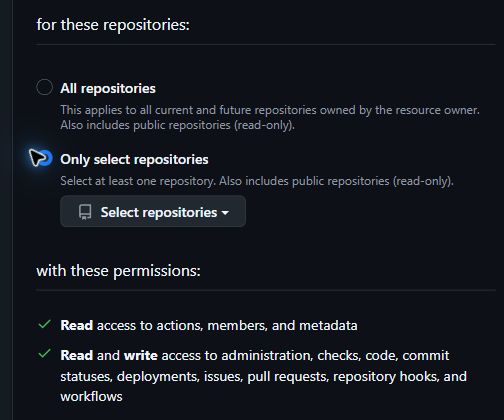
4. **Repository access:** automatic repository creation needs **All repositories**, which also covers every current and future repo under that owner. To limit access to one repository, first create the exact empty private repository in GitHub, then choose **Only select repositories** and select that repository.
Leave **Description** blank unless you want to add a note.
GitHub - choose the account that owns the repo. The example shows All repositories for automatic creation and a 30-day expiry.
**Automatic creation needs broad repository access**
**All repositories** includes every current and future repository under the selected owner. A fine-grained token can select one owner only. For least access, precreate the exact empty private repository and use **Only select repositories**; set `GITHUB_OWNER`, `GITHUB_REPO_NAME` and its numeric `GITHUB_REPO_ID` to that repository before checking deployment.
### Add the repository permissions [#add-the-repository-permissions]
Scroll to **Permissions**. With **Repositories** selected, click **Add permissions**. Search for and select **Administration**, then **Contents**. Close the menu and change each permission's **Access** to **Read and write**.
GitHub · Add permissions → search for a permission → select it. Repeat for Contents.
Your permissions should match this table:
| Permission | Access |
| -------------- | ------------------------------------------------------------- |
| Administration | Read and write (create/manage the repository) |
| Contents | Read and write (publish source) |
| Metadata | Read-only, added automatically |
| Workflows | Read and write only when publishing `.github/workflows` files |
Leave **Account** permissions unchanged. A fine-grained token for an organization may need owner approval before it works.
GitHub · Check the access levels, then click Generate token.
Click **Generate token**, then copy the token immediately. You won't be able to view the full value again after leaving the page.
### Save it in `.env` [#save-it-in-env]
Open the root `.env` file beside `package.json`. If it doesn't exist, copy `.env.example` to `.env`. Find the existing `GITHUB_TOKEN=` line, paste your token after the equals sign and save:
```dotenv title="Your private .env"
GITHUB_TOKEN=replace_with_your_github_token
```
Replace the example value with your token. Keep one active `GITHUB_TOKEN` line and preserve the file's other settings. On Windows, make sure the file is named `.env`, not `.env.txt`.
Keep this token only in your local `.env`. It's a setup credential, so it never goes into Vercel's environment variables either.
## You are finished when [#you-are-finished-when]
* `GITHUB_TOKEN` has one saved value in the root `.env` file.
* For a new automatic deployment, `GITHUB_OWNER`, `GITHUB_REPO_NAME` and `GITHUB_REPO_ID` remain blank. Kickstart fills them in. Keep existing values if you've already started deployment.
Next, prepare your [Vercel token and GitHub App connection](/docs/accounts/vercel). Vercel needs that connection to build from your repository. If you limit the App to selected repositories, add the new repository when Kickstart pauses for authorization, then rerun with the same saved settings.
Once all deployment accounts are ready, run this read-only check:
```sh
npm run kickstart:deploy -- --check
```
Resolve any errors before deploying. This command checks your configuration and account access; it doesn't create a repository or prove that a future push will succeed.
## Use a precreated empty repository [#use-a-precreated-empty-repository]
**Optional: limit the token to one repository**
1. Create a **private** repository in your account. Leave it empty: don't add a README, license, `.gitignore` or initial commit.
2. In the token form, choose **Only select repositories** and select that repository. Use the same permissions listed above.
3. Get its numeric ID. GitHub doesn't show it on the repository page. If you use GitHub CLI, replace the owner and repository in this command:
```sh
gh api repos/YOUR_OWNER/YOUR_REPOSITORY --jq .id
```
Without GitHub CLI, ask your coding agent to read the `id` field from `https://api.github.com/repos/YOUR_OWNER/YOUR_REPOSITORY` using the `GITHUB_TOKEN` in your `.env`, without printing the token.
4. Save your token and these identifiers in `.env`, replacing all example values:
```dotenv
GITHUB_OWNER=your-owner
GITHUB_REPO_NAME=your-empty-repository
GITHUB_REPO_ID=123456789
```
Use the numeric ID returned by GitHub. Kickstart can initialize a matching empty private repository; a populated repository stops setup.
**If the token or repository access doesn't work**
For an expired or invalid token, create a replacement with the same owner and permissions and update only `GITHUB_TOKEN`. Keep your generated repository settings and rerun the deployment check.
For an organization-owned repository, choose that organization as **Resource owner** and set `GITHUB_OWNER` to its name. Organization policies may require approval before the token can access private repositories. See [GitHub's token guide](https://docs.github.com/en/authentication/keeping-your-account-and-data-secure/managing-your-personal-access-tokens).
If a push fails after repository creation, fix the access problem and rerun with the saved settings. Keep the `.kickstart` receipt; don't delete repository IDs, force-push or create a replacement repository to bypass the error. If the remote repository has new commits, reconcile them with normal Git tools first.
[Back to Accounts](/docs/accounts)
Continue with Vercel to prepare for deployment.
---
# Google OAuth client
URL: https://ship-and-scale.vercel.app/docs/accounts/google
Create a Google OAuth client and connect it to Supabase for optional Google sign-in.
Prepare these credentials before deployment if you want customers to sign in with Google. Email sign-in works without them, so you can skip this guide if you're not offering Google sign-in yet.
Google uses a **client ID and client secret**, rather than an API token. Save both in your hosted Supabase project's Google provider settings. They don't belong in the root `.env`, Vercel variables or browser code.
## Create and connect your credentials [#create-and-connect-your-credentials]
Complete the first [Kickstart](/docs/start/project-kickstart) before these steps so you have a hosted Supabase project and its callback URL.
### Prepare your Google project [#prepare-your-google-project]
Sign in to [Google Cloud Console](https://console.cloud.google.com/). Use the project picker at the top to select a project for your app, or choose **New project** and give it your app's name. Google Cloud projects are free; this one only holds your sign-in settings.
Open **Google Auth Platform** from the menu or search bar. If it asks you to get started, follow its prompts. Then complete these sections in its sidebar:
1. **Branding:** enter your app's name and a support email. Customers see these on Google's consent screen.
2. **Audience:** choose **External** so any Google account can sign in. A new app starts in **Testing**, where only the accounts listed under **Test users** can sign in. Add your own Google account there for now.
3. **Data Access:** add the `openid`, `.../auth/userinfo.email` and `.../auth/userinfo.profile` scopes. These are all Supabase needs for basic sign-in.
Google's screens change from time to time. If yours differ, follow the current [Supabase Google setup instructions](https://supabase.com/docs/guides/auth/social-login/auth-google).
### Copy your Supabase callback URL [#copy-your-supabase-callback-url]
In [Supabase](https://supabase.com/dashboard), open the project created for this app. Go to **Authentication → Sign In / Providers → Google** and copy the callback URL shown there.
It normally looks like this:
```text title="Example callback shape — use your project's actual URL"
https://YOUR_PROJECT_REF.supabase.co/auth/v1/callback
```
Use the URL from your own project. This is where Google returns the sign-in result to Supabase; it isn't your app's dashboard URL.
### Create a web client in Google [#create-a-web-client-in-google]
Return to **Google Auth Platform → Clients**, choose **Create client** and select **Web application**. Give the client a recognizable name for your app.
* Under **Authorized JavaScript origins**, add each address your app runs at, without a path: `http://localhost:3000` for local testing and your live address, such as `https://your-app.example`.
* Under **Authorized redirect URIs**, paste the exact Supabase callback URL from the previous step.
Create the client and copy its client ID and client secret. Keep the secret out of screenshots and agent chat.
### Save the credentials in Supabase [#save-the-credentials-in-supabase]
Return to the same Supabase project's **Google** provider settings. Paste the client ID and client secret into their matching fields, enable the provider and save.
Keep Supabase's site URL and allowed application redirects aligned with the app address you're using. Kickstart manages the app's callback allowlist; deployment updates it for the production origin.
## What Kickstart handles [#what-kickstart-handles]
Kickstart reports Google provider status and manages the app's allowed callback URLs. It doesn't create a Google OAuth client or enter, store or deploy the Google client credentials for you. Those are the manual steps above.
Your local app and the default deployment share the same hosted Supabase project. Check the active app URL when testing redirects, especially after deployment changes the hosted configuration.
## Check Google sign-in [#check-google-sign-in]
Open your app and choose its Google sign-in button. Use an account allowed by your Google audience settings, complete consent and confirm that you return to the app with a working session and workspace. Reload, sign out and sign in again.
If Google reports a redirect mismatch, compare its authorized redirect URI with the callback shown in Supabase. If the app says Google is unavailable, check that the provider is enabled and its credentials are saved in the correct project. Audience restrictions and test-user settings can also prevent an account from signing in.
Before launch, return to **Audience** and choose **Publish app** so accounts outside your test users can sign in. Google may ask you to verify your app's branding first. A successful test sign-in only proves it works for your test users. The [authentication guide](/docs/core/authentication) covers the app's other sign-in methods and session checks.
[Back to Accounts](/docs/accounts)
Review the remaining deployment accounts.
---
# Accounts overview
URL: https://ship-and-scale.vercel.app/docs/accounts
See which accounts and keys you need for Kickstart and deployment.
Prepare the accounts for your current stage. Each service name links to a guide showing where to get its key and where to save it. You can build and launch on the free plans; the costs column shows where a paid plan or credits come in.
## Before Kickstart [#before-kickstart]
The default setup needs **Supabase, Stripe test and Resend credentials**. OpenRouter is optional.
| Service | API key variable | What it's used for | Cost |
| -------------------------------------------------- | ------------------------ | -------------------------------------------------------------------------------------------------- | ----------------------------------- |
| [Supabase](/docs/accounts/supabase) | `SUPABASE_ACCESS_TOKEN` |
Create your hosted project
Set up database, sign-in and storage
| Free plan |
| [Stripe](/docs/accounts/stripe#test-secret-key) | `STRIPE_TEST_SECRET_KEY` |
Create test products and prices
Configure the billing portal and webhook
| Free; test mode moves no real money |
| [Resend](/docs/accounts/resend) | `RESEND_API_KEY` |
Publish email templates
Send authentication emails and invitations
| Free plan |
| [OpenRouter](/docs/accounts/openrouter) (optional) | `OPENROUTER_API_KEY` |
Check model access during setup
Generate AI chat responses in your app
| Paid credits for AI requests |
Stripe gives every account a **test** environment and a **live** one. Test keys start with `sk_test_` and use test card numbers, so you can try checkout without charging anyone. You only need the live key when you deploy.
For AI, add the OpenRouter key and set `AI_ENABLED=true`. Otherwise, leave `AI_ENABLED=false`: your app works, but AI chat is unavailable.
## Before deployment [#before-deployment]
Keep your existing `.env`, Supabase project and optional OpenRouter setup. Prepare these when your local app is ready to go online:
| Service | API key variable | What it's used for | Cost |
| ---------------------------------------------------------- | ---------------------------------------------------- | ----------------------------------------------------------------------------------------------------- | ------------------------------------------ |
| [GitHub](/docs/accounts/github) | `GITHUB_TOKEN` |
| Free Hobby plan; Pro for commercial use |
| [Stripe](/docs/accounts/stripe#live-secret-key) | `STRIPE_LIVE_SECRET_KEY` |
Create live products and prices
Configure the live portal and webhook
| Free; Stripe's fees apply to real payments |
| [Resend](/docs/accounts/resend#verify-a-production-sender) | `RESEND_API_KEY` (keep existing) |
Check your verified sender
Send emails to customers
| Free plan; you need a domain |
| [Google sign-in](/docs/accounts/google) (optional) | Client ID and secret in Supabase; no `.env` variable |
Let customers sign in with Google
Configure manually in Google and Supabase
| Free |
Vercel's Hobby plan is limited to personal, non-commercial projects. Upgrade to Pro before your app takes payments. Every provider has its own usage limits, and live Stripe payments charge real money.
## Where to save your keys [#where-to-save-your-keys]
All keys go in one file named `.env`, in the project folder beside `package.json`. Create it from the example file if it doesn't exist yet:
```sh
cp .env.example .env
```
```sh
copy .env.example .env
```
Run the command from the project folder, or keep your existing `.env` if you already have one. Open `.env` in your editor, paste each key after the `=` on its existing line and save. Use `.env`, not `.env.local` or `.env.txt`. Files starting with a dot are hidden in Finder by default; your editor's file list shows them.
If you use an AI agent, give it this prompt to prepare the file, then paste the keys yourself:
**Agent prompt: prepare my .env file**
```text title="Copy this prompt into your agent"
Prepare the root .env file for this Ship & Scale project, following AGENTS.md.
Find the folder containing package.json and .env.example. If .env is missing, copy .env.example to .env. Preserve an existing .env and all its values. Don't create .env.local or modify the example.
Confirm .env is excluded from Git. Open it in my editor if supported, or tell me where to find it. Don't print, upload or commit its contents.
Point me to SUPABASE_ACCESS_TOKEN, STRIPE_TEST_SECRET_KEY and RESEND_API_KEY. Explain that optional AI needs OPENROUTER_API_KEY and AI_ENABLED=true; otherwise leave AI_ENABLED=false.
I'll paste the keys myself. Don't create credentials or run Kickstart yet.
```
**Keep your keys private**
These keys can create resources, send email and manage billing on your accounts. Keep them only in `.env`. Don't paste them into chat, screenshots, Git commits or any `NEXT_PUBLIC_` field, because those values are visible in the browser. If a key leaks, revoke it in the provider's dashboard and create a new one.
## You're ready when [#youre-ready-when]
* `.env` exists beside `package.json`.
* `SUPABASE_ACCESS_TOKEN`, `STRIPE_TEST_SECRET_KEY` and `RESEND_API_KEY` each have one saved value.
* If you want AI chat, `OPENROUTER_API_KEY` is saved and `AI_ENABLED=true`.
[Next: Configuration](/docs/build/configuration)
Name your app and review the settings Kickstart will use.
---
# OpenRouter API key
URL: https://ship-and-scale.vercel.app/docs/accounts/openrouter
Create an OpenRouter API key and save it to enable AI chat in your app.
By the end of this guide, your OpenRouter API key will be saved in the starter's root `.env` file, ready for Kickstart to enable AI chat.
OpenRouter is optional. If you don't want AI chat yet, leave `AI_ENABLED=false` and `OPENROUTER_API_KEY` blank, then return to [Accounts](/docs/accounts).
## Create and save the key [#create-and-save-the-key]
### Sign in and open API Keys [#sign-in-and-open-api-keys]
Create an account or sign in at [OpenRouter](https://openrouter.ai/), then open [API Keys](https://openrouter.ai/settings/keys). If you have several workspaces, choose the one for your app using the selector at the top of the sidebar.
Click the green **New Key** button in the top-right corner. Use **API Keys**, not **Management Keys**.
OpenRouter · API Keys → New Key. Existing keys are filtered out for privacy.
### Create a key for your app [#create-a-key-for-your-app]
Fill in the form:
1. **Name:** enter a recognizable name, such as `Ship & Scale`.
2. **Expiration:** choose a lifetime, such as **90 days**. Replace the key in your app before it expires.
3. **Credit limit:** choose **Custom amount** and enter a testing budget, such as `5` for a $5 limit.
4. **Reset limit every…:** leave **N/A** for a total limit that doesn't renew automatically.
OpenRouter · Example settings for a key with a $5 total spending limit.
Click **Create**, then copy the generated key and save it privately. You'll paste it into `.env` in the final step.
The credit limit caps this key's usage; it doesn't add money to your account. When the limit is reached, requests stop until you increase it.
### Add credits for model requests [#add-credits-for-model-requests]
Open [Credits](https://openrouter.ai/settings/credits) from the sidebar. The starter's default model requires paid credits. If your account already has an available balance, you can skip the purchase.
Otherwise, click **Add Credits** under **Buy Credits**.
OpenRouter · Credits → Buy Credits → Add Credits.
Choose your **Amount**, add a payment method if needed, and review **Service fees**, any tax and **Total due** before clicking **Purchase**. The amounts below are an example; use the total shown in your checkout.
OpenRouter · Review the amount and total before purchasing credits.
After payment, confirm that **Total available** shows a balance. Your app's workspace credits are separate from this OpenRouter balance.
### Save the key in `.env` [#save-the-key-in-env]
Open the root `.env` file beside `package.json`. If it doesn't exist, copy `.env.example` to `.env`. Update these existing lines and save:
```dotenv title="Your private .env"
AI_ENABLED=true
OPENROUTER_API_KEY=replace_with_your_openrouter_key
AI_MODEL=openai/gpt-4.1-mini
```
Replace the example key with your real value. Keep the default `AI_MODEL` for now and only one active line for each setting. On Windows, make sure the file is named `.env`, not `.env.txt`.
**Keep the key private**
This key authorizes spending from your OpenRouter account. Keep it only in `.env`, as described in [Keep your keys private](/docs/accounts#where-to-save-your-keys).
## You are finished when [#you-are-finished-when]
* Your key is saved as `OPENROUTER_API_KEY` in the root `.env` file.
* `AI_ENABLED=true` and `AI_MODEL` has a value.
* Your OpenRouter account has credits and the key has an unused spending allowance.
Continue with Accounts, then Configuration and [Kickstart](/docs/start/project-kickstart). Once your other required credentials are ready, `npm run kickstart:check` checks the key and model without generating a paid response. Full Kickstart installs the AI feature.
**Adding AI to an app you’ve already set up?**
Save the settings above in your existing `.env`, preserving its other values. From the project root, run the check first:
```sh
npm run kickstart:ai -- --check
```
When it passes, install the AI feature:
```sh
npm run kickstart:ai
```
This uses your existing managed Supabase project and preserves workspace credits and chat history. Restart your local app afterward. For an already deployed app, apply the new settings through the [deployment workflow](/docs/start/deployment-kickstart); changing local `.env` alone won't update production.
Open AI chat and send a short message to verify a real response. This uses provider credits. If it fails, check the key's expiration and limit, your OpenRouter balance and model access. See [OpenRouter's key instructions](https://openrouter.ai/docs/api_reference/authentication) or the [AI feature guide](/docs/integrations/ai) for more help.
[Back to Accounts](/docs/accounts)
Check your Kickstart keys, then continue to Configuration.
---
# Resend API key
URL: https://ship-and-scale.vercel.app/docs/accounts/resend
Create your email API key and prepare a verified sender when you're ready to deploy.
Resend sends your app's authentication emails, workspace invitations and other messages. You need a Full access API key before Kickstart. You can test locally with Resend's restricted sender, then verify your own sending domain before deployment.
## Get your API key [#get-your-api-key]
Create an account or sign in at [Resend](https://resend.com). Use the account that should own your app's email templates and sending domain.
### Open API Keys [#open-api-keys]
Choose **API Keys** in the dashboard, or open [the API Keys page](https://resend.com/api-keys) directly. Select **Create API key** and give it a recognizable name, such as `My app Kickstart`.
### Choose Full access [#choose-full-access]
Set the permission to **Full access**. Kickstart needs to inspect domains and manage email templates as well as send messages. A Sending access key doesn't cover those setup operations.
Authentication and invitation email uses Resend's API-published templates through Supabase's signed Send Email Hook. This is an API-template flow, not SMTP. Kickstart installs the Resend key only as a server-side function secret; keep it out of browser code and Vercel unless a separate server feature needs it.
Create the key and copy its value while it is shown. Save the key itself, not its name or ID. Resend's [key management guide](https://resend.com/docs/dashboard/api-keys/introduction) explains the permission choices.
**Screenshot: Full access in the key form**
Check the Permission field before selecting Add. The image contains no API key.
### Add the key to .env [#add-the-key-to-env]
In your editor, open `.env` in the main project folder beside `package.json`. If you haven't created it, copy `.env.example` to `.env`. Keep an existing `.env` and edit it.
Find the existing `RESEND_API_KEY=` line, paste the key after `=`, and save:
```dotenv title="Your private .env"
RESEND_API_KEY=replace_with_your_resend_full_access_key
```
Use the actual value you copied and keep one `RESEND_API_KEY` line. Don't add a second assignment at the bottom of the file.
## Start with local test emails [#start-with-local-test-emails]
On a new installation, leave `RESEND_FROM_EMAIL`, `RESEND_TEST_MODE` and the `RESEND_TEMPLATE_*_ID` fields blank. Kickstart discovers a verified domain or selects the restricted test sender, then publishes the templates and saves their IDs.
With no verified domain, emails from `onboarding@resend.dev` can only go to the address associated with your Resend account. Use that address to test the app's email flows. If you have several verified domains, Kickstart asks which one to use.
**Before emailing other people**
Verify a sending domain you control before inviting customers or testing with other recipients. Owning a domain and verifying it for outbound email are separate steps.
## Verify a production sender [#verify-a-production-sender]
You can return to this section when your local app works and you're preparing deployment.
1. Open [Resend Domains](https://resend.com/domains) and add your domain or a sending subdomain, such as `mail.your-domain.com`.
2. Open the DNS settings where your domain is managed. That's usually where you bought it, such as Namecheap, GoDaddy or Cloudflare. If you changed nameservers, use the provider they point to.
3. Add the exact record types, names and values Resend gives you. Each domain has its own verification records.
4. Return to Resend and start verification. DNS changes can take from a few minutes to several hours to appear. Use Resend's diagnostics to fix pending or failed records.
5. Choose a From address on that verified domain and edit the existing fields in `.env`:
```dotenv title="Production sender in .env"
RESEND_FROM_EMAIL=noreply@your-verified-domain.example
RESEND_TEST_MODE=false
```
Replace the example address with your own. If your public contact form should email you, also set `CONTACT_TO_EMAIL` to an inbox you monitor. Resend's [domain guide](https://resend.com/docs/dashboard/domains/introduction) explains DNS verification. Setting up an outbound sender doesn't create an inbox.
## Check that you're ready [#check-that-youre-ready]
For the first Kickstart, a saved Full access key is enough to continue collecting credentials. Once all three are ready, run `npm run kickstart:check`.
For deployment, you also need verified domain status and the production sender settings above. Follow [Deployment Kickstart](/docs/start/deployment-kickstart) to apply them. Editing `.env` alone doesn't update the hosted Auth email hook or an existing production deployment.
**Example: the email settings in .env**
Keep your existing API key. Update the sender fields when your domain is verified.
## Technical reference [#technical-reference]
**Technical reference: permissions, generated settings and recovery**
## Check configuration and real delivery separately [#check-configuration-and-real-delivery-separately]
Run `npm run kickstart:check` only after the other local credentials are ready. Required account-level failures prevent project provisioning. With no project yet, later project and hook checks remain deferred. Template listing access proves neither future template-write permission nor inbox delivery.
After installation, trigger a recovery or sign-in email to an authorized test recipient. Inspect the message in the actual inbox, follow its link once, and verify the result in the application. Check spam placement and sender identity. For production readiness, repeat with an address different from the Resend account email.
A Resend accepted or delivered event is useful transport evidence. It does not prove the recipient saw the email or completed the application flow. Auth links contain one-use credentials, so avoid full URLs in diagnostic screenshots and logs.
## Troubleshoot and rotate [#troubleshoot-and-rotate]
| Problem | Check | Recovery |
| ----------------------------------- | ------------------------------------------ | --------------------------------------------------------------- |
| Domain/template access denied | Key permission and account | Use the intended account's Full access key |
| Mail only reaches one address | `RESEND_TEST_MODE` and sender domain | Verify a production domain, then reconcile sender configuration |
| Several verified domains | Terminal choice or explicit sender | Select the intended domain; do not choose by list order |
| Sender rejected despite a valid key | Domain verification and exact From address | Correct the address/status, then rerun |
| Mail sent, link fails | Active `APP_URL`, callback and link expiry | Use a fresh link at the configured origin |
If Kickstart stops partway through setup, finish it with the same Resend key. Kickstart remembers which key started the installation, so a different key can block recovery. After installation you can replace the key with another one from the same Resend account. Keep the saved template IDs so reruns reuse your existing templates.
To change the email content itself, see [email templates](/docs/email/templates-delivery).
[Back to Accounts](/docs/accounts)
Add OpenRouter if you want AI chat, or continue to Configuration.
---
# Stripe secret key
URL: https://ship-and-scale.vercel.app/docs/accounts/stripe
Find your Stripe test Secret key and save it for Kickstart.
By the end of this guide, your Stripe test Secret key will be saved in the starter's root `.env` file. Kickstart uses it to set up your app's test billing, including products, prices and the billing portal. You don't need to create those yourself.
## Test Secret key [#test-secret-key]
### Sign in and choose a sandbox [#sign-in-and-choose-a-sandbox]
Open the [Stripe Dashboard](https://dashboard.stripe.com). Create an account if you don't have one, or sign in to the account you'll use for your app.
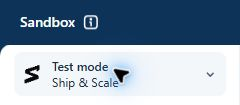
Open the account menu in the top-left corner and choose **Switch to sandbox**. Select your app's sandbox, or choose **Create sandbox** if you haven't made one. Keep using the same sandbox throughout setup.
Check for the **Sandbox** banner at the top. An existing **Test mode** environment also works; the screenshot below shows that view. Payments here don't move real money.
Stripe · Confirm you're in a test environment.
### Copy the test Secret key [#copy-the-test-secret-key]
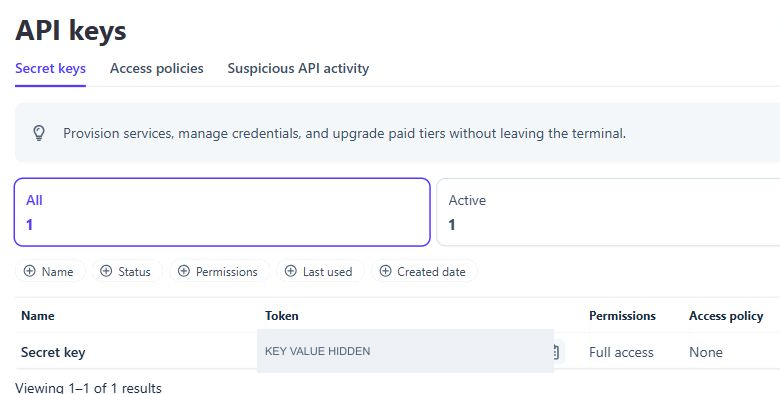
Open [API keys](https://dashboard.stripe.com/apikeys) and check that you're still in your chosen test environment. Select **Secret keys**, find the **Secret key** row and click the copy icon beside its token. If Stripe shows a reveal control first, use it to display the key.
Stripe · Copy the token from the Secret key row. Key values are hidden here.
The key for this walkthrough starts with `sk_test_`. The **Publishable key** at the top starts with `pk_test_` and won't work in this field.
If you have no Secret key, choose **Create secret key**, complete Stripe's verification and name it `Ship & Scale Kickstart`. Copy the key when Stripe displays it. If your account can't manage keys, ask its owner for access. See [Stripe's API key guide](https://docs.stripe.com/keys) if your controls differ.
### Save it in `.env` [#save-it-in-env]
Open the root `.env` file beside `package.json`. If it doesn't exist, copy `.env.example` to `.env`. Find `STRIPE_TEST_SECRET_KEY=`, paste your key after the equals sign and save:
```dotenv title="Your private .env"
STRIPE_TEST_SECRET_KEY=sk_test_REPLACE_WITH_YOUR_KEY
```
Replace the example with your actual key. Keep one line for this setting and leave `STRIPE_LIVE_SECRET_KEY` empty for now.
**Keep the Secret key private**
Anyone with this key can manage your Stripe account's test data. Store it only in `.env`, as described in [Keep your keys private](/docs/accounts#where-to-save-your-keys).
## You are finished when [#you-are-finished-when]
* `STRIPE_TEST_SECRET_KEY` contains your `sk_test_` key in the root `.env` file.
* The key belongs to the test environment you chose for your app.
After saving the Supabase, Stripe and Resend credentials, run `npm run kickstart:check` to check them before setup.
## Live Secret key [#live-secret-key]
You only need this before deploying with billing enabled. First [activate your Stripe account](https://docs.stripe.com/get-started/account/activate) by adding your business and payout details; Stripe needs these before it accepts real payments. Then leave the sandbox, open your live account and return to **API keys**. Copy its live Secret key into the separate field:
```dotenv title="Before deployment"
STRIPE_LIVE_SECRET_KEY=sk_live_REPLACE_WITH_YOUR_KEY
```
Keep your test key in its original field. Save a newly created live key immediately; Stripe only shows it once. Complete the [launch checks](/docs/operations/launch) before accepting real payments.
[Back to Accounts](/docs/accounts)
Continue with the Resend API key.
---
# Supabase access token
URL: https://ship-and-scale.vercel.app/docs/accounts/supabase
Create a Supabase account and save the management token Kickstart needs.
By the end of this guide, your Supabase account will be ready and its management token will be saved in the starter's root `.env` file. Kickstart uses that token to create and configure your hosted project, so you do not need to create a Supabase project yourself.
## Create and save the token [#create-and-save-the-token]
### Create or sign in to your account [#create-or-sign-in-to-your-account]
Open the [Supabase dashboard](https://supabase.com/dashboard). Choose **Sign up** if you are new to Supabase, or sign in to your existing account.
A new account includes a default organization where you are the Owner. With an existing account, use an organization where you are an Owner or Administrator and can create another project. The Free plan allows two active projects per organization, so pause or delete an unused one if you've reached that limit.
### Generate a management token [#generate-a-management-token]
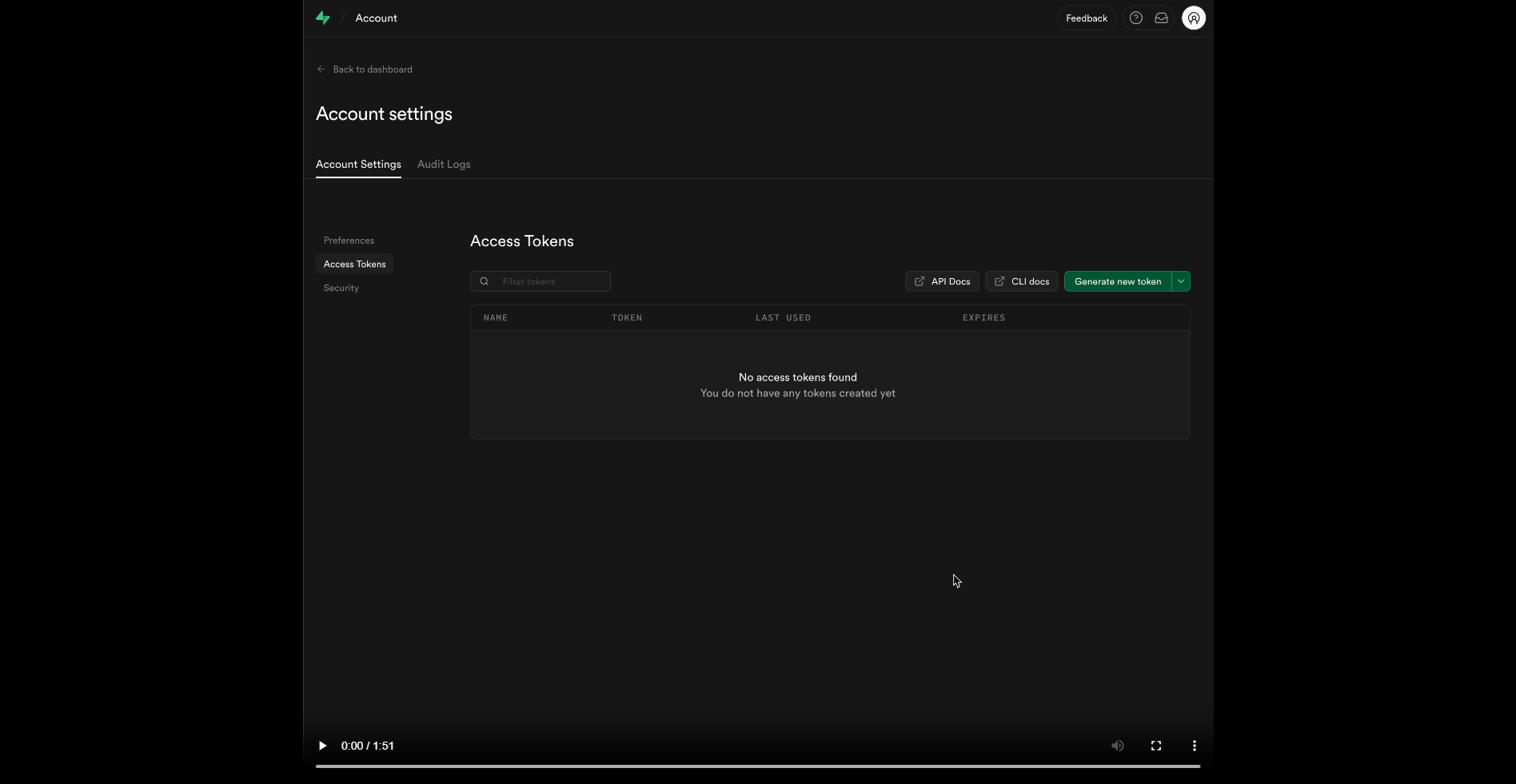
Open your avatar menu, choose **Account preferences**, then select **Access Tokens** under Preferences. You can also go directly to [Access Tokens](https://supabase.com/dashboard/account/tokens). Click the green **Generate new token** button in the top-right corner.
Supabase · Account preferences → Access Tokens → Generate new token.
Prefer a **scoped personal access token**. For a new Kickstart, scope it to the organization that will own the project and grant these permissions. Kickstart lists the account and organization, creates the project, then configures its database, keys, Auth and email function:
| Scope | Access | Why Kickstart needs it |
| ----------------------- | ---------- | -------------------------------------------------------- |
| Organizations | Read | List accessible organizations |
| Projects (account-wide) | Read | List accessible projects |
| Organization Projects | Read-write | Create the new project and inspect available regions |
| Project Settings | Read-write | Read project health and update Auth settings |
| Database | Read-write | Run setup SQL and versioned migrations |
| API Keys | Read-write | Read or create the project's publishable and secret keys |
| API Key Secrets | Read | Reveal the generated secret key privately |
| Auth Config | Read-write | Read and configure Auth |
| Edge Functions | Read-write | Inspect and deploy the signed email hook |
| Edge Function Secrets | Read-write | Inspect and install only the hook's selected secrets |
These names match Supabase's [scoped-token permission list](https://supabase.com/docs/guides/platform/personal-access-tokens#permission-scopes). They only narrow your existing Supabase role; they cannot grant access you do not have. Kickstart's `--check` proves the reads it performs, not future project creation, key creation, SQL writes or function deployment.
For an existing installation, scope project permissions to that exact project. Migration-only maintenance needs **Project Settings: Read** and **Database: Read** for `npm run kickstart:migrate -- --check`; applying pending migrations also needs **Database: Read-write**. Full Kickstart still performs account discovery, so retain the two account-level read permissions when rerunning it.
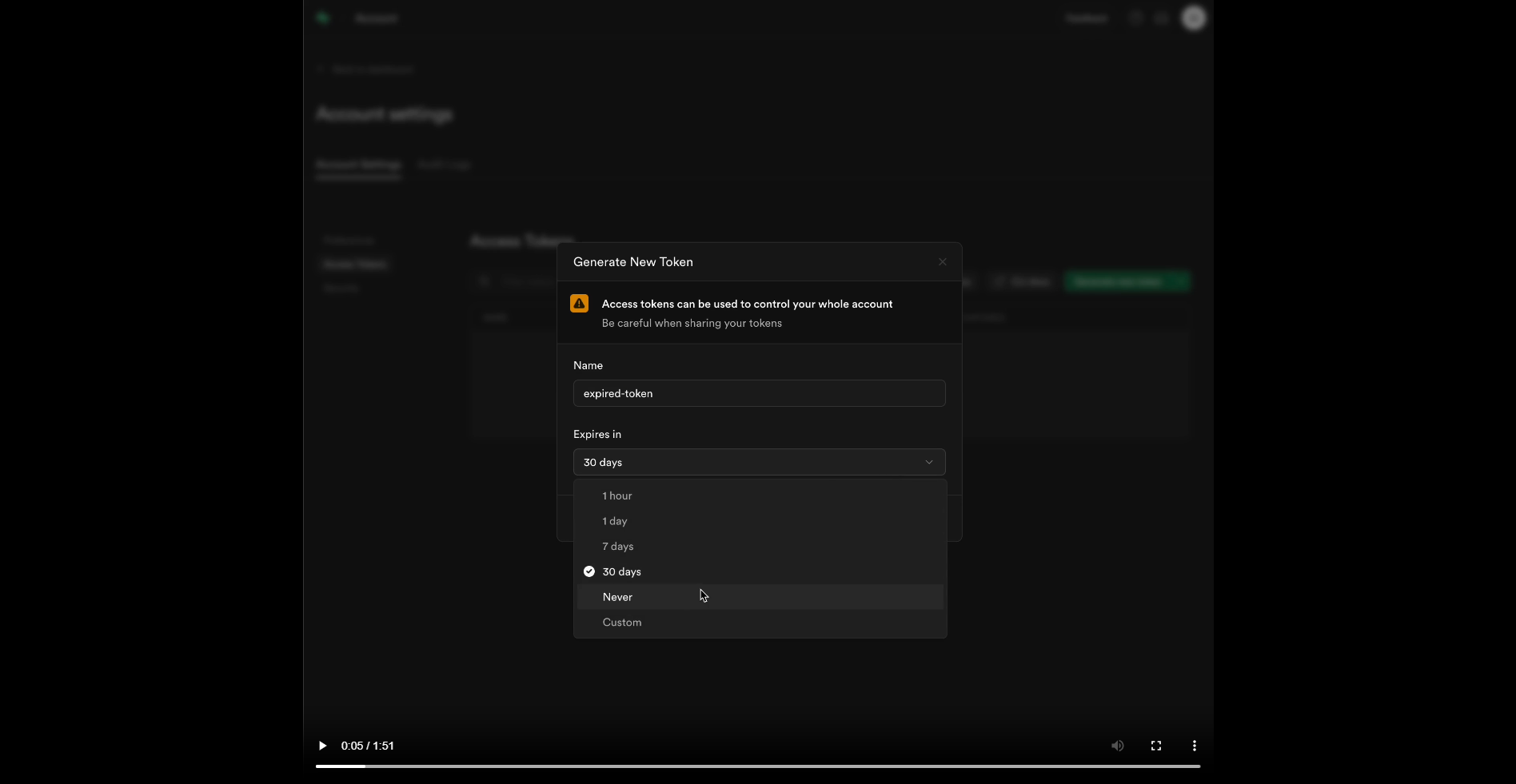
If scoped tokens are unavailable for your account, create a **Legacy** token instead. It inherits your account's access across all organizations and projects, with no per-permission restriction. Choose an expiry, copy the token once and keep it private. A project publishable or secret API key cannot replace the Management API token.
Supabase · Open Expires in and choose an expiry. Legacy-token example; prefer the scoped permissions above.
**Optional: connect Supabase directly**
If your coding agent supports the hosted [Supabase MCP server](https://supabase.com/docs/guides/ai-tools/mcp), you can connect it for ongoing work. Its browser sign-in means you do not need to keep a permanent token in `.env`. For local CLI work, you can run `supabase login` and link the repository after Kickstart creates the project. You still need the token in this guide for the initial Kickstart setup.
**Keep the management token private**
Prefer a scoped token with only the organization and project permissions listed above. A Legacy token instead inherits your full Supabase account access until it expires or you revoke it. Both types belong only in the private local `.env`; never replace them with a project publishable or secret API key.
### Save it in `.env` [#save-it-in-env]
Open the root `.env` file beside `package.json`. If it does not exist, copy `.env.example` to `.env`. Find the existing `SUPABASE_ACCESS_TOKEN=` line, paste the token after the equals sign and save the file:
```dotenv title="Your private .env"
SUPABASE_ACCESS_TOKEN=replace_with_your_supabase_management_token
```
Replace the example value with the real token and keep one active `SUPABASE_ACCESS_TOKEN` line.
## You are finished when [#you-are-finished-when]
* `SUPABASE_ACCESS_TOKEN` has one saved value in the root `.env` file.
* `SUPABASE_PROJECT_REF`, `NEXT_PUBLIC_SUPABASE_URL`, `NEXT_PUBLIC_SUPABASE_PUBLISHABLE_KEY` and `SUPABASE_SECRET_KEY` remain blank for a new installation. Kickstart fills them in.
* The token is only in `.env`, following [Keep your keys private](/docs/accounts#where-to-save-your-keys).
After you add the Stripe test key and Resend key, `npm run kickstart:check` checks that this token can read your account and organizations. The command does not create the project. Project creation and configuration happen when you run Kickstart.
**If the token screen or account access is different**
Scoped permissions only reduce the access your Supabase role already has. If an organization or project is missing, confirm the token's resource scope and your Owner or Administrator role. Supabase's [access control guide](https://supabase.com/docs/guides/platform/access-control) explains organization roles. When a token expires, create a replacement for the same target and update only `SUPABASE_ACCESS_TOKEN`; keep the project, receipts and generated settings.
[Back to Accounts](/docs/accounts)
Continue with the Stripe test key.
---
# Vercel access token
URL: https://ship-and-scale.vercel.app/docs/accounts/vercel
Save your Vercel token and connect GitHub for Deployment Kickstart.
By the end of this guide, your Vercel token will be saved in the starter's root `.env` file and GitHub will be connected for deployment. Kickstart creates the Vercel project and configures hosting for you.
You only need Vercel when you're ready to deploy. Finish the first Kickstart and prepare your [GitHub access token](/docs/accounts/github) before continuing.
## Create and save the token [#create-and-save-the-token]
### Create or sign in to your account [#create-or-sign-in-to-your-account]
Open [Vercel](https://vercel.com) and sign up or sign in. Use the team that will own your app, with permission to create projects and deployments.
The free [Hobby plan](https://vercel.com/docs/plans/hobby) works for building and testing your deployment. It's limited to personal, non-commercial projects, so upgrade to [Pro](https://vercel.com/pricing) before your app takes payments.
### Generate an access token [#generate-an-access-token]
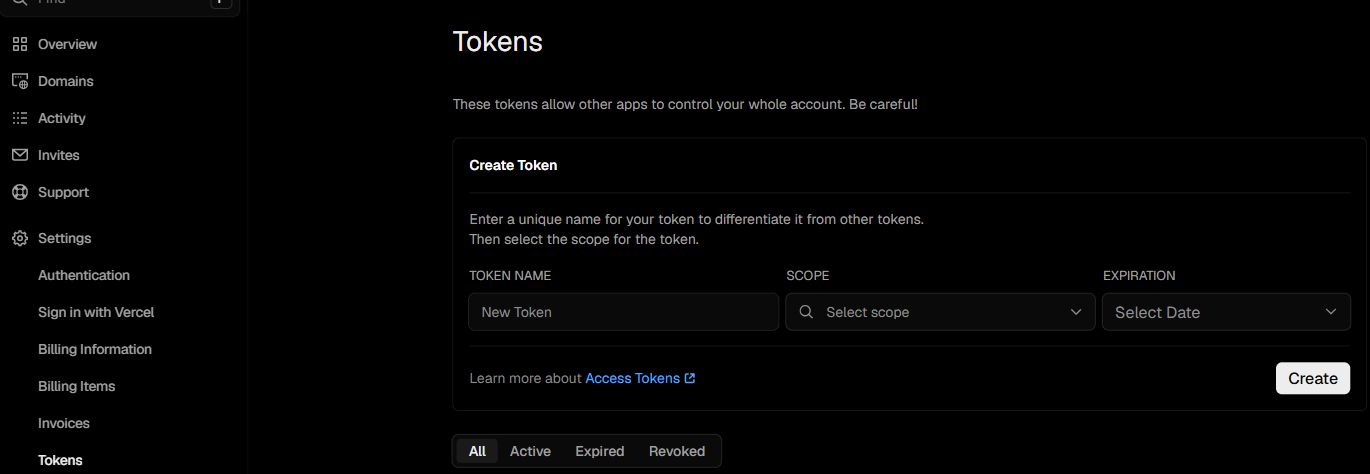
Open [Account Tokens](https://vercel.com/account/tokens). This is under your personal account's **Settings → Tokens**, even when the app belongs to a team. The **Create Token** form appears on this page.
Vercel · Account settings → Tokens.
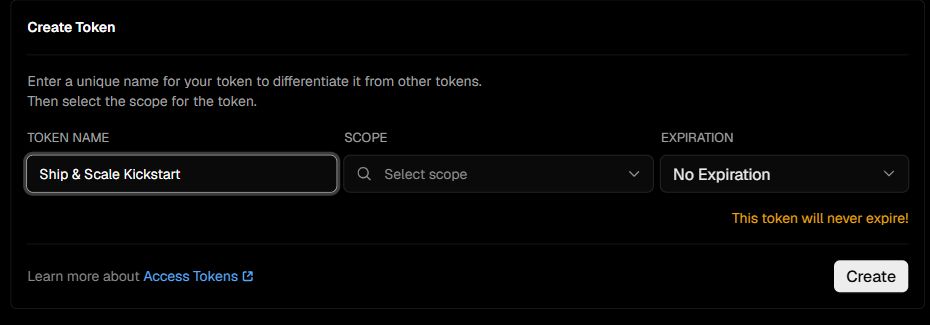
1. Under **Token Name**, enter `Ship & Scale Kickstart`.
2. Under **Scope**, select the team that will own your app. You don't need **Full Account** access.
3. Under **Expiration**, choose **90 days**. That covers deployment and any retries. Choose **No Expiration** only if a coding agent will keep using this token for Vercel changes, and revoke it when you no longer need it.
4. Click **Create** and copy the token immediately. Vercel only shows its full value once.
The token must be scoped to the team that owns this project. Keep `VERCEL_TEAM_ID` and `VERCEL_PROJECT_ID` matched to the team and project saved during deployment. For a new project, leave the project ID blank until Kickstart records it; for later checks and secret updates, use the recorded project rather than a similarly named project.
Enter a name, select your own team in Scope, choose an expiration, then click Create. The example shows No Expiration.
### Save it in `.env` [#save-it-in-env]
Open the root `.env` file beside `package.json`. Keep the settings from your local installation. Find the existing `VERCEL_TOKEN=` line, paste the token after the equals sign and save:
```dotenv title="Your private .env"
VERCEL_TOKEN=replace_with_your_vercel_token
```
Replace the example with your real token and keep one active `VERCEL_TOKEN` line. For a new deployment, leave `VERCEL_TEAM_ID`, `VERCEL_PROJECT_NAME`, `VERCEL_PROJECT_ID` and `APP_URL_LIVE` blank. Kickstart fills them in.
**Keep the token private**
This token can manage resources in its selected scope until it expires or you revoke it. Keep it only in your local `.env`. Don't import your whole `.env` into Vercel; Kickstart uploads only the runtime values your app needs.
## Connect GitHub [#connect-github]
Vercel also needs its own connection to GitHub to read your app's code. Saving the two tokens does not create this connection.
### Link your GitHub account [#link-your-github-account]
Open Vercel's [Authentication settings](https://vercel.com/account/settings/authentication). Under **Sign-in Methods**, connect **GitHub** using the same account as your GitHub token. If your GitHub username is already shown, this step is done.
Vercel · Authentication → Sign-in Methods. Your own GitHub username should appear here.
### Allow access to your app's repository [#allow-access-to-your-apps-repository]
Open the [Vercel GitHub App](https://github.com/apps/vercel/installations/new). Choose the account that will own your app's repository. For the automatic Kickstart setup, this is your personal GitHub account.
Kickstart creates your app's repository later, so it doesn't exist yet. Choose one of these:
* **All repositories** is the simplest path. Vercel can read the new repository as soon as Kickstart creates it. It also gives Vercel access to every current and future repository owned by that account.
* **Only select repositories** keeps access narrower. GitHub requires at least one repository here, so select any existing one for now. When Kickstart creates your app's repository, it pauses with a link; add the new repository there and rerun the same command.
GitHub · Vercel App → repository access. Use Select repositories to choose which code Vercel can read.
Review the permissions and click **Install** for a new installation or **Save** when updating one. If GitHub shows **Request**, an organization owner must approve it before you continue.
If Kickstart later pauses for repository access, keep the generated `.env` values and `.kickstart` files so the rerun continues with the same resources.
## You are finished when [#you-are-finished-when]
* `VERCEL_TOKEN` has one saved value in your root `.env`.
* Its scope matches the Vercel team that will host your app.
* GitHub is connected to Vercel, and the Vercel App is installed for your repository owner.
Once the other [deployment prerequisites](/docs/start/deployment-kickstart#finish-local-setup-first) are ready, run:
```sh
npm run kickstart:deploy -- --check
```
This checks access without creating provider resources. Access to a new repository is checked after Kickstart creates it during deployment.
**If your team, token or repository is unavailable**
If your team is missing from **Scope**, check that you're signed in to the right Vercel account and have access to that team. The token cannot grant permissions your account doesn't have. See [Vercel's token guide](https://vercel.com/kb/guide/how-do-i-use-a-vercel-api-access-token).
If the token expires or is revoked, create a replacement for the same team and update `VERCEL_TOKEN`. Keep the generated project IDs and receipts.
If Vercel cannot find the repository, check the GitHub connection, App installation owner and selected repositories. Follow [Vercel's repository access guide](https://vercel.com/kb/guide/unable-to-find-github-repository) if it is still missing.
[Back to Accounts](/docs/accounts)
Check the remaining deployment accounts, then deploy.
---
# Plans, pricing and paid access
URL: https://ship-and-scale.vercel.app/docs/billing/plans
Author the catalog once and enforce your paid feature on the correct workspace.
## A subscription belongs to a workspace [#a-subscription-belongs-to-a-workspace]
Each workspace has one separately paid subscription. All members share its product entitlement. Owners/admins manage billing; ordinary members do not access financial details or the portal. A person can belong to both a paid workspace and an unpaid one without the payment transferring between them.
The starter's infrastructure is available across its example tiers. You add product differences deliberately. There are no seat charges, recurring AI grants, top-ups or usage billing. AI starts with one workspace credit grant independent of Stripe events.
## Initial seed and later authoring [#initial-seed-and-later-authoring]
`config/billing-seed.json` defines the initial missing catalog. Kickstart creates/reuses the template-owned test products and monthly/yearly prices. Once initialized, **the owned Stripe test catalog is the authoring source**. The app's shared catalog reader uses installed data; unconnected UI can show seed values with purchase controls disabled.
Do not maintain another editable price list in the frontend or this manual. Generated `STRIPE_*_PRODUCT_ID_*` fields bind the installation to resources; editing an ID is not a pricing change. Keep the `forma_catalog` and `forma_plan` metadata that provides stable identity across display-name edits.
## Change a catalog price [#change-a-catalog-price]
In the intended Stripe test account, locate the owned plan. For a display-name/description edit, change those fields on that product. For an amount change, create a replacement flat recurring price for the intended interval, then archive the superseded active variant after reviewing existing subscribers.
Keep exactly one active monthly and one active yearly price per plan, and one currency across the supported catalog. Multiple active eligible prices make setup ambiguous and should stop reconciliation. Run the relevant setup check/reconciliation and inspect the app's Billing tab.
New prices do not silently move existing subscribers. Existing subscriptions retain their price until explicitly changed through the supported portal/provider flow. Deployment copies the current owned test catalog into live resources; it does not turn a test price ID into a live price ID. [Stripe price management](https://docs.stripe.com/products-prices/manage-prices).
## Display is not enforcement [#display-is-not-enforcement]
The header's plan tag is a member-safe summary: Free means no current paid entitlement; a catalog lookup can yield Paid or Plan unavailable according to state. Hiding a button based on that tag does not authorize a paid operation.
`requireSubscription()` in `lib/billing/server.ts` checks the currently selected workspace using `workspace_subscription` and the server-selected billing mode. It takes **no workspace argument** in this source snapshot. Do not invent `requireSubscription(orgId)` or use the cookie-selected workspace to authorize a stale form targeting another workspace.
## Make note creation paid [#make-note-creation-paid]
This optional variant builds on [workspace notes](/docs/build/first-feature). It leaves existing notes readable but makes creation require an active subscription for the explicit form workspace.
First apply this **new** migration after the base notes migration:
**supabase/migrations/20260916090100_paid_notes.sql**
```
-- Optional paid-create variant. Existing notes remain readable through RLS.
revoke insert(id, org_id, created_by, body) on public.workspace_notes from authenticated;
drop policy notes_create on public.workspace_notes;
grant select, insert on public.workspace_notes to service_role;
-- Every create now goes through the verified server action and its paid check.
```
Revoking direct insert closes the ordinary Data API bypass. A paid check only in a button or action would be insufficient while the base table still allowed unpaid clients to insert directly. Keep the SELECT policy for member reads.
Then replace `app/actions/notes.ts` with this complete optional action:
**app/actions/notes.ts — optional paid variant**
```
'use server';
import { revalidatePath } from 'next/cache';
import { getWorkspace, requireUser } from '@/lib/auth';
import { createAdminClient } from '@/lib/supabase/admin';
import { billingMode } from '@/lib/billing/environment.mjs';
import { noteInput, type NoteState } from '@/lib/notes-schema';
export async function createNote(_previous: NoteState, form: FormData): Promise {
const parsed = noteInput.safeParse({ request_id: form.get('request_id'), org_id: form.get('org_id'), body: form.get('body') });
if (!parsed.success) return { error: 'Enter a note of 1–2,000 characters.' };
const { user, supabase } = await requireUser();
const { org_id, request_id, body } = parsed.data;
try {
const { role } = await getWorkspace(org_id);
if (role === 'member') return { error: 'Only owners and admins can create notes.' };
} catch { return { error: 'Workspace access is no longer available.' }; }
const subscription = await supabase.rpc('workspace_subscription', { target: org_id, target_mode: billingMode() });
if (subscription.error || subscription.data?.paid !== true) return { error: 'An active subscription for this workspace is required.' };
// Narrow privileged write: caller and explicit tenant were checked above.
// Ordinary clients have no INSERT grant after the paid migration.
const admin = createAdminClient();
const result = await admin.from('workspace_notes').insert({ id: request_id, org_id, created_by: user.id, body });
if (result.error?.code === '23505') {
const existing = await admin.from('workspace_notes').select('body,created_by').eq('id', request_id).eq('org_id', org_id).maybeSingle();
if (existing.error || existing.data?.created_by !== user.id || existing.data?.body !== body) return { error: 'This request was already used. Start a new note.' };
} else if (result.error) return { error: 'The note could not be saved. Retry with the same request.' };
revalidatePath('/dashboard/notes');
return { success: 'Note saved.' };
}
```
The action authenticates, validates the explicit workspace, checks current manager role and calls the existing member-safe subscription RPC with that same target and server-chosen mode. Only then does a narrow privileged insert occur. Do not accept `paid`, Stripe IDs or billing mode from the browser.
The elevated client here has one justified write boundary because ordinary clients cannot insert after the optional migration. Keep it server-only, scope replay lookups to the same workspace, and do not reuse it for the notes list or unrelated customer queries. An already-authorized request may finish during a concurrent entitlement change; stronger transactional entitlement/role locking would require a dedicated database operation and matching tests.
## Paid states and existing subscribers [#paid-states-and-existing-subscribers]
Recognized `active` and `trialing` subscriptions grant entitlement. The default product does not create a trial, but the state reader recognizes it. Past-due, unpaid, paused, incomplete, canceled or unknown subscriptions do not grant access; no additional app grace period is invented.
Cancellation normally takes effect at period end, so a still-active canceling subscription remains paid until its state changes. Checkout return URLs never grant access themselves. Only synchronized provider state does. Keep auth, account settings and billing management accessible so an unpaid user can resolve payment or manage data.
## Verify the gate [#verify-the-gate]
Test an unpaid workspace, a paid workspace, a Member in a paid workspace and a user belonging to paid A/unpaid B. Submit a stale form for B while A is selected: it must check B. Attempt direct authenticated inserts after the optional migration: they must fail even for owners. Replay an accepted request and a changed body with the same request ID.
Static sample validation does not prove paid synchronization. The optional action and grants need hosted tests with real synchronized Stripe state. No payment, SQL migration or entitlement mutation was performed while writing this manual. Continue with [Checkout and webhooks](/docs/billing/subscriptions).
---
# Checkout, subscriptions and webhooks
URL: https://ship-and-scale.vercel.app/docs/billing/subscriptions
Follow a subscription from purchase to synchronized access, cancellation and safe deletion.
## Start from Settings → Billing [#start-from-settings--billing]
Owners/admins select the workspace, choose monthly or yearly pricing and start Checkout. Members see a permission explanation. The server targets the explicit workspace from the form and verifies current access, preventing a stale tab from purchasing for a newly selected workspace silently.
Checkout purchases one recurring price with quantity one. An existing subscriber uses **Manage subscription** to open Stripe Customer Portal for payment methods, invoices, plan changes and cancellation. Do not create a second subscription to implement a plan change.
## Subscription lifecycle [#subscription-lifecycle]
| State/transition | Application behavior |
| --------------------------------- | -------------------------------------------------------------------------- |
| No subscription | Free/unsubscribed; core auth/settings remain available |
| Checkout pending | Request identity prevents duplicate checkout creation; deletion is guarded |
| Recognized active/trialing | Workspace receives paid entitlement |
| Scheduled cancellation | Paid while still active through the paid period |
| Past due/unpaid/incomplete/paused | No app-added paid grace period |
| Canceled or expired incomplete | No entitlement; deletion may proceed after reconciliation |
Upgrades use Stripe's immediate prorated invoice and confirmation. Decreases in amount or shorter intervals are scheduled for period end through the configured portal behavior. Review the real portal confirmation before submitting a change; the app does not implement a separate customer credit-adjustment panel.
## How webhooks reach local development [#how-webhooks-reach-local-development]
Billing webhook handling lives in hosted Supabase Edge Functions. The endpoint is reachable before Next.js is deployed, so local test billing does not require ngrok or a manually exposed localhost webhook. Kickstart installs the mode-specific endpoint, function configuration, portal and reconciliation resources.
`lib/billing/engine.mjs` and `lib/billing/server.ts` coordinate provider state and database synchronization. Incoming events must pass signature verification. Events can be duplicated or arrive out of order, so the engine uses durable account mapping, synchronization leases and idempotent state handling rather than trusting arrival order.
The hosted source includes `supabase/functions/stripe-billing`. Keep test and live function/secrets separate according to installer configuration. Never send the setup environment wholesale into a function.
## Verify a test purchase [#verify-a-test-purchase]
Use a dedicated authorized test account/workspace and the configured Stripe test environment:
1. Record the selected workspace and its initial unsubscribed state without exposing keys.
2. Start a plan purchase from Billing, confirm the hosted Stripe screen is in test mode, and use Stripe's documented test payment method.
3. Complete Checkout and return to the app. Wait for synchronization or use **Refresh status**.
4. Confirm the correct workspace shows the recognized subscription and that another unpaid workspace remains unpaid.
5. Open Manage subscription and inspect the corresponding portal subscription.
Use Stripe's current [testing guide](https://docs.stripe.com/testing) for test payment details and failure scenarios. Do not enter real payment information in test documentation or represent a mocked Checkout URL as a completed payment.
## Exercise failure, changes and cancellation [#exercise-failure-changes-and-cancellation]
Run a plan change through Portal and verify the effective timing and invoice result. Test payment failure using the documented sandbox flow and inspect the resulting subscription state. The absence of paid entitlement must match synchronized state, not the last optimistic UI selection.
Schedule cancellation and confirm access remains while the subscription is still active. Once the paid period ends and the terminal state is synchronized, verify the tag and paid operation change. Use provider test tools where appropriate, but record whether the event originated from Stripe or from a fixture.
## Replay and reconcile [#replay-and-reconcile]
Webhook replay must not duplicate customers, subscriptions or entitlement effects. Test an older event after a newer one and confirm the final state agrees with Stripe. If local subscription cache data is unavailable, durable customer/subscription lookup information supports recovery; do not erase that mapping while cleaning UI rows.
Scheduled reconciliation and Refresh status help recover missed events. Inspect the configured mode and account before diagnosing a stale cache. A valid signature probe proves rejection/acceptance logic, not actual Stripe event delivery. A Checkout success query parameter is never sufficient proof of payment.
## Deletion guards [#deletion-guards]
Pending Checkout and nonterminal subscriptions block workspace deletion. Account deletion also checks any workspaces it would delete. Cancel first, wait until the paid period ends, refresh the subscription and retry the explicit deletion flow. Transferred/shared workspaces and their subscriptions remain intact.
Stripe financial records are not deleted as part of ordinary workspace removal. Durable billing records can survive without their organization link. Decide your actual retention policy for launch; do not promise a total financial-record purge or bypass the guard by deleting private rows.
## Diagnose unavailable billing [#diagnose-unavailable-billing]
If the catalog shows disabled controls, inspect whether it is using display-only seed entries or an installed provider catalog. If Portal is unavailable, confirm the selected role, runtime key/mode and installed portal configuration. If the wrong price appears, inspect the owned catalog for multiple active eligible variants.
If webhook creation succeeded but its signing secret was not saved, recover the matching secret from Stripe Workbench; the installer does not create another endpoint blindly. Keep receipts and resource IDs. The [troubleshooting guide](/docs/operations/troubleshooting) covers uncertain operations and origin/source guards.
## Evidence required before launch [#evidence-required-before-launch]
Record actual purchase, plan change, failed payment, cancellation, duplicate/out-of-order events, cache recovery, workspace isolation and test-to-live promotion. A documentation build, fixture suite or provider configuration read does not prove these flows. No new purchase or Stripe-originated event was executed for this manual. Continue with [production launch](/docs/operations/launch).
---
# Architecture
URL: https://ship-and-scale.vercel.app/docs/build/architecture
How requests, permissions and services fit together, with the commands you'll use while building features.
These notes help you and your agent extend the starter without breaking workspace permissions or exposing secrets. Read them when you start building features; you don't need them for Setup or Kickstart. For what each tool does, start with [Tech stack](/docs/build/codebase).
## One application, hosted services [#one-application-hosted-services]
Your app is one Next.js App Router application. Pages, server actions, HTTP routes and reusable UI live in the same repository. Hosted Supabase owns Postgres, Auth, Storage and Edge Functions. Stripe owns checkout and billing objects, Resend sends email, and AI requests go through OpenRouter from the server.
Local development runs Next.js on your computer against those hosted services, with no local database or Docker container. The Ship & Scale manual you're reading is separate from the product documentation included in your app.
## Next.js, React and TypeScript [#nextjs-react-and-typescript]
Next.js supplies the routing and server runtime. React components describe the interface, while TypeScript catches mismatched data shapes before a production build. App Router folders determine routes: `app/dashboard` owns protected product pages, and `app/api` owns HTTP endpoints.
Server Components can load authorized data before rendering. Add a Client Component for interaction such as an editable form or a menu. A server action handles a submitted mutation, validates its input and checks access. You can follow a complete example in [Build your first workspace feature](/docs/build/first-feature).
## Server and browser boundaries [#server-and-browser-boundaries]
Client Components use `'use client'` when they need state, events or browser APIs. Server actions use `'use server'` and still need authentication, validation and authorization: a form is an HTTP entry point, even if the UI hides it.
Keep modules importing `server-only` out of client imports. Only intentionally public values use `NEXT_PUBLIC_`. Pass the minimum presentation data into client props; never pass a Supabase admin client, API secret or provider response containing private account details.
## Tailwind CSS and the component library [#tailwind-css-and-the-component-library]
Tailwind provides utility classes; shadcn/ui places editable component source in `components/ui/`. The installed preset uses Base UI's interaction primitives with the Vega style, neutral colors, Inter typography and Lucide icons. All 61 component files are in your repository, so you can inspect and adapt their actual props.
Shared design tokens in `app/globals.css` control colors, borders and spacing. Reusing those tokens and the existing buttons, dialogs and fields keeps a new feature consistent with the rest of the product. See [Branding and UI customization](/docs/build/customization) before replacing the component foundation.
## Hosted Supabase [#hosted-supabase]
The browser and server use the Supabase client libraries with the current user's session. Row-level security, or RLS, checks which rows that user can access; workspace membership and roles determine the permitted reads and writes.
Schema and permission changes live in versioned SQL files under `supabase/migrations/`. Kickstart applies them through the Supabase Management API and records a checksum for each file. The default workflow has no ORM schema generation, local database container or direct database password. [Database and migrations](/docs/core/database) explains how to extend it without bypassing that record.
Auth handles sessions, recovery and provider sign-in. Storage holds private avatars; workspace logos use access-controlled database rows. Edge Functions run the hosted email and billing work. Everything stays in your own Supabase project.
## Stripe and Resend [#stripe-and-resend]
Stripe owns checkout sessions, subscriptions, invoices and portal configuration. The app keeps a protected copy of each subscription's state, updated from verified webhook events. Billing belongs to a workspace, and the server decides whether that workspace has paid access. [Subscriptions and webhooks](/docs/billing/subscriptions) covers that lifecycle.
Resend delivers transactional email. The starter publishes five source HTML templates and connects a signed Supabase email hook for Auth messages. Workspace invitations and other application emails use their own narrowly scoped server code. Editing a template file doesn't change sent emails until you publish it through Kickstart; see [email templates](/docs/email/templates-delivery).
## GitHub and Vercel [#github-and-vercel]
Git tracks your changes, GitHub stores the private repository, and Vercel builds and runs the deployed app. Deployment Kickstart sets up their initial connection and uploads the runtime settings your app needs. After that, pushing to `main` deploys new versions.
Your setup folder keeps `.kickstart` and `.secrets` records that Kickstart uses to recognize the resources it created. They stay out of the repository. See [Deployment Kickstart](/docs/start/deployment-kickstart) for the first deployment and [Updates and recovery](/docs/operations/deployment) for later changes.
## Fumadocs, validation and AI [#fumadocs-validation-and-ai]
Fumadocs turns MDX into documentation pages with navigation, search, headings and Markdown actions. The product docs are files in your repository; the blog reads published posts from Supabase. Keep those two authoring paths separate when adding public content.
Zod validates structured input at application boundaries. Next.js route handlers serve the REST API, and the MCP SDK exposes the same operations as assistant tools. Both authenticate the caller and enforce explicit workspace permissions. Adding a field to a schema doesn't grant access to another workspace.
The AI example uses the Vercel AI SDK with the OpenRouter provider for streamed responses. The provider key stays on the server, alongside credit and request checks. The [AI guide](/docs/integrations/ai) covers configuration, enabling chat and removing it while keeping Auth, workspaces and billing.
## Follow a workspace mutation [#follow-a-workspace-mutation]
Workspace invitations show how a change travels through the app:
1. A form in the workspace UI sends the explicit workspace `org_id` and the selected recipient and role.
2. `inviteMember()` in `app/actions/workspaces.ts` gets the verified user through `requireUser()` and validates the IDs and role.
3. The signed-in user's Supabase client calls `issue_workspace_invitation`.
4. The database checks current membership, role, rate limits and invitation state. Hidden buttons are not the permission boundary.
5. The server sends the saved invitation through `lib/email/invitation.mjs` and records the outcome of that send attempt.
6. `revalidatePath('/dashboard/workspace')` refreshes the page. Resend accepting a message doesn't confirm it reached the inbox.
`lib/auth.ts` centralizes `requireUser()` and `getWorkspace(target?)`. The latter checks an explicit target against the user's current memberships. Never use a browser-supplied workspace ID in an elevated query without an equivalent authorization check.
## Daily commands [#daily-commands]
| Command | Use | Effect on your services |
| --------------------- | ------------------------------------------------------------ | --------------------------------------------------------------- |
| `npm ci` | Install pinned dependencies and generate the docs collection | Downloads packages only |
| `npm run dev` | Run the app locally | Using the app reads and writes your hosted services |
| `npm run typecheck` | TypeScript validation | None |
| `npm run lint` | Static code checks | None |
| `npm run build` | Production compilation | None; a passing build doesn't test provider flows |
| `npm test` | Setup and failure checks | Uses fake providers; no live calls |
| `npm run test:ui` | Browser tests against a running server | Review what each suite does first |
| `npm run test:hosted` | SQL isolation checks | Runs rolled-back test transactions on a chosen Supabase project |
Restart the development server after changing `.env`. If you change `APP_URL`, change it consistently: `localhost` and `127.0.0.1` count as different addresses for cookies and sign-in links.
## Development previews [#development-previews]
`/preview` renders development-only example states, and `/setup` helps with local configuration. They don't bypass `/dashboard` sign-in or show real provider behavior. For example, a preview of an active billing card has disabled payment controls. Use previews for layout work, and test real behavior with a signed-in test account.
## Work with a coding assistant [#work-with-a-coding-assistant]
Give the assistant a concrete outcome, the relevant files and the permission rule, for example: "Add a note visible only to members of its workspace; owners and admins can create one; test that other workspaces can't read or write it." Ask it to inspect the current source and installed framework docs before choosing helpers.
Keep credentials in `.env` rather than pasting them into the conversation. Your repository's `AGENTS.md` gives the assistant project rules; review it and add your own. Don't ask an assistant to reset a shared database or rewrite applied migrations to make a test pass.
## Dependencies, formatting and verification [#dependencies-formatting-and-verification]
`package.json` and `package-lock.json` belong together. Review upgrades deliberately, update the lockfile through npm and rerun the affected checks. `npm run format` formats TypeScript files only; it doesn't touch SQL, JSON or MDX. The starter doesn't include a database-type generator or CI pipeline, so add your own if you need them.
After a change, test the real path, including wrong roles, stale forms, failure states and recovery. The [first workspace feature](/docs/build/first-feature) is a worked example.
---
# Tech stack
URL: https://ship-and-scale.vercel.app/docs/build/codebase
The tools behind your SaaS, what they do and why we use them.
Ship & Scale brings your app, backend services and deployment workflow into one connected starting point. You get a single Next.js codebase with the integrations in place, ready to extend with your own features.
We use this stack to keep product development in code you control, with hosted services handling the infrastructure behind it. Here's what each part contributes to your SaaS.
## App and interface [#app-and-interface]
### Next.js [#nextjs]
[Next.js](https://nextjs.org/docs) is the React framework that runs your application. Its App Router keeps pages, server actions and API routes in one project, so a feature's interface and server logic can live together. You'll use it for both the public website and protected dashboard.
### React [#react]
[React](https://react.dev/learn) builds the interface from reusable components. A form, sidebar or settings panel can be defined once and used across your app. This makes new screens easier to maintain as your product grows, and gives your coding agent existing patterns to build on.
### TypeScript [#typescript]
[TypeScript](https://www.typescriptlang.org/docs/handbook/intro.html) adds type checking to JavaScript. It catches mismatched data and component props while you're working, helping you change code with clearer expectations about what each function receives and returns. It supports safer refactoring; runtime validation and tests still matter.
### Tailwind CSS [#tailwind-css]
[Tailwind CSS](https://tailwindcss.com/docs/styling-with-utility-classes) styles layouts, spacing, colors and responsive behavior through utility classes. The starter combines those classes with shared design tokens, so you can change the brand and build new screens with a consistent appearance. Most visual work happens alongside the component you're editing.
### shadcn/ui [#shadcnui]
[shadcn/ui](https://ui.shadcn.com/docs) supplies the source for buttons, dialogs, forms and other interface components. Those files live in your repository, so you and your agent can adapt their appearance and behavior. The starter uses Base UI interaction primitives and Lucide icons; [UI customization](/docs/build/customization) shows where to start.
## Data and services [#data-and-services]
### Supabase [#supabase]
[Supabase](https://supabase.com/docs/guides/database/overview) provides hosted Postgres, Auth, Storage and Edge Functions. It gives your SaaS a relational database with sign-in and access controls connected to it. The starter uses server checks and database policies to isolate workspace data, giving you a permission model to follow when adding features.
### Stripe [#stripe]
[Stripe](https://docs.stripe.com/billing/subscriptions/overview) handles subscription payments through hosted Checkout and the customer billing portal. Your app uses verified webhooks to keep each workspace's subscription state in sync. This gives you a billing workflow to extend with your own plans, while keeping payment collection with Stripe. See [subscriptions and webhooks](/docs/billing/subscriptions).
### Resend [#resend]
[Resend](https://resend.com/docs/introduction) sends your app's transactional emails. The starter includes five editable templates for welcome, verification, password reset, magic-link sign-in and workspace invitations. Keeping these templates in source lets you review email changes alongside the app; Kickstart publishes them to your Resend account.
### OpenRouter [#openrouter]
[OpenRouter](https://openrouter.ai/docs/quickstart) connects your app to AI models through one API. The chat example uses it with the Vercel AI SDK to stream responses, giving you a starting point for AI features and a shared integration for trying different models. Add a server-only key and fund your provider account using the [AI setup guide](/docs/integrations/ai).
## Documentation and publishing [#documentation-and-publishing]
### Fumadocs [#fumadocs]
[Fumadocs](https://fumadocs.dev/docs) turns MDX files into product documentation with navigation, search and code examples. You can update guides in the same repository as the features they explain. The starter includes a [documentation site for your customers](/docs/website/documentation), separate from the Ship & Scale manual you're reading now.
### GitHub [#github]
[GitHub](https://docs.github.com/en/repositories) stores your private repository and its Git history. It gives you a place to review changes, collaborate and trace how a feature evolved, including changes made by an agent. Deployment Kickstart creates that repository when you [deploy](/docs/start/deployment-kickstart).
### Vercel [#vercel]
[Vercel](https://vercel.com/docs/git) builds and hosts your Next.js app from its connected GitHub repository. Deployment Kickstart configures that connection and the runtime settings; later pushes to the production branch trigger new deployments. This keeps releasing code part of your normal Git workflow. Follow [deployment](/docs/start/deployment-kickstart) after local setup.
## Where your app runs [#where-your-app-runs]
During development, Next.js runs on your computer against your hosted services. After deployment, Vercel runs the app. Supabase holds your data and handles Auth in both cases, while Stripe, Resend and OpenRouter serve the features that use them. No local database or Docker setup is required.
**Local and live share services**
Your local app and your live app use the same Supabase project. That keeps setup simple, and it has two effects once you've deployed:
* Accounts, workspaces and data you create while testing locally go into the same database as your customers' data.
* Sign-in emails, Google sign-in and connected integrations return to your live address, even when you're running the app locally.
Use clearly labeled test accounts, and don't delete or reset data you didn't create. Stripe is different: it keeps test and live settings separate. A fully separate staging environment needs a second Supabase project, which the default setup doesn't configure.
The integrations give you a foundation for a production-ready SaaS. Your provider accounts have their own costs and limits, and your app still needs testing and the [launch checks](/docs/operations/launch). Exact dependency versions live in `package.json` and `package-lock.json`; install those versions when following Setup.
## Repository map [#repository-map]
Use this map to find the main parts of your app when you open the starter. Most feature work will touch `app/`, `components/` and `lib/`; database changes belong in `supabase/migrations/`.
```text
app/
(auth)/ sign-in, signup and account recovery pages
(public)/ blog and public legal pages
actions/ authenticated server mutations
admin/ admin panel for app operators
api/ HTTP, AI and integration endpoints
dashboard/ protected product pages
docs/ your customers' product-documentation UI
oauth/ consent page for connected MCP clients
onboarding/ account survey
preview/ development-only UI fixtures
setup/ development-only setup information
components/ feature UI and all 61 installed UI primitives
config/ site, marketing, SEO, billing seed, integrations
content/docs/ your product docs in MDX
emails/ source HTML email templates
hooks/ shared React hooks
lib/ auth, workspace, billing and feature services
public/ images, icons and other public files
scripts/kickstart/ account checks, provisioning and retry state
supabase/migrations/ versioned hosted SQL changes
supabase/functions/ hosted email/billing function source
tests/ setup fixtures, database and browser checks
docs/ engineering notes for you and your agent
proxy.ts refreshes the signed-in session on each request
```
The root marketing pages also include `app/page.tsx`, `app/pricing`, `app/faq` and `app/contact`. Next.js folder groups in parentheses organize routes without adding URL segments. Generated `.source`, `.next`, setup records and dependencies are not code you edit.
When you start building features, [Architecture](/docs/build/architecture) explains how requests, permissions and commands fit together. You don't need it before Setup.
[Next: Setup](/docs/start/environment)
Get access to the starter and open your own copy.
---
# Configuration reference
URL: https://ship-and-scale.vercel.app/docs/build/configuration-reference
Find environment fields, source settings and the steps needed to apply a change.
Use this reference when you need to look up a setting or change an installed app. For your first installation, start with [Configuration](/docs/build/configuration), which walks through the choices to make before Kickstart.
## Three places to configure behavior [#three-places-to-configure-behavior]
Root `.env` holds installation inputs and generated runtime values. `config/` holds source-controlled product choices. Provider-owned resources hold state such as the initialized Stripe catalog. Choose the existing source of truth rather than creating another editable copy.
Keep one assignment per environment name. Kickstart reads root `.env`; do not add conflicting `.env.local` values. A local file change does not automatically update deployed variables or hosted Auth/function settings. The action column below explains the next step.
## Source configuration [#source-configuration]
| File | Responsibility |
| -------------------------- | -------------------------------------------------------- |
| `config/site.ts` | Brand name and base description |
| `config/marketing.ts` | Public positioning and marketing content |
| `config/seo.ts` | Real public pages, language/locale and social image |
| `config/billing-seed.json` | Initial missing catalog seed |
| `config/integrations.json` | REST/MCP/OAuth switches and enabled workspace operations |
| `config/deployment.json` | Explicit source-export roots |
| `lib/ai/config.mjs` | AI example model/context/cost policy |
| `lib/onboarding.ts` | Survey choices and validation |
Start with the file responsible for the behavior you want to change. For example, editing a page's marketing copy belongs in source; changing an API key belongs in the private environment; changing an initialized subscription price follows the Stripe catalog workflow.
## Change the product name and description [#change-the-product-name-and-description]
Set your product name in the existing root `.env` entry:
```dotenv
APP_NAME=Fieldnotes
```
The complete `config/site.ts` module can then keep that environment override and supply your product description:
```ts title="config/site.ts"
export const site = {
name: process.env.APP_NAME || 'Fieldnotes',
description: 'Shared project notes for teams that work with customers.',
}
```
Restart the development server after changing the environment and verify the header and public metadata. Update the page copy in `config/marketing.ts`, logos, social artwork and email wording as part of [branding](/docs/build/customization). `APP_NAME` is not a global search-and-replace tool and does not rename provider resources that already exist.
## Choose the integration surface [#choose-the-integration-surface]
`config/integrations.json` owns the supported REST/MCP switches. This complete example keeps the REST API available and disables MCP and its OAuth connection flow:
```json title="config/integrations.json"
{
"apiEnabled": true,
"mcpEnabled": false,
"oauthEnabled": false,
"operations": ["get_workspace", "rename_workspace"]
}
```
Use the existing operation names; adding a string does not implement a new endpoint or permission. Check the server routes and connection UI after the change, and review issued credentials before retiring an integration. [REST API](/docs/integrations/api) and [MCP](/docs/integrations/mcp) explain the shared contracts.
## Common configuration tasks [#common-configuration-tasks]
| You want to… | Change | Then verify |
| -------------------------- | ------------------------------------------------------------------------------------- | ----------------------------------------------------------------------- |
| Brand the app | `APP_NAME`, `config/site.ts`, `config/marketing.ts` and shared assets | Header, page copy, metadata and emails |
| Require email verification | `AUTH_EMAIL_VERIFICATION=true` | Reconcile Auth through kickstart, then test a new signup and inbox link |
| Enable the AI example | `AI_ENABLED`, `OPENROUTER_API_KEY`, `AI_MODEL` | Follow the scoped AI installation and response checks |
| Edit prices | `config/billing-seed.json` before initialization; owned Stripe test catalog afterward | Catalog synchronization, checkout and subscription events |
| Publish discoverable pages | Real page entries in `config/seo.ts`, then `SEO_INDEXABLE=true` at launch | Production canonicals, robots, sitemap and public content |
| Change the app's origin | Active `APP_URL` plus the documented origin workflow | Auth redirects, email links and MCP/OAuth callbacks |
The sections below list the exact environment fields, including generated values you should preserve. They are a reference for your installed project; you only need the three credentials from [Accounts](/docs/accounts) for the first installation.
## Application and Supabase values [#application-and-supabase-values]
| Field | Initial/default | Visibility and consumer | Change action |
| -------------------------------------- | --------------------------------------- | ---------------------------------------------- | -------------------------------------------------------------- |
| `APP_NAME` | `Forma`; optional input | Site branding and setup naming | Restart/rebuild; review sample copy and email templates |
| `APP_URL` | `http://localhost:3000` | Active runtime/setup origin | Reconcile Auth/email/MCP and rebuild; follow origin guards |
| `APP_URL_DEV` | `http://127.0.0.1:3000` | Saved reference only | Editing alone changes no active origin |
| `APP_URL_LIVE` | Generated; optional custom-domain input | Saved production reference; deployment uses it | Verify domain, then reconcile production |
| `SEO_INDEXABLE` | `false` | Public discovery policy at build/runtime | Rebuild after deliberate launch choice |
| `SUPABASE_ACCESS_TOKEN` | Required local input | Setup-only Management API | Check same account/target; never deploy as runtime |
| `AUTH_EMAIL_VERIFICATION` | `false` | Hosted Auth and server behavior | Run kickstart for selected active origin |
| `HOSTED_TEST_PROJECT_REF` | Blank; opt-in test target | Test runner guard | Set only to the explicitly authorized test reference |
| `SUPABASE_PROJECT_REF` | Generated | Setup/recovery target identity | Preserve; changing target is a new installation decision |
| `NEXT_PUBLIC_SUPABASE_URL` | Generated | Public browser/server project URL | Keep consistent with saved reference |
| `NEXT_PUBLIC_SUPABASE_PUBLISHABLE_KEY` | Generated | Intentionally public browser/server key | Rebuild clients after an intentional provider rotation |
| `SUPABASE_SECRET_KEY` | Generated | Server-only privileged operations | Coordinate private runtime updates and verify narrow consumers |
| `SUPABASE_EMAIL_HOOK_SECRET` | Generated | Signed hosted Auth email hook | Coordinated hook/runtime reconciliation; never browser code |
`SUPABASE_ORGANIZATION_SLUG` and `SUPABASE_REGION` are optional bootstrap overrides accepted by the parser even though the example file only links to them in comments. Organization selection uses the real slug. A region override must be available. Neither is another credential.
## Email values [#email-values]
| Field | Initial/default | Consumer | Change action |
| ----------------------------------------- | -------------------------- | ----------------------------------- | ------------------------------------------------------------------ |
| `RESEND_API_KEY` | Required Full access input | Setup and server email | Preserve account; publish/reconcile and update runtime on rotation |
| `RESEND_FROM_EMAIL` | Blank → sender discovery | Setup, hosted hook and server sends | Verify domain, reconcile, restart/redeploy |
| `RESEND_TEST_MODE` | Blank → discovery | Recipient restrictions | `false` requires a verified sender |
| `CONTACT_TO_EMAIL` | Blank; optional input | Public contact delivery recipient | Set monitored inbox and redeploy runtime |
| `RESEND_TEMPLATE_WELCOME_ID` | Generated | Welcome delivery | Preserve installer ownership |
| `RESEND_TEMPLATE_VERIFICATION_ID` | Generated | Hosted Auth email hook | Publish template changes through setup |
| `RESEND_TEMPLATE_PASSWORD_RESET_ID` | Generated | Hosted recovery email hook | Publish/reconcile |
| `RESEND_TEMPLATE_MAGIC_LINK_ID` | Generated | Hosted magic-link email hook | Publish/reconcile |
| `RESEND_TEMPLATE_WORKSPACE_INVITATION_ID` | Generated | Server invitation delivery | Publish/reconcile |
These IDs identify published templates; they are not interchangeable with API keys. Source HTML and installer variable definitions must stay aligned. See [email delivery](/docs/email/templates-delivery).
## Billing and AI values [#billing-and-ai-values]
| Field | Initial/default | Consumer | Change action |
| -------------------------------- | ------------------------------------- | ---------------------------------- | -------------------------------------------------------- |
| `STRIPE_TEST_SECRET_KEY` | Required when billing enabled | Test setup/server billing | Check mode/account; reconcile after rotation |
| `STRIPE_LIVE_SECRET_KEY` | Deployment input when billing enabled | Live setup/production billing | Update production privately and verify payment flow |
| `STRIPE_TEST_WEBHOOK_SECRET` | Generated | Hosted test signature verification | Restore/rotate only for matching endpoint |
| `STRIPE_LIVE_WEBHOOK_SECRET` | Generated | Hosted live signature verification | Coordinate endpoint/function state |
| `STRIPE_TEST_PRODUCT_ID_STARTER` | Generated | Test catalog identity | Preserve |
| `STRIPE_TEST_PRODUCT_ID_PRO` | Generated | Test catalog identity | Preserve |
| `STRIPE_TEST_PRODUCT_ID_GROWTH` | Generated | Test catalog identity | Preserve |
| `STRIPE_LIVE_PRODUCT_ID_STARTER` | Generated | Live catalog identity | Preserve |
| `STRIPE_LIVE_PRODUCT_ID_PRO` | Generated | Live catalog identity | Preserve |
| `STRIPE_LIVE_PRODUCT_ID_GROWTH` | Generated | Live catalog identity | Preserve |
| `AI_ENABLED` | `false` | Server/UI feature availability | Supply model/key, install AI, restart/redeploy |
| `OPENROUTER_API_KEY` | Optional server-only input | AI requests | Verify provider access/funding; update runtime privately |
| `AI_MODEL` | `openai/gpt-4.1-mini` | AI server/provider configuration | Check supported model; restart/redeploy |
Prices and seat/usage limits are not extra environment variables. Initial prices come from `config/billing-seed.json`; after initialization, the owned Stripe test catalog becomes the authoring source. This table deliberately does not reproduce an editable catalog. Workspace AI credits are one-time and independent of subscription prices.
## GitHub and Vercel values [#github-and-vercel-values]
| Field | Initial/default | Consumer | Change action |
| --------------------- | -------------------------------------- | ----------------------------- | --------------------------------------------------- |
| `GITHUB_TOKEN` | Deployment input | Setup-only source publication | Rotate for same owner/repository; run check |
| `GITHUB_OWNER` | Discovered; optional override | Repository ownership | Deliberately choose before first provisioning |
| `GITHUB_REPO_NAME` | Derived; optional override | Repository name | Keep receipt/provider identity consistent |
| `GITHUB_REPO_ID` | Generated or verified empty-repo input | Recovery identity | Preserve numeric ID |
| `GITHUB_REPOSITORY` | Generated | Saved owner/name reference | Preserve |
| `VERCEL_TOKEN` | Deployment input | Setup-only project management | Rotate for same intended team |
| `VERCEL_TEAM_ID` | Discovered; optional override | Team identity | Use actual `team_` ID when needed |
| `VERCEL_PROJECT_NAME` | Derived; optional override | Initial project name | Set before creation; generated state then preserved |
| `VERCEL_PROJECT_ID` | Generated | Recovery identity | Preserve `prj_` ID |
Google OAuth client ID and secret are configured only in hosted Supabase. Do not add them to this table's runtime environment. The production allowlist is `productionEnvironment()` in `scripts/kickstart/deploy-config.mjs`; it is the authoritative code for values that leave the setup computer.
## Apply a feature switch [#apply-a-feature-switch]
To enable AI on an installed, authorized target, set `AI_ENABLED=true`, fill `OPENROUTER_API_KEY`, retain a supported `AI_MODEL`, and use the scoped [AI install procedure](/docs/integrations/ai#enable-and-install). Restart Next.js and verify a real response separately. Changing the visible menu is not equivalent to installing the schema.
For integration switches, disable the corresponding server route and consent surface as defined by the shared config, not only a sidebar item. Database grants and issued credentials still deserve a review when removing a capability. Billing removal similarly requires handling existing subscriptions rather than hiding the Billing tab.
## Active and saved URLs [#active-and-saved-urls]
`APP_URL` drives active application behavior. The two saved references do not create independent local/live Supabase environments. Once deployed, shared Auth/email/MCP settings use production and ordinary local setup stops to prevent accidental reversal. Read [origin recovery](/docs/operations/deployment#active-and-saved-origins) before changing them.
## Validate a configuration change [#validate-a-configuration-change]
Identify its consumer, update one source of truth, run the relevant read-only check, then perform only the authorized provisioning/runtime action. Verify the actual UI and failure state. Keep generated identifiers and private receipts. A successful parser or TypeScript check proves neither permissions to write provider resources nor the availability of a configured model or sender.
---
# Configuration
URL: https://ship-and-scale.vercel.app/docs/build/configuration
Choose the settings Kickstart will use to create your app.
Review your app's name and setup defaults before Kickstart creates the hosted services. You can keep the defaults while exploring, or adjust the choices below for your product.
## Before you begin [#before-you-begin]
Complete [Accounts](/docs/accounts) first. Your root `.env`, beside `package.json`, should already contain `SUPABASE_ACCESS_TOKEN`, `STRIPE_TEST_SECRET_KEY` (for the default billing setup) and `RESEND_API_KEY`.
Edit that existing file and keep one line per setting. If you haven't created it or saved your keys, follow [where to save your keys](/docs/accounts#where-to-save-your-keys).
Kickstart reads only the root `.env`, so avoid conflicting values in `.env.local`. The same [privacy rules](/docs/accounts#where-to-save-your-keys) apply to every setting in this file.
## Name your app [#name-your-app]
Update these existing entries in `.env`:
```dotenv
APP_NAME=Forma
APP_URL=http://localhost:3000
```
Replace `Forma` with your product's name, or keep it while exploring. `APP_NAME` sets the configured app name and helps name resources created during setup. It doesn't rename existing provider resources or replace logos, page copy and email wording; those belong in [branding](/docs/build/customization).
Keep the local URL for your first run. Your browser address and the configured URL need to match for sign-in to work.
## Review the setup defaults [#review-the-setup-defaults]
These defaults give you a local app with hosted services and Stripe test billing. Review the database location and initial billing plans before provisioning, because Kickstart uses those choices when it creates resources.
| Choice | Default | When to change it |
| ------------------ | ----------------------------------------------------- | --------------------------------------------------------------------------------------------------- |
| Database location | US East, with another available US region as fallback | Set `SUPABASE_REGION` before creation if you need a specific available region. |
| Email verification | `AUTH_EMAIL_VERIFICATION=false` | Set it to `true` to require new users to confirm their email before signing in. |
| AI chat | `AI_ENABLED=false` | Set it to `true` and add `OPENROUTER_API_KEY` to include AI in your first installation. |
| Billing | Enabled with sample Starter, Pro and Growth plans | Edit `config/billing-seed.json` before installation to change the initial plans or disable billing. |
| Email sender | Automatic selection | Choose a verified sender if you already have a domain ready. |
| Search indexing | `SEO_INDEXABLE=false` | Keep it off while building; enable it when your public pages are ready to launch. |
If Resend has no verified sending domain, the default test sender delivers only to your Resend account email. Use that exact address for signup and recovery testing. Sending to other people requires a verified domain.
**Choose a database region or organization**
To choose a region, add one `SUPABASE_REGION` entry to `.env` using an available region code for your Supabase organization. The default code is `us-east-1`. Kickstart checks availability before creating the project.
With one accessible Supabase organization, Kickstart selects it automatically. With several, the terminal asks you to choose. For unattended setup, add `SUPABASE_ORGANIZATION_SLUG` with the intended organization's actual slug.
Make these choices before the first run. Changing a region or organization entry later does not move an existing database. Preserve the generated project reference and saved setup state when resuming an installation.
**Require email verification**
Set the existing `AUTH_EMAIL_VERIFICATION` entry to `true`. Kickstart applies it to hosted authentication, so new users must follow their verification email before signing in.
If you change this after installation, follow [email verification](/docs/core/authentication#email-verification) to apply the setting and test the signup flow. Editing `.env` alone doesn't update hosted Auth.
**Include AI chat**
Add your key using the [OpenRouter guide](/docs/accounts/openrouter), then set `AI_ENABLED=true`. You can keep the supplied `AI_MODEL` for your first run. Kickstart checks the configured model and key before installation; provider funding and usage limits apply.
To add AI after your app is installed, follow [enable and install AI](/docs/integrations/ai#enable-and-install).
**Choose your initial billing plans**
Open `config/billing-seed.json`. You can keep the sample plans while testing, or edit their names, descriptions, currency and monthly/yearly amounts before the first installation. Keep the supported `starter`, `pro` and `growth` plan keys. Amounts use the currency's smallest unit; for USD, `1900` means $19.00.
The seed fills missing products and prices during setup. After initialization, the owned Stripe test catalog becomes the place to edit them; changing the seed won't overwrite existing prices. Follow [plans and pricing](/docs/billing/plans#initial-seed-and-later-authoring) for the catalog workflow.
For a fresh app without billing, change the existing top-level `enabled` field to `false`, preserving the rest of the file. Kickstart then skips Stripe provisioning, and the Stripe test key is no longer required. Disabling this setting on an installed app does not cancel existing subscriptions; review [subscriptions](/docs/billing/subscriptions) before removing billing.
**Choose an email sender**
Leave `RESEND_FROM_EMAIL` and `RESEND_TEST_MODE` blank for automatic selection. Kickstart uses a verified sending domain when available and asks you to choose if there are several. Otherwise, local setup uses the restricted test sender described above.
To choose a sender explicitly, set `RESEND_FROM_EMAIL` to an address under your verified domain and `RESEND_TEST_MODE=false`. Follow [verify a production sender](/docs/accounts/resend#verify-a-production-sender) if the domain isn't ready. `CONTACT_TO_EMAIL` is an optional inbox for public contact-form messages.
## Let Kickstart fill in the rest [#let-kickstart-fill-in-the-rest]
On a fresh installation, leave the project keys, project IDs, email template IDs and webhook secrets in the **Kickstart fills in** sections blank. Kickstart saves those values as it creates and connects your services. The optional sender choices above are the exception when you want to override discovery.
If you've already run Kickstart, preserve its generated values and private recovery files. Follow [safe reruns](/docs/start/project-kickstart#safe-reruns) to resume that installation.
For individual environment fields and later source changes, use the [Configuration reference](/docs/build/configuration-reference).
When your local app works, [Deployment Kickstart](/docs/start/deployment-kickstart) covers the extra settings for going live.
## Ready for Kickstart [#ready-for-kickstart]
Save your changes and confirm:
* Your required credentials are in the existing root `.env`.
* Your app name, local URL and setup choices are ready, including an OpenRouter key if you enabled AI.
* Generated fields are blank for a fresh installation, or preserved if you're resuming one.
You can now check the accounts and install your app on the next page.
[Next: Kickstart](/docs/start/project-kickstart)
Check your settings, install the hosted services and run your app.
---
# Branding, UI and dashboard customization
URL: https://ship-and-scale.vercel.app/docs/build/customization
Change the product identity and navigation while preserving the shared design and access boundaries.
## Start with product identity [#start-with-product-identity]
Set `APP_NAME` for the configured name, then review `config/site.ts` and `config/marketing.ts`. The former supplies a default description and server-consumed name. It does not rewrite all sample headings, legal text, illustrations or email subjects. Search the source for sample product names before launch, excluding environments, dependencies and generated files.
```sh
rg -n 'Forma|starter|sample' app components config content emails
```
Review each occurrence rather than doing an unrestricted replacement. Some references explain the starter to developers; others are customer-facing copy that should describe your product. Keep credentials and private setup state out of search output and screenshots.
## Logo, favicon and social identity [#logo-favicon-and-social-identity]
`components/brand.tsx` renders the shared brand component. Replace or adapt its mark in that component; store approved public assets in `public/`. Change `app/favicon.ico` for browser tabs and the social image referenced by `config/seo.ts`. The [SEO metadata guide](/docs/website/seo-metadata) explains canonical origins, page titles and sharing previews.
Workspace logos and personal avatars are user data, not public brand assets. Do not copy one customer's logo into the public directory as a global product icon. Their authenticated access paths are documented under [Storage](/docs/storage/overview).
## Preserve the neutral visual foundation [#preserve-the-neutral-visual-foundation]
The installed shadcn preset is Base UI/Vega with neutral colors, Inter and Lucide. All 61 UI component files were intentionally installed. Use the existing primitives in `components/ui` and the semantic CSS variables in `app/globals.css`.
For a subtle radius adjustment, edit the shared `--radius` token and inspect cards, inputs, dialogs and buttons together. For a color adjustment, review both `:root` and `.dark` definitions of the relevant semantic pair. For example, a primary background needs a readable primary foreground. Avoid hardcoding a light background in one component that becomes unreadable in dark mode.
```css title="Example token change in app/globals.css"
:root {
--radius: 0.75rem;
}
```
This small example changes radius only. Keep the rest of the existing token declarations in place; do not replace the entire stylesheet with it. The documentation uses its own scoped `app/docs/docs.css` layered over shared tokens.
## Add a protected page [#add-a-protected-page]
Create `app/dashboard/reports/page.tsx` for a product-specific page. This minimal example displays the verified selected workspace; it does not claim a shipped reporting backend:
```tsx title="app/dashboard/reports/page.tsx"
import { getWorkspace } from '@/lib/auth';
export default async function ReportsPage() {
const { organization } = await getWorkspace();
return (
Reports
Reports for {organization.name}.
No reports have been created yet.
);
}
```
The dashboard layout already establishes the application shell and onboarding flow. `getWorkspace()` confirms current account/workspace access for the page's data. Add actual data access through user-scoped clients and database policies when the feature becomes functional; a protected route alone does not isolate records.
## Add the navigation item [#add-the-navigation-item]
The sidebar entries live in `components/dashboard/app-shell.tsx`. Import the chosen Lucide icon, then add an item beside the existing entries with `href`, `label` and `icon`:
```tsx
{ href: '/dashboard/reports', label: 'Reports', icon: FileText }
```
Import `FileText` from `lucide-react` in the same file. Verify its route exists, the active state is correct and the collapsed sidebar still exposes an accessible name. Use [workspace notes](/docs/build/first-feature) for a complete create/list feature rather than leaving a sample page as a finished product claim.
## Loading, error and empty states [#loading-error-and-empty-states]
A loading state should say what is loading. An empty state should explain the user's next permitted action. An error state should preserve entered data when possible and give a retry path. Avoid passing raw database/provider error payloads into customer UI.
Use route `loading.tsx` and client `error.tsx` boundaries for data-loading transitions. Handle validation failures as inline form state instead of throwing every rejected input into a route-wide error boundary. Disable duplicate submission while pending, but keep server/database retry protection too.
## Responsive and keyboard checks [#responsive-and-keyboard-checks]
Inspect desktop and narrow mobile layouts, including the sidebar drawer, long workspace names, dialogs and tables. Check 320px and 390px widths for page-level horizontal overflow. Code blocks can scroll inside their container; the entire page should not require sideways navigation.
Use keyboard Tab and Shift+Tab, open dialogs and return focus to the invoking control. Inputs need labels and validation messages. Do not rely on an icon's shape or color alone to communicate state. Honor reduced-motion preferences if adding animation.
## Verify branding across surfaces [#verify-branding-across-surfaces]
Check the public homepage, login, dashboard, account menu, email templates, product docs, metadata and social image. Some branding is rendered server-side from `APP_NAME`; a Client Component should receive necessary public text through explicit props or an intentional public config, not import a secret-reading server module.
Run `npm run typecheck`, scoped lint and `npm run build`. Inspect changed UI in light/dark and mobile/desktop. These checks validate local presentation; they do not show a received email with the new brand. Complete that delivery check through [email templates](/docs/email/templates-delivery) when an authorized sender and recipient are available.
---
# Build your first workspace feature
URL: https://ship-and-scale.vercel.app/docs/build/first-feature
Add workspace notes with a real migration, validated action, protected page and tenant tests.
## Result and prerequisites [#result-and-prerequisites]
This tutorial adds **workspace notes** to your own copy: verified members can read the latest 50 notes, and owners/admins can create them. It is an original tutorial extension, not a feature already installed in the starter. Later guides add a [paid create operation](/docs/billing/plans#make-note-creation-paid) and explicit [REST](/docs/integrations/api#extend-with-workspace-notes)/[MCP](/docs/integrations/mcp#add-the-notes-tool) read access to this same domain.
Use a clean source copy and a dedicated hosted test installation. The sample TypeScript is checked against this source snapshot; its SQL and live browser create/list path still need authorized hosted execution. Nothing in this documentation project installs the example in the main application.
**Workspace notes request path**
Browser form → verified server action → user-scoped Supabase client → column grants and workspace RLS → workspace-owned note. The list uses the same selected workspace and never chooses a tenant from a URL alone.
## File map [#file-map]
Download or copy each complete source block into the following destination in your local project:
| Sample | Destination |
| --------------------------------------------------------------------------- | -------------------------------------------------------- |
| [Migration](/docs-assets/examples/notes/20260916090000_workspace_notes.sql) | `supabase/migrations/20260916090000_workspace_notes.sql` |
| [Validation and types](/docs-assets/examples/notes/notes-schema.ts) | `lib/notes-schema.ts` |
| [Server action](/docs-assets/examples/notes/notes-action.ts) | `app/actions/notes.ts` |
| [Form](/docs-assets/examples/notes/note-form.tsx) | `components/notes/note-form.tsx` |
| [Page](/docs-assets/examples/notes/notes-page.tsx) | `app/dashboard/notes/page.tsx` |
| [Loading](/docs-assets/examples/notes/notes-loading.tsx) | `app/dashboard/notes/loading.tsx` |
| [Error boundary](/docs-assets/examples/notes/notes-error.tsx) | `app/dashboard/notes/error.tsx` |
Choose a new timestamp later than your last migration if your project has advanced. Never rename or edit an already-applied migration. Keep the filenames referenced by imports exactly as shown in the destination column.
## Add the migration and policies [#add-the-migration-and-policies]
**supabase/migrations/20260916090000_workspace_notes.sql**
```
-- Tutorial-only additive migration. Apply in a dedicated hosted test installation.
create table public.workspace_notes (
id uuid primary key,
org_id uuid not null references public.organizations(id) on delete cascade,
created_by uuid references auth.users(id) on delete set null,
body text not null check (char_length(btrim(body)) between 1 and 2000),
created_at timestamptz not null default now()
);
create index workspace_notes_org_created_idx on public.workspace_notes(org_id, created_at desc, id);
alter table public.workspace_notes enable row level security;
revoke all on public.workspace_notes from public, anon, authenticated;
grant select on public.workspace_notes to authenticated;
grant insert(id, org_id, created_by, body) on public.workspace_notes to authenticated;
create policy notes_read on public.workspace_notes for select to authenticated
using ((select private.is_org_member(org_id)));
create policy notes_create on public.workspace_notes for insert to authenticated
with check ((select private.can_manage_org(org_id)) and created_by = (select auth.uid()));
-- No update/delete grants: this tutorial implements create/list only.
```
`org_id` is the tenant boundary. Deleting a workspace cascades to its notes. Deleting a creator leaves the workspace's note with a null author reference; choose a different retention rule only through a deliberate product decision and new migration. The body limit is enforced in SQL as well as the form.
Row-level security (RLS) decides which rows a signed-in account may access. Grants separately decide which operations and columns that role can use. `private.is_org_member` and `private.can_manage_org` already exist in the template and check a current verified account. The migration permits select and limited insert only; clients cannot rewrite ownership, timestamps or existing notes.
Run the installer check, then apply migrations through `npm run kickstart:migrate -- --check` and `npm run kickstart:migrate` on the authorized test target. Do not switch to Supabase CLI migration history. For an already deployed installation, the migration-only command uses its configured hosted project and does not restore local Auth or change its production origin.
## Validate input and retry identity [#validate-input-and-retry-identity]
**lib/notes-schema.ts**
```
import { z } from 'zod';
export const noteInput = z.strictObject({
request_id: z.uuid(),
org_id: z.uuid(),
body: z.string().trim().min(1).max(2000),
});
export type Note = { id: string; body: string; created_at: string };
export type NoteState = { error?: string; success?: string };
```
The request UUID makes a retried submission identifiable. The organization UUID travels with the form so a stale tab retains its original workspace target. Both are validated on the server. The hidden field is a statement of intent, not authorization.
## Create through the signed-in user [#create-through-the-signed-in-user]
**app/actions/notes.ts**
```
'use server';
import { revalidatePath } from 'next/cache';
import { getWorkspace, requireUser } from '@/lib/auth';
import { noteInput, type NoteState } from '@/lib/notes-schema';
export async function createNote(_previous: NoteState, form: FormData): Promise {
const parsed = noteInput.safeParse({ request_id: form.get('request_id'), org_id: form.get('org_id'), body: form.get('body') });
if (!parsed.success) return { error: 'Enter a note of 1–2,000 characters.' };
const { user, supabase } = await requireUser();
const { org_id, request_id, body } = parsed.data;
try {
const { role } = await getWorkspace(org_id);
if (role === 'member') return { error: 'Only owners and admins can create notes.' };
} catch { return { error: 'Workspace access is no longer available.' }; }
const result = await supabase.from('workspace_notes').insert({ id: request_id, org_id, created_by: user.id, body });
if (result.error?.code === '23505') {
const existing = await supabase.from('workspace_notes').select('id,body,created_by').eq('org_id', org_id).eq('id', request_id).maybeSingle();
if (existing.error || existing.data?.created_by !== user.id || existing.data?.body !== body) return { error: 'This request was already used. Start a new note.' };
} else if (result.error) return { error: 'The note could not be saved. Retry with the same request.' };
revalidatePath('/dashboard/notes');
return { success: 'Note saved.' };
}
```
`requireUser()` verifies the session. `getWorkspace(org_id)` verifies that the supplied target is one of this account's current workspaces. The database independently enforces the role and author. Ordinary application writes use the signed-in user's client; no elevated client is needed for this base recipe.
If an insert response is lost, the same request ID can be retried. A duplicate primary key counts as success only when the visible existing row has the same workspace, author and body. Reusing an ID for changed content returns an error. Other database errors return a safe retry message, not a raw query or provider payload.
## Render the form and list [#render-the-form-and-list]
**components/notes/note-form.tsx**
```
'use client';
import { useActionState } from 'react';
import { createNote } from '@/app/actions/notes';
import type { NoteState } from '@/lib/notes-schema';
export function NoteForm({ workspaceId, requestId }: { workspaceId: string; requestId: string }) {
const [state, action, pending] = useActionState(createNote, {});
return ;
}
```
**app/dashboard/notes/page.tsx**
```
import { randomUUID } from 'node:crypto';
import { getWorkspace, requireUser } from '@/lib/auth';
import { NoteForm } from '@/components/notes/note-form';
import type { Note } from '@/lib/notes-schema';
export default async function NotesPage() {
const { organization, role } = await getWorkspace();
const { supabase } = await requireUser();
const { data, error } = await supabase.from('workspace_notes').select('id,body,created_at').eq('org_id', organization.id).order('created_at', { ascending: false }).order('id').limit(50);
if (error) throw new Error('Notes could not be loaded. Check the notes migration and retry.');
const notes = (data ?? []) as Note[];
return
Workspace notes
Latest 50 notes for {organization.name}.
{role !== 'member' && }
{notes.length ?
{notes.map(note =>
{note.body}
)}
:
No notes yet. An owner or admin can add the first one.
}
;
}
```
The list is explicitly bounded to 50 rows and labels that limit. For a larger product, add cursor pagination before representing it as a complete history. The form's workspace key resets local state when the selected workspace changes. A successful revalidation refreshes notes and supplies a fresh request ID. The pending button limits accidental duplicates; SQL uniqueness remains the retry guarantee.
Add the loading/error files from the map. The error boundary exposes `reset()` as a visible retry action. A query failure must not be rendered as “No notes yet,” because that would hide a broken migration or permission policy.
## Add navigation [#add-navigation]
In `components/dashboard/app-shell.tsx`, import `NotebookPen` from `lucide-react` and add this item to the existing navigation array:
```tsx
{ href: '/dashboard/notes', label: 'Notes', icon: NotebookPen }
```
Open the real `/dashboard/notes` route with a verified account. Members should see the list without a create form; an owner/admin should see both. The hidden form alone is insufficient: direct inserts from a member must still fail.
## Test tenant and role boundaries [#test-tenant-and-role-boundaries]
The [transactional SQL fixture](/docs-assets/examples/notes/notes-isolation.sql) and [target-guarded runner](/docs-assets/examples/notes/test-notes.mjs) are included with the example. Copy them to `tests/database/notes-isolation.sql` and `scripts/test-notes.mjs`. The runner uses the existing Management API helper and requires `HOSTED_TEST_PROJECT_REF` to match the configured project.
```sh
npm run typecheck
npm run lint
node scripts/test-notes.mjs
```
Only run the last command on an authorized hosted test target after the base migration. It inserts fixture users/notes in one transaction and rolls them back. Verify A cannot read or insert into B; member writes fail; unverified accounts are denied; oversized/empty values fail; and existing ownership/timestamp columns cannot be altered.
In the browser, test a lost-response retry, two workspace tabs, membership removal and a failed save. Confirm that a forged target does not write anywhere. A TypeScript pass cannot prove RLS behavior; the hosted fixture remains a required acceptance step.
## Customize deliberately [#customize-deliberately]
If you add editing, introduce both column grants and UPDATE policies with `USING` and `WITH CHECK`; preserve immutable tenant identity. If you add attachments, design storage paths and cleanup separately. If you make creation paid, close the direct database insert path as described in [paid access](/docs/billing/plans#make-note-creation-paid). Continue with [database boundaries](/docs/core/database).
---
# Authentication and Google sign-in
URL: https://ship-and-scale.vercel.app/docs/core/authentication
Configure email methods and Google OAuth while preserving verified sessions and invitation rules.
## Included authentication methods [#included-authentication-methods]
The starter supports email/password signup and login, magic links, password recovery, logout and Google OAuth when configured. Supabase Auth owns identities and sessions. Next.js server code verifies the current user before protected work. Ordinary signup creates a profile, workspace and owner membership; an invited signup follows a different guarded bootstrap path.
The UI is in `components/auth`, page routes are in `app/(auth)`, actions are in `app/actions/auth.ts`, and verified access helpers are in `lib/auth.ts`. Auth confirmation/callback routes complete provider redirects. Avoid putting a provider credential directly in an auth component.
## Email and password [#email-and-password]
Install the hosted schema, Auth settings and signed email hook through [kickstart](/docs/start/project-kickstart). Sign up at the application's configured origin. With verification off, Supabase confirms new email/password accounts according to the configured setting; protected server code still requires a confirmed user.
Login checks should include a wrong password, a signed-out dashboard visit and a valid account after reload. Never treat the presence of a browser cookie or an unverified `getSession()` payload as sufficient server authorization. `requireUser()` uses the verified user flow and redirects missing sessions to login.
## Email verification [#email-verification]
Change the existing root setting:
```dotenv
AUTH_EMAIL_VERIFICATION=true
```
Then run the appropriate kickstart check and provisioning/reconciliation for the current active origin. Restart/redeploy runtime configuration as needed. Editing the variable without updating hosted Auth leaves the app and provider inconsistent.
With verification enabled, a new email/password account must complete its emailed confirmation before entering protected UI. Test the actual received link, expiry, replay and recovery behavior with an authorized recipient. Generated confirmation links and mocked mail do not prove inbox delivery. [Email delivery](/docs/email/templates-delivery) explains the signed hook.
## Magic links and recovery [#magic-links-and-recovery]
Choose the email-link method on login/signup and use the exact address you intend to authenticate. Supabase sends through the managed magic-link template. Follow the fresh link at the active app origin. A link may be one-use or expire; repeatedly opening an old message is not a valid retry strategy.
Password recovery is a separate flow. Google or magic-link users can establish a password using **Set a password by email** in Security before password-confirmed account changes or deletion. Existing current-password and confirmation guards remain in force.
Logout clears the application session. Test the next protected request rather than relying only on a menu changing appearance. Sessions, callback state and redirects should never be dumped into public diagnostics.
## Set up Google sign-in [#set-up-google-sign-in]
Google is optional. Follow [Google OAuth client](/docs/accounts/google) to prepare your Google Cloud project, create a web OAuth client and save its client ID and secret in Supabase. The guide also covers callback URLs, test users and the first sign-in check.
Kickstart manages the app's callback allowlist and reports Google provider status. It doesn't create or save Google credentials for you. Keep those credentials in Supabase's Google provider settings, outside root `.env`, Vercel variables and browser code.
## Invited signups and server permissions [#invited-signups-and-server-permissions]
Invitation acceptance validates the secret, recipient identity and current invitation state. A valid new invite joins only the invited workspace. An existing user's other workspaces remain intact. Untrusted signup metadata cannot create an owner role or forge invited status.
Active invitations use their validated email flow; do not redirect an invited user through an unrelated social flow that loses the invitation context. An invalid invitation must not silently become ordinary signup with a new personal workspace. See [workspace invitations](/docs/core/workspaces#invitations).
The dashboard layout and `requireUser()` are navigation/session boundaries. Database RLS and role-aware RPCs remain necessary for record access. Every sensitive operation rechecks current permissions; a hidden button or cached role is not sufficient.
## Callback errors and verification [#callback-errors-and-verification]
| Symptom | Investigate | Safe next step |
| ------------------------------------ | ------------------------------------------------------ | ---------------------------------------------------------------------- |
| Google button returns unavailable | Provider disabled or missing hosted credentials | Configure Google in the correct Supabase project |
| Redirect URI mismatch | Google callback differs from Supabase's displayed URI | Correct the exact redirect URI |
| Link goes to the wrong app | Shared active origin changed | Reconcile the intended origin, request a fresh link |
| Email accepted but no usable session | Expired/reused link, cookie origin or callback failure | Inspect sanitized error and repeat with a fresh email |
| Invited user gets wrong workspace | Lost/invalid invitation context | Stop and test recipient/bootstrap rules; do not patch membership in UI |
Verify ordinary signup, verification-on signup, magic-link completion, recovery, logout and Google separately. Include real invitation inbox acceptance and a second buyer installation. Local compilation or a generated-link test does not close those provider checks.
---
# Database, migrations and data access
URL: https://ship-and-scale.vercel.app/docs/core/database
Keep hosted schema changes reproducible and make tenant permissions part of every data operation.
## Schema ownership [#schema-ownership]
Supabase is hosted in development and production. Next.js uses the Data API and RPCs; kickstart applies versioned SQL through the Management API. The current installation uses its own `private.kickstart_migrations` checksum ledger, not Supabase CLI migration history.
| Area | Ownership and access |
| -------------------------------------- | -------------------------------------------------------------------------------- |
| `auth` | Supabase identities and sessions; app lifecycle hooks coordinate account effects |
| Public profiles/onboarding/preferences | Account-owned, verified-user policies |
| Organizations/memberships/product rows | Workspace-owned, tenant and role policies |
| Private billing state | Restricted synchronization operations; member-safe/manager summaries |
| Private API keys and MCP grants | Digests/connections; narrow exchange and consent RPCs |
| Storage objects | Private avatar paths with separate Storage policies |
| Public blog rows | Only published, due posts readable publicly; customer writes denied |
**Data access layers**
Verified session → user-scoped query/RPC → table grants → row policies. Privileged integration and billing operations use separate narrow entry points with explicit identities and target checks.
## Choose the correct client [#choose-the-correct-client]
`lib/supabase/server.ts` creates a server client using the public project key and the signed-in user's cookies. `requireUser()` verifies the account and returns its user-scoped client. This is the normal choice for dashboard reads and mutations.
```tsx
import { getWorkspace, requireUser } from '@/lib/auth';
export async function readSelectedWorkspaceName() {
const { organization } = await getWorkspace();
const { supabase } = await requireUser();
const { data, error } = await supabase
.from('organizations')
.select('id,name')
.eq('id', organization.id)
.single();
if (error) throw new Error('Workspace could not be loaded.');
return data;
}
```
`lib/supabase/admin.ts` is privileged and server-only. Existing justified consumers include API credential exchange, Auth deletion, email receipts and guarded billing synchronization. Do not use it for ordinary dashboard reads just because an RLS error is inconvenient.
## Queries, grants and RLS [#queries-grants-and-rls]
A table grant permits an operation; RLS restricts rows. Both are needed. An authenticated role alone is not a tenant boundary. Policies should use current verified membership and explicit ownership, not editable user metadata.
The [notes migration](/docs/build/first-feature#add-the-migration-and-policies) gives every note `org_id`, a workspace foreign key, an index and narrow grants. Members can select; managers can insert a note authored by themselves. No update or delete access is granted. The [complete SQL](/docs-assets/examples/notes/20260916090000_workspace_notes.sql) is downloadable and is the same source rendered in that tutorial.
Adding UPDATE requires a SELECT policy and appropriate `USING`/`WITH CHECK` conditions. Restrict writable columns so the client cannot move a record to another tenant. Index fields used in membership/tenant filters. Prefer explicit selected columns and bounded queries over unbounded `select('*')` lists.
## RPC and privileged functions [#rpc-and-privileged-functions]
RPCs let one database transaction enforce lifecycle or concurrency rules. The existing workspace invitation and owner-transfer functions check the actor, lock relevant state and return safe results. Preserve their lock ordering when extending them.
Security-definer functions execute with elevated database privileges. Use them only for a specific operation that cannot be safely expressed through ordinary policies, set an empty search path, qualify every relation and revoke default public execution. Public wrappers must validate identity and permissions. A function is not secure merely because its UI is hidden. [Supabase RLS guidance](https://supabase.com/docs/guides/database/postgres/row-level-security).
## Add an immutable migration [#add-an-immutable-migration]
Create a new timestamped SQL file under `supabase/migrations`. Review the proposed schema, grants, policies, triggers, cleanup and compatibility with existing rows. Apply it through the existing kickstart runner on the explicitly authorized hosted test target. Its checksum ledger and transaction/advisory locking coordinate repeat runs.
Once a migration has been applied or released, do not edit it. Make a new corrective migration. Do not reset a shared database, remove checksums to hide drift or combine this runner with CLI migrations without a documented transition.
The Management API token is setup-only. You do not need direct database credentials or a Docker-dependent shadow database to author a SQL file. Before any provisioning, run the applicable read-only checks; they cannot conclusively prove DDL write permission.
## Types and fixtures [#types-and-fixtures]
This source snapshot has local TypeScript types and some explicit relationship narrowing, but no shipped database-type generation command. Use actual existing types, or define a small result shape at a reviewed boundary as the notes example does. Do not import a nonexistent `Database` module or advertise an npm type-generation script that is not installed.
Public example records use synthetic values. Avoid automatically seeding fake customers or paid subscriptions into buyer installs. SQL test fixtures belong in transactions that roll back on a dedicated test project. Real Auth/email/payment flows require separate setup and cleanup; transactional SQL is not an inbox test.
## Retry and recover safely [#retry-and-recover-safely]
A failed migration should report the specific error and preserve previous provider resources. Inspect the migration ledger and intended target before retrying. If an already-applied file's checksum differs, restore the original released content and add a corrective migration. Do not reset the database to make the checksum agree.
Code rollback and data rollback are different. An older application may not understand a new column or schema constraint. Prefer additive changes and staged removal, and rehearse recovery under your provider's available backup plan. [Maintenance](/docs/operations/maintenance) covers the boundary between setup receipts and database backups.
## Verify isolation [#verify-isolation]
Test A reading/writing B, a Member calling a manager operation, an unverified account, a stale token after deletion and concurrent operations where uniqueness matters. `npm run test:hosted` uses an explicit target guard and transactional fixtures; browser tests verify the user flow separately.
No hosted migration or notes RLS test was run for this documentation project. Static sample validation does not establish database enforcement. Execute the provided fixture on your authorized test installation before adopting the recipe.
---
# Notifications and customer feedback
URL: https://ship-and-scale.vercel.app/docs/core/notifications-feedback
Add account messages and customize feedback while respecting private recipients and shared content.
## Account inbox behavior [#account-inbox-behavior]
The dashboard bell shows the signed-in account's unread count. Opening the popover displays the five newest messages without marking them read. Selecting a message marks it read and opens `/dashboard/notifications` at that message. The full inbox paginates 20 messages at a time; Mark all as read includes older pages.
Messages belong to the account across workspaces. Owners/admins cannot read teammates' inboxes. The welcome notification is an in-app signup example, independent of welcome email delivery. Failed loads offer retry; failed updates must not claim that read state changed.
The header refreshes on opening, focus/visibility and every 60 seconds while visible. The implementation does not require a Realtime subscription or a general job queue. Customer text is rendered as escaped plain text.
## Preferences and suppression [#preferences-and-suppression]
Both email and in-app preferences default on. In-app opt-out suppresses future inserts through a database BEFORE INSERT trigger, including trusted backend inserts. Existing messages remain readable. Re-enabling does not replay suppressed messages.
An insertion producer must use `RETURNING` and accept an empty result as intentionally suppressed. It must not repeatedly insert until a row appears. Welcome/invitation emails check the separate email preference immediately before each send attempt; essential account-access emails remain available.
## Add a trusted notification producer [#add-a-trusted-notification-producer]
The table is `public.notifications` with `user_id`, `kind`, `title`, `body`, `created_at` and `read_at`. Authenticated clients have SELECT and UPDATE of `read_at` only. Do not expose a generic endpoint where a caller can select any recipient and message.
For a one-time operator-authored announcement, create a new versioned migration with your own event kind and content. This example inserts a nonconfidential account announcement once per current user and respects the suppression trigger:
```sql
insert into public.notifications(user_id, kind, title, body)
select u.id, 'notes_available', 'Workspace notes are available',
'Open your workspace to read notes shared with your team.'
from auth.users u
where not exists (
select 1 from public.notifications n
where n.user_id = u.id and n.kind = 'notes_available'
)
returning id;
```
The current `kind` column accepts text of 1–80 characters; it is not an enum. Choose a stable event name within that limit. The migration ledger prevents concurrent reapplication of this file. For a recurring producer, add a durable event ID and database uniqueness rather than relying on a read-before-insert check under concurrency.
Do not include a private note body in an account notification without deciding what happens when its recipient leaves the workspace. Account inbox retention differs from current workspace membership. A generic “notes available” message avoids copying tenant-confidential content into a long-lived account record.
## Read-state changes [#read-state-changes]
Read updates must derive the account from verified authentication and filter by that account. Preserve the database grant that permits only `read_at`; clients must not change recipient, title or body. Use the existing notification helpers/actions and refresh the header summary after successful writes.
Test an account with more than one inbox page: Mark all should clear the unread count for all pages, while reading one message changes only that message. UTC dates avoid server/browser timezone disagreement in the included presentation.
## Shared feature requests [#shared-feature-requests]
The account menu exposes Feature request and Bug report. Feature requests support shared product feedback and votes. This shared feature content is intentionally different from workspace-private product records: visible feature content can be shared while voter/submitter identity remains private.
Use `docs/FEEDBACK.md`, `app/actions/feedback.ts` and the feature UI to trace current submission/search/vote rules. Keep server validation, retry IDs, limits and identity separation intact when changing labels or layout. A workspace owner does not become a global feedback moderator by owning a customer workspace.
## Private bug reports [#private-bug-reports]
Bug reports belong to the reporting account with attribution determined by the server. They are not public feature cards. Do not add report bodies or reporter email addresses to public blog/search/Markdown exports. Reports can contain private product context; collect only fields your support process needs.
The starter does not provide a complete operator moderation or customer impersonation interface for these records. Adding such an interface is a new product/security decision, not a documentation customization. Preserve account deletion and attribution rules when extending data retention.
## Customize and verify [#customize-and-verify]
Edit copy in the feedback components while preserving controlled form labels, success/error states and keyboard dialog behavior. Test double submissions, repeat votes, opt-out, failure/retry and cross-account access. Use the existing hosted transactional tests for recipients and private identity, and browser tests for popovers/forms.
The local documentation site does not create notification or feedback records. A fixture-based UI check proves presentation only. Verify the inserted announcement's `RETURNING` result on an authorized target, including an opted-out account, before publishing that migration as a product change.
---
# Onboarding and account settings
URL: https://ship-and-scale.vercel.app/docs/core/onboarding-settings
Customize the survey and account controls without changing workspace creation or deletion protections.
## Account onboarding [#account-onboarding]
After confirmed authentication, users see three skippable steps: preferred name, intended use and initial interests. The answers belong to the account, not the selected workspace. Back and Continue save visible answers and the destination step; Get started records completion. Skip for now saves partial answers and permanently records the skip.
Unsaved text is not automatically persisted. A reload resumes the last saved step. Completed or skipped accounts do not repeat onboarding, even after workspace changes. A failed save keeps the form visible with retry feedback. The survey does not create workspaces, rename profiles, send invitations or perform the selected activities.
## Change labels without changing stored values [#change-labels-without-changing-stored-values]
Options and validation live in `lib/onboarding.ts`; UI copy/layout lives in `components/onboarding/onboarding-form.tsx`. To rename the visible Work choice while preserving existing answers, change its label only:
```ts
{ value: 'work', label: 'My business' }
```
The saved `use_case` still equals `work`, so no data migration is needed for that label edit. Check the question, selected state, summary and narrow-screen layout. Keep other entries in the existing array; this is a one-entry change, not a replacement for the full file.
## Change stored values or steps [#change-stored-values-or-steps]
Adding `agency` as a new stored choice requires coordinated changes: the option array, Zod enum, database validation constraint and any readers of existing answers. Add a new migration with an intentional mapping/backfill policy. Do not edit the already-applied onboarding migration or drop historical values before migrating them.
`public.onboarding` stores `user_id`, `display_name`, `use_case`, `interests`, `current_step`, `status` and timestamps. The update trigger preserves terminal status and timestamps; grants prevent client insertion/deletion, owner reassignment and timestamp rewriting. A stale form must not turn completed onboarding back into in-progress state.
The AI interest is hidden when AI is disabled. Removing the AI module does not require deleting historical survey answers. Those answers are interests, not active provider configuration.
## Install and verify onboarding changes [#install-and-verify-onboarding-changes]
Ordinary kickstart discovers the versioned migration. Existing managed installations can use the scoped installer:
```sh
npm run kickstart:onboarding -- --check
npm run kickstart:onboarding
```
This verifies the configured target and migration ledger and applies onboarding without changing the active Auth/email origin. Read-only checks cannot prove DDL permission. Test Back/Continue, reload, failed-save recovery, skip with unanswered fields and competing finish/skip tabs on an authorized hosted test installation.
## Profile and security settings [#profile-and-security-settings]
`/dashboard/account` contains General, Security, Notifications and Billing. Profile changes update the name and avatar shown in the shell. Email remains read-only; the starter does not implement a completed email-change confirmation workflow.
Password changes require the current password, a different new password of 12–128 characters and matching confirmation. An isolated client checks the current password; the signed-in user client performs the update. Success clears/collapses the form. Recovery is a separate email flow. Social/link users can establish a password through **Set a password by email** before password-confirmed operations.
Personal photos accept JPG, PNG or WebP up to 2 MB, normalize to 256 × 256 WebP and use private Storage. Read [upload and access](/docs/storage/files) before changing validation or cleanup.
## Notification settings [#notification-settings]
Email and in-app notifications default on. Each switch saves independently for the authenticated account; no user ID from the form chooses the recipient. Settings survive reload and workspace switches. A failed save retains the persisted value and offers retry feedback.
Turning off in-app notifications prevents new rows but keeps the current inbox. Welcome and invitation email attempts check email preference; verification/recovery remain available. These preferences do not define a general-purpose marketing subscription platform. [Notifications and feedback](/docs/core/notifications-feedback) covers insertion and audience boundaries.
## Guarded account deletion [#guarded-account-deletion]
Deletion requires current-password verification and typing `DELETE`. The dialog identifies personal workspaces that would be removed. Shared workspace ownership must first be transferred. A pending Checkout or nonterminal subscription for a workspace that would be deleted blocks the operation.
The server removes the avatar through Storage and then invokes Admin Auth deletion for the verified signed-in account. Database triggers coordinate membership/workspace cleanup. Shared/transferred workspaces survive; account-scoped data and created credentials are removed or revoked according to their foreign keys and lifecycle rules.
Storage cleanup can succeed before Auth deletion fails. The account then remains retryable but its photo may already be gone. Do not tell the user “nothing changed” after a partial cleanup. Additional storage buckets need explicit deletion handling before extending this flow.
## Permission and persistence checks [#permission-and-persistence-checks]
Test two users in the same workspace: neither may read or update the other's onboarding or preferences. Test anonymous/unverified access, forged user IDs, profile-path reassignment and a deleted account's stale token. UI tests should cover keyboard tabs, mobile forms and a failed save without losing the user's intended value.
A mocked settings screen is insufficient for deletion, password or persistence acceptance. The manual's build does not establish a successful real Auth deletion or emailed password setup. Preserve existing guards and run the appropriate dedicated hosted/browser checks for your release.
---
# Workspaces, invitations and permissions
URL: https://ship-and-scale.vercel.app/docs/core/workspaces
Understand tenant ownership, roles, switching and lifecycle rules before extending product data.
## One organization-based model [#one-organization-based-model]
Each workspace is an organization row with memberships. Ordinary signup creates one personal workspace automatically; a valid invited signup joins only the invited workspace. Users can belong to multiple workspaces. There is no separate single-player data model or `SINGLE_PLAYER_MODE` switch.
Workspaces own product data and subscriptions. Paying for workspace A does not pay for B. Switching changes which workspace the dashboard displays, while account settings and onboarding remain tied to the person. A surviving account retains a membership through guarded fallback behavior when necessary.
## Selected workspace and explicit targets [#selected-workspace-and-explicit-targets]
The sidebar switcher remains usable with one workspace and offers creation. `getWorkspace()` reads the selected workspace from the validated `forma-workspace` HTTP-only cookie, falling back to an available membership. `getWorkspace(id)` verifies an explicit target against current memberships.
Every workspace mutation carries its intended ID so a stale tab does not silently write to a newly selected workspace. The server then validates that ID. In the [notes action](/docs/build/first-feature#create-through-the-signed-in-user), `getWorkspace(org_id)` checks access and SQL independently enforces the role.
## Role matrix [#role-matrix]
| Operation | Owner | Admin | Member |
| ------------------------------------- | ---------------------------------- | ------------------------ | ------ |
| Read permitted workspace data | Yes | Yes | Yes |
| Rename workspace / manage logo | Yes | Yes | No |
| Invite Admin or Member | Yes | Yes | No |
| Manage ordinary teammates/invitations | Yes | Within server role rules | No |
| Manage billing and API keys | Yes | Yes | No |
| Transfer ownership | Yes | No | No |
| Delete workspace | Yes, with guards | No | No |
| Leave | Transfer first if teammates remain | Yes | Yes |
Exactly one Owner exists. Owner transfer is a specific operation, not a normal role dropdown option. The database remains authoritative if the UI is stale or a request is forged.
## Invitations [#invitations]
Owners/admins invite an email address as Member by default or explicitly as Admin. One pending invitation exists per workspace/email. Invitations expire after seven days. Resending retains the offered role, rotates the secret and expiry, and invalidates the old link. Merely opening a link does not consume it.
Team filters show Active, Pending, Expired, Revoked and All states. A send failure can leave a valid saved invitation with an actionable delivery status. Inspect the row before retrying; a later Resend is a new attempt with a new secret. Provider acceptance is not inbox receipt.
For new users, the validated recipient flow prevents a duplicate personal workspace. Existing users keep their other workspaces when accepting. Reject wrong-email, expired, revoked and forged context. Do not accept a role or invitation identity from editable Auth user metadata.
The existing abuse policy limits explicit workspace creation to five/account/hour, invitations to 30/workspace/hour and repeated recipient sends to a 60-second cooldown. These are not subscription or seat limits. Change the private policy through a new versioned migration, not a second UI-only constant.
## Transfer ownership [#transfer-ownership]
The current Owner selects an accepted, verified teammate. A pending invitation or unverified account cannot receive ownership. Confirmation makes that teammate Owner and the previous owner Admin atomically. Verify both role views after reload; a successful button click alone does not establish the invariant.
The lifecycle code coordinates locks before organization row locks. Preserve that ordering when adding data cleanup or lifecycle hooks. Competing owner departures and invitation acceptance need transactional verification rather than separate client checks.
## Leave and fallback [#leave-and-fallback]
An owner with teammates must transfer before leaving. A solo owner's Leave action opens the password-and-name-confirmed workspace deletion flow, including any pending invitations. Admins/members can leave under the server rules.
If leaving, removal or workspace deletion would leave a surviving account without membership, a personal fallback is created atomically. Account deletion is different and never creates a replacement workspace. Removing or demoting a user revokes their workspace API keys and outstanding issued invitations; rejoining does not revive old credentials.
## Delete with billing protection [#delete-with-billing-protection]
Workspace deletion preserves accounts and other workspaces. It removes workspace-owned records and its database-backed logo. Pending Checkout or a nonterminal subscription blocks deletion. Cancel, wait for the paid period to end, refresh billing, and only then retry the explicit deletion flow.
Account deletion also checks any workspaces it would delete. Transferred/shared workspaces and their subscriptions remain. Never remove the billing trigger to make deletion appear successful. [Subscriptions and deletion](/docs/billing/subscriptions#deletion-guards) describes the financial-state boundary.
## Extend workspace data [#extend-workspace-data]
New tables should carry `org_id`, a foreign key, appropriate cleanup behavior, RLS and explicit grants. Ordinary dashboard queries use the signed-in user's client and an explicit workspace filter. API/MCP access is a separate grant: existing workspace-only credentials do not automatically authorize new customer data.
The [workspace-notes recipe](/docs/build/first-feature) demonstrates create/list, role checks, stale-form targeting and retry IDs. If hiding team controls for a simpler product, preserve organizations and automatic membership. Hiding a route does not disable its server actions; remove a capability explicitly if the product should not permit it.
## Verify lifecycle behavior [#verify-lifecycle-behavior]
Test cross-workspace reads/writes, Member denial, owner transfer, last-membership fallback and stale tabs. Exercise received invitations for both new and existing accounts. Hosted SQL tests validate transactional boundaries; browser tests validate forms and navigation. Real inbox receipt and acceptance remain separate evidence and were not performed for this manual.
---
# Email templates and delivery
URL: https://ship-and-scale.vercel.app/docs/email/templates-delivery
Edit the five source HTML messages, publish safely and distinguish send acceptance from inbox completion.
## Included messages [#included-messages]
| Source file | Trigger | Runtime variables |
| ---------------------------------- | ----------------------------- | ------------------------------------------------------- |
| `emails/welcome.html` | Confirmed signup/welcome path | `ACTION_URL` |
| `emails/verification.html` | Email confirmation | `ACTION_URL` |
| `emails/password-reset.html` | Password recovery | `ACTION_URL` |
| `emails/magic-link.html` | Email-link sign-in | `ACTION_URL` |
| `emails/workspace-invitation.html` | Workspace invitation | `ACTION_URL`, `WORKSPACE`, `INVITER`, `ROLE`, `EXPIRES` |
These are source HTML templates published through the Resend API. The current implementation is not a React Email authoring system and does not require SMTP. `scripts/kickstart/templates.mjs` defines subjects, variable declarations, aliases and publication verification.
## Preview and edit HTML [#preview-and-edit-html]
Open a source HTML file in your editor and preview a **copy** with synthetic substitution values. Never use a real one-use Auth link in a screenshot. `{{APP_NAME}}` is replaced and escaped by the installer; Resend's declared runtime variables remain part of the published template contract.
For example, edit the welcome heading to explain your product's first meaningful action. Keep the action URL variable intact and check the result with long product names, narrow email widths and dark-mode email clients. A browser HTML preview checks layout only; it is not equivalent to a received email in several clients.
Subject prefixes are in `templateDefinitions` in `scripts/kickstart/templates.mjs`, combined with `APP_NAME`. Change the relevant subject there rather than editing the live provider template independently. If you add a variable, update its declaration and every sending call together.
## Publish and rerun [#publish-and-rerun]
For an authorized local installation, run:
```sh
npm run kickstart:check
npm run kickstart
```
For an installation with the production origin active, follow its production reconciliation workflow. Do not restore localhost merely to publish an email edit. Restart/redeploy the application when environment IDs or server configuration changes.
Template aliases include project identity and a content fingerprint. Repeating the same content reuses the matching resource after checking it. Changed source content produces a new version identity and saves the appropriate ID. Rerun safety means no duplicate resource for the same project/content attempt; it does not mean every content revision shares one immutable provider ID.
If an owned matching template was edited outside the codebase, the installer stops instead of overwriting it. Reconcile the intended source/provider content first. Existing configured IDs also bind recovery to the same Resend account.
## Signed Auth hook [#signed-auth-hook]
Supabase's hosted Send Email Hook receives Auth email requests, verifies their signature and sends through the configured Resend API templates. Verification, recovery and magic-link values are mapped into narrowly selected function secrets. Google credentials and the Supabase management token are not copied into that hook.
Changing the sender, template IDs, active origin or signing secret requires coordinated configuration. A local `.env` edit does not by itself update the hosted function. Keep the generated hook secret private and retain the installation receipts.
## Application sends and preferences [#application-sends-and-preferences]
`lib/email/welcome.mjs` exposes `deliverWelcome(user, env, fetcher)` for internal use after successful signup/verification. It requires a confirmed user, checks `emailDeliveryDecision` before every attempt and uses a stable idempotency key. `lib/email/invitation.mjs` uses the invitation attempt identity and records accepted, failed, suppressed or unknown outcomes.
To add an application message, start with a trusted server event that already establishes the recipient. Reuse the shared preference lookup before each attempt, add a dedicated template declaration and supply only its declared variables. Create a stable event ID and reuse it across retries. Do not export a generic Server Action that accepts arbitrary `to`, subject and HTML from a customer.
For a notes notification, the event could say “A note was added” and link to the dashboard. Before including note content, decide how current membership and account inbox retention interact. Email already delivered cannot be recalled after someone leaves a workspace.
## Retry and uncertainty [#retry-and-uncertainty]
Welcome retries use the same user-bound idempotency identity. Invitations distinguish the saved invitation from an individual send attempt. A timeout may mean the provider accepted the request but its response was lost; that state is unknown, not definitely failed.
An opt-out stops future nonessential attempts. Suppressed invitation rows remain visible for authorized managers, without exposing the recipient's private preference values or whether an account exists. Re-enabling preferences does not automatically send old messages. Verification and password recovery remain essential account-access mail.
## Diagnose delivery [#diagnose-delivery]
| Layer | What a pass proves | What it does not prove |
| --------------------------------- | -------------------------------------- | ---------------------------------------------- |
| Key/domain/template check | Readable intended resources | Future send permission or inbox placement |
| Template published status | Provider accepted the template version | Runtime variables and actual message rendering |
| Send accepted with ID | Provider accepted the request | Recipient saw it |
| Delivered provider event | Provider-reported transport delivery | User completed the app link |
| Received inbox and completed link | Tested recipient/path works | Every recipient/client/provider scenario |
Check sender restrictions before changing Auth code. `onboarding@resend.dev` is limited to the Resend account recipient; [verify a production sender](/docs/accounts/resend#verify-a-production-sender) for other users. Inspect sanitized provider errors and the active origin, not raw links or tokens.
## Verification checklist [#verification-checklist]
Receive each relevant message with synthetic account/workspace names. Inspect subject, sender, body, variables and link destination. Complete verification/recovery/invitation flows, then retry the same provisioning to confirm resource reuse. Test an opted-out account and an uncertain send without claiming guaranteed failure.
No email was sent while authoring this documentation site. Source and layout checks are separate from inbox acceptance. Record real delivery and completed link results on your authorized installation before release.
---
# AI chat, OpenRouter and removal
URL: https://ship-and-scale.vercel.app/docs/integrations/ai
Enable the optional streaming chat example, understand its credits and remove it without breaking the foundation.
## Optional module and provider cost [#optional-module-and-provider-cost]
AI is optional and defaults off for a new buyer. The module supplies streaming chat, saved conversations, title search and per-request provider usage accounting. It uses a server-only OpenRouter key through the AI SDK. The model has no tools, project files or workspace database credentials.
Every workspace receives 100 credits once when the module is installed/when that workspace is created. One completed response costs one credit. Credits do not renew, expire, refill with subscriptions or move between workspaces. OpenRouter funding is separate: a workspace can have template credits while the provider account cannot fund another request.
## Obtain an OpenRouter key [#obtain-an-openrouter-key]
Follow the [OpenRouter token guide](/docs/accounts/openrouter) to create your account, find the key and save it in the root `.env`. The guide covers both enabling AI in your first Kickstart and adding it to an existing managed installation.
AI needs `OPENROUTER_API_KEY` and `AI_ENABLED=true`. Keep `AI_ENABLED=false` if you're skipping it. The key remains on the server; don't put it in browser code or email functions.
## Enable and install [#enable-and-install]
For a new installation, full Kickstart installs the AI module when enabled, subject to the other required service checks. For an existing managed installation, save the AI settings, then run:
```sh
npm run kickstart:ai -- --check
npm run kickstart:ai
```
Run each command separately and continue only when its checks pass. The scoped installer checks target identity, the matching receipt, migration checksums, project keys and OpenRouter configuration before applying AI migrations. It saves `AI_ENABLED=true` after installation. It doesn't provision Stripe or reset balances.
Restart the app after changes. For production, update the AI runtime variables through the supported deployment workflow. The read-only key/model check sends no generation and cannot prove a successful response. Test a real chat message separately; provider usage costs apply.
## Customize prompts, model and context [#customize-prompts-model-and-context]
`lib/ai/config.mjs` defines `DEFAULT_AI_MODEL`, `aiConfig`, `SYSTEM_PROMPT` and context helpers. Change the system prompt to your product domain while preserving truthful access claims. For example, a notes-writing assistant can help draft text supplied in the conversation, but it cannot claim to read stored notes unless you implement an authorized retrieval path.
The current system prompt requests concise plain text. That is an instruction to the model, not an output filter, and it does not rewrite historical saved messages. Context is server-loaded and bounded: messages have a 4,000-character input limit, context is bounded to 16,000 characters and ten completed turns, and generation is limited to 1,024 output tokens/90 seconds. Character counts are not token counts.
Keep limits in their canonical code/database locations. The initial grant lives in versioned AI SQL; do not maintain a second editable subscription-credit table in the frontend.
## Chat, history and request identity [#chat-history-and-request-identity]
New chat begins blank without creating an empty database record. First send creates the saved conversation and request. History opens a centered searchable dialog, with cursor pagination and literal case-insensitive title search. Messages scroll independently from the input; Enter sends and Shift+Enter adds a line.
Request UUIDs and server leases prevent replay from starting another provider call or reserving twice. The saved output and credit charge commit together. User and assistant UI IDs remain distinct during streaming. Test reload and history after a successful completion rather than relying only on a visible streamed response.
## Stop, retry and failures [#stop-retry-and-failures]
Stop, timeout, provider failure and abandoned requests release reservations. Provider charges may still occur and are recorded independently when returned. Late accounting can fill missing usage without changing an already terminal credit result. Scheduled recovery handles abandoned reservations; it is an AI-specific job, not a general queue.
At most one generation streams per conversation and three per workspace, with ten attempts/member/workspace/minute. Stopping does not erase an attempt from the rate-limit window. At zero available credits, another generation must not start. Subscription renewal, membership changes and setup reruns cannot refill the balance.
## Disable without deleting history [#disable-without-deleting-history]
Set `AI_ENABLED=false` and restart/redeploy. Navigation and new provider requests stop, while stored history and balances remain. Re-enabling does not grant another 100 credits. This is useful when you want to pause the example while retaining data; it is not full source/schema removal.
## Remove the example [#remove-the-example]
There is no shipped one-command removal tool in this snapshot. Work in a reviewed source copy:
1. Remove AI navigation and chat-specific shell layout logic from `components/dashboard/app-shell.tsx`, plus the dashboard layout's AI flag wiring.
2. Remove `app/dashboard/chat`, `app/api/ai`, `app/preview/chat`, `components/ai`, `lib/ai`, and AI-only tests/scripts.
3. Remove the OpenRouter probe, AI imports and AI verification step from kickstart; remove `scripts/kickstart/ai.mjs`, `install-ai.mjs`, the `kickstart:ai` script and AI environment/deployment fields.
4. Uninstall the AI packages and update the lockfile:
```sh
npm uninstall ai @ai-sdk/react @openrouter/ai-sdk-provider
```
5. Preserve released migrations/checksums. For an installed database, write an additive cleanup migration: unschedule only `forma-ai-recovery`, remove the `on_workspace_created_ai` organization trigger before its data/functions, then remove AI-specific RPCs/tables. Keep shared extensions and permissions used by billing or other modules.
6. Search remaining source for AI imports/identifiers, run static/build checks, then verify signup, workspace creation/switching, notes, Checkout and Portal. Do not remove billing resources or alter the organization model.
Historical onboarding interests can stay stored; the AI choice already follows the feature flag. A source-only build after removal does not prove hosted trigger cleanup or real billing acceptance. The cleanup migration must be reviewed against the installed schema before execution.
## Verify and diagnose [#verify-and-diagnose]
Use the dedicated hosted AI tests and an explicitly authorized paid provider request to check first response/history, provider failure/refund, zero credits, concurrency and late settlement. Key validation alone does not prove provider funding. This manual did not spend provider credits or exercise Stop/Retry, clean hosted removal or real billing afterward. Record those results separately from local documentation checks.
---
# REST API, keys and extension
URL: https://ship-and-scale.vercel.app/docs/integrations/api
Call the workspace API, manage credentials and deliberately grant access to a new domain.
## What the API exposes [#what-the-api-exposes]
The included REST API exposes two workspace operations. `GET /api/v1/workspace` reads the connected workspace; `PATCH /api/v1/workspace` changes its display name. Keys are tied to one workspace and a current owner/admin. They do not provide arbitrary database access, member management, billing control or AI access.
Use this interface for another server or script. Dashboard pages continue using signed-in, user-scoped database access. Never embed a workspace key into browser JavaScript or a public environment variable.
## Create, expire and revoke keys [#create-expire-and-revoke-keys]
In the dashboard, open **Settings → API keys** while the correct workspace is selected. An owner/admin can enter a descriptive name, choose **Read only** or **Read and write**, and choose 30, 90, 365 days or Never. The default is 90 days. Choose the shortest useful lifetime; Never means you must rotate it deliberately.
The complete key is shown once when created. Save it in the calling service's secret store. Later listings show a prefix and metadata, not the recoverable secret. A workspace supports up to 20 active keys. Revoke unused keys before creating more. Revocation takes effect on subsequent authorization checks; an already authorized request can finish.
Membership removal or demotion to member revokes the creator's keys. Restoring their role does not revive old credentials. Create a replacement only when access is intended again. Switching the dashboard workspace never changes an existing key's target.
## Read and rename with curl [#read-and-rename-with-curl]
Set `API_BASE_URL` to your own application origin and `WORKSPACE_API_KEY` through your shell's secret facility. These are variables for your client example, not new template `.env` requirements. The following is POSIX shell syntax; in PowerShell use `$env:API_BASE_URL` and `$env:WORKSPACE_API_KEY`, and call `curl.exe` explicitly.
```sh
curl --fail-with-body "$API_BASE_URL/api/v1/workspace" \
--header "Authorization: Bearer $WORKSPACE_API_KEY"
curl --fail-with-body --request PATCH "$API_BASE_URL/api/v1/workspace" \
--header "Authorization: Bearer $WORKSPACE_API_KEY" \
--header "Content-Type: application/json" \
--data '{"name":"Field Notes"}'
```
The following is a synthetic response showing the exact shape, not a captured production request:
```json
{
"data": {
"id": "10000000-0000-4000-8000-000000000001",
"name": "Field Notes",
"slug": "field-notes",
"created_at": "2026-09-15T12:00:00Z"
}
}
```
Rename returns `data` with `id`, `name` and `slug`; it omits `created_at`. It preserves the ID and slug. The name is trimmed and must contain 2–80 characters. The strict input schema accepts only `name`: sending `org_id`, a billing field or an unknown property is rejected. The request body limit is 2,048 bytes.
## TypeScript client [#typescript-client]
This server-side example validates the response with Zod. Replace its origin and supply the key through the calling server's environment. Do not log request headers.
```ts
import { z } from 'zod';
const responseSchema = z.object({
data: z.object({
id: z.uuid(), name: z.string(), slug: z.string(), created_at: z.string(),
}),
});
export async function readWorkspace() {
const origin = process.env.API_BASE_URL;
const key = process.env.WORKSPACE_API_KEY;
if (!origin || !key) throw new Error('Configure API_BASE_URL and WORKSPACE_API_KEY.');
const response = await fetch(new URL('/api/v1/workspace', origin), {
headers: { Authorization: `Bearer ${key}` }, cache: 'no-store',
});
if (!response.ok) throw new Error(`Workspace request failed (${response.status}).`);
return responseSchema.parse(await response.json()).data;
}
```
## Permissions, errors and limits [#permissions-errors-and-limits]
| Status | Meaning | Safe response |
| --------- | ---------------------------------------------------------------------------------------- | --------------------------------------------------------------------------------- |
| 401 | Missing, invalid, expired or revoked credential; current membership no longer permits it | Check the intended key and workspace; replace only through an authorized account |
| 403 | Valid credential lacks write permission or an operation is unavailable | Use a deliberately granted capability; do not retry as an elevated dashboard user |
| 400 / 413 | Invalid JSON, invalid schema or oversized body | Correct the input before retrying |
| 429 | Credential request window exhausted | Observe `Retry-After: 60`; use bounded backoff |
| 503 | Required service or operation unavailable | Retry with backoff; record status and request ID without the token |
| 404 | API disabled through `config/integrations.json` | Confirm the feature is enabled in the deployed source |
| 409 | Rename cannot be completed in the current state | Refresh the workspace and retry deliberately; preserve the original error context |
The current limiter permits 60 requests per credential per minute. JSON responses use `Cache-Control: no-store` and an `X-Request-Id`. Error bodies contain `error` and `code`. A successful GET is safe to retry. Rename is idempotent for the same target/name, but concurrent renames can still overwrite the display name in arrival order.
## Schemas and OpenAPI [#schemas-and-openapi]
`lib/integrations/schema.ts` defines `get_workspace` and `rename_workspace` once for the service and MCP tools. `lib/integrations/workspace.ts` executes them; `lib/integrations/auth.ts` resolves the current principal. Inspect your app's `/api/openapi` for the release's machine-readable REST contract. The seller manual has no live connection to that endpoint.
When you change an input or output, update the shared schema, route/OpenAPI contract, integration tests and public product docs together. Do not broaden an existing operation's output to unrelated customer data just because its caller already has a workspace key.
## Extend with workspace notes [#extend-with-workspace-notes]
Start with [workspace notes](/docs/build/first-feature). This optional extension adds **read-only access to the latest 50 notes** through a new endpoint. Existing keys and OAuth connections receive no new access by default. It works with either base note creation or the optional paid-create variant; it never adds external write access.
1. Add the following versioned migration after the base notes migration. It stores a separate grant for one concrete API key or OAuth connection.
2. Add the complete service, route and dashboard files in the table below.
3. Apply migrations on the authorized hosted test target using the current runner, then typecheck and test the acceptance matrix below.
4. In `/dashboard/notes-access`, deliberately grant the new read capability to one credential. The page lists identifiers without revealing secret values.
| Download | Destination in your local project |
| ------------------------------------------------------------------------------ | ----------------------------------------------------- |
| [Grant migration](/docs-assets/examples/notes/20260916090200_notes_grants.sql) | `supabase/migrations/20260916090200_notes_grants.sql` |
| [Notes integration service](/docs-assets/examples/notes/notes-api.ts) | `lib/integrations/notes.ts` |
| [REST route](/docs-assets/examples/notes/notes-api-route.ts) | `app/api/v1/notes/route.ts` |
| [Updated OpenAPI route](/docs-assets/examples/notes/notes-openapi-route.ts) | `app/api/openapi/route.ts` |
| [Grant action](/docs-assets/examples/notes/notes-grant-action.ts) | `app/actions/notes-access.ts` |
| [Grant form](/docs-assets/examples/notes/notes-grant-form.tsx) | `components/notes/notes-grant-form.tsx` |
| [Credential selection page](/docs-assets/examples/notes/notes-access-page.tsx) | `app/dashboard/notes-access/page.tsx` |
**Explicit notes read grants**
```
-- Optional notes read capability. Existing keys/connections receive no grants.
create table private.notes_read_grants (
id uuid primary key default gen_random_uuid(),
org_id uuid not null references public.organizations(id) on delete cascade,
api_key_id uuid unique references private.api_keys(id) on delete cascade,
connection_id uuid unique references private.mcp_connections(id) on delete cascade,
check (num_nonnulls(api_key_id, connection_id) = 1)
);
alter table private.notes_read_grants enable row level security;
revoke all on private.notes_read_grants from public, anon, authenticated, service_role;
create function public.set_notes_read_access(target uuid, credential uuid, credential_kind text, enabled boolean)
returns void language plpgsql security definer set search_path='' as $$
begin
if not private.can_manage_org(target) or auth.jwt()->>'client_id' is not null or enabled is null then raise exception 'Not permitted'; end if;
if credential_kind='api' then
if not exists(select 1 from private.api_keys where id=credential and org_id=target and revoked_at is null and (expires_at is null or expires_at>now())) then raise exception 'Credential unavailable'; end if;
if enabled then
insert into private.notes_read_grants(org_id,api_key_id) values(target,credential) on conflict(api_key_id) do nothing;
else delete from private.notes_read_grants where org_id=target and api_key_id=credential; end if;
elsif credential_kind='oauth' then
if not exists(select 1 from private.mcp_connections where id=credential and org_id=target and user_id=auth.uid() and revoked_at is null) then raise exception 'Credential unavailable'; end if;
if enabled then
insert into private.notes_read_grants(org_id,connection_id) values(target,credential) on conflict(connection_id) do nothing;
else delete from private.notes_read_grants where org_id=target and connection_id=credential; end if;
else raise exception 'Invalid credential kind'; end if;
end $$;
revoke all on function public.set_notes_read_access(uuid,uuid,text,boolean) from public,anon,service_role;
grant execute on function public.set_notes_read_access(uuid,uuid,text,boolean) to authenticated;
create function public.notes_has_read_access(target uuid, credential uuid)
returns boolean language sql stable security definer set search_path='' as $$
select exists(
select 1 from private.notes_read_grants g
left join private.api_keys k on k.id=g.api_key_id
left join private.mcp_connections c on c.id=g.connection_id
join public.organization_members m on m.org_id=g.org_id and m.user_id=coalesce(k.created_by,c.user_id)
join auth.users u on u.id=m.user_id
where g.org_id=target and m.role in ('owner','admin') and u.email_confirmed_at is not null
and ((k.id=credential and k.revoked_at is null and (k.expires_at is null or k.expires_at>now()))
or (c.id=credential and c.revoked_at is null))
);
$$;
create function public.read_workspace_notes(target uuid, credential uuid)
returns jsonb language plpgsql security definer set search_path='' as $$
begin
if not public.notes_has_read_access(target,credential) then raise exception 'Notes access not granted'; end if;
return coalesce((select jsonb_agg(row_to_json(n) order by n.created_at desc,n.id)
from (select id,body,created_at from public.workspace_notes where org_id=target order by created_at desc,id limit 50) n),'[]'::jsonb);
end $$;
revoke all on function public.notes_has_read_access(uuid,uuid),public.read_workspace_notes(uuid,uuid) from public,anon,authenticated;
grant execute on function public.notes_has_read_access(uuid,uuid),public.read_workspace_notes(uuid,uuid) to service_role;
```
The grant action uses a verified dashboard session and user-scoped RPC. Only current owners/admins may change grants. An OAuth connection must also belong to the approving user; an OAuth bearer cannot grant itself more access. The server-only read RPC rechecks current membership, verification, expiration and revocation, and always filters by the authorized workspace. The service rejects legacy principals without a concrete credential ID.
**lib/integrations/notes.ts**
```
import 'server-only';
import { z } from 'zod';
import { createAdminClient } from '@/lib/supabase/admin';
import type { Principal } from '@/lib/integrations/auth';
import { IntegrationError } from '@/lib/integrations/http';
export const notesOutput = z.object({ notes: z.array(z.object({ id: z.uuid(), body: z.string(), created_at: z.string() })).max(50) });
export async function canReadNotes(auth: Principal) {
if (!auth.credential_id) return false;
const { data, error } = await createAdminClient().rpc('notes_has_read_access', { target: auth.org_id, credential: auth.credential_id });
if (error) throw new IntegrationError(503, 'notes_unavailable', 'Notes access could not be checked.');
return data === true;
}
export async function readNotes(auth: Principal) {
if (!await canReadNotes(auth)) throw new IntegrationError(403, 'notes_scope_required', 'Grant workspace notes read access in the dashboard.');
const { data, error } = await createAdminClient().rpc('read_workspace_notes', { target: auth.org_id, credential: auth.credential_id });
if (error) throw new IntegrationError(403, 'notes_unavailable', 'Notes access is no longer available.');
const parsed = notesOutput.safeParse({ notes: data });
if (!parsed.success) throw new IntegrationError(503, 'notes_unavailable', 'Notes response is unavailable.');
return parsed.data;
}
```
**app/api/v1/notes/route.ts**
```
import config from '@/config/integrations.json';
import { authorize } from '@/lib/integrations/auth';
import { errorResponse, json } from '@/lib/integrations/http';
import { readNotes } from '@/lib/integrations/notes';
export const runtime = 'nodejs';
export const dynamic = 'force-dynamic';
export async function GET(request: Request) {
if (!config.apiEnabled) return new Response(null, { status: 404 });
try {
const auth = await authorize(request, 'read');
return json({ data: await readNotes(auth) });
} catch (error) { return errorResponse(error); }
}
```
`GET /api/v1/notes` returns `{ "data": { "notes": [] } }` when the granted workspace has no notes. Entries have only `id`, `body` and `created_at`. Call it with the same bearer header as the workspace endpoint. No client-provided workspace ID is accepted. Remove the grant in the dashboard to stop future note reads while preserving the original workspace API permission.
The complete OpenAPI replacement in the file map preserves the existing workspace operations and documents the new endpoint using the same `notesOutput` schema. Review/merge it with any OpenAPI changes you already made. It declares the bearer requirement, explicit-grant requirement, 50-row bound and error responses. The tutorial's new contract is not installed in an unchanged starter release.
## Verify the extension [#verify-the-extension]
Check an old key gets 403 for notes; a granted key reads only its workspace; a foreign credential ID cannot receive the grant; a member cannot grant access; and revoked/expired/demoted credentials fail. Test removal of just the notes grant, empty data, 50-row truncation, invalid input and service failure. Repeat for an OAuth connection through [MCP](/docs/integrations/mcp#add-the-notes-tool).
The sample has local source/type verification. Its privileged SQL functions and hosted authorization paths require execution on a dedicated authorized installation before release. No hosted grant or live request is represented as completed by this manual's build.
---
# MCP, OAuth and tool extension
URL: https://ship-and-scale.vercel.app/docs/integrations/mcp
Connect a tool client with workspace credentials, understand consent and add an explicitly granted notes tool.
## The stateless MCP model [#the-stateless-mcp-model]
Model Context Protocol (MCP) lets a compatible client discover and call named tools. The starter's endpoint is `/api/mcp` on your application origin. It exposes the same `get_workspace` and `rename_workspace` operations as the [REST API](/docs/integrations/api), using their shared validation and service layer.
Each request constructs a server for the current credential. It does not retain a shared customer's session, accept JSON-RPC batches or offer a long-lived subscription stream. The supported transport is stateless HTTP with JSON responses. A client must authenticate each request. Read-only credentials never see the rename tool in tool discovery, and the underlying operation independently checks permission.
**MCP authorization diagram**
Client → bearer verification → current workspace grant → allowed tool schema → shared operation → workspace-scoped result. An OAuth login identifies the person; the explicit application connection determines the workspace and permission.
## Local key client [#local-key-client]
Create a workspace key with the smallest permission needed in **Settings → API keys**. Configure a client that supports remote HTTP MCP and an Authorization header:
```json
{
"url": "http://localhost:3000/api/mcp",
"headers": { "Authorization": "Bearer REPLACE_WITH_WORKSPACE_KEY" }
}
```
This is the connection data, not a universal configuration-file format. Put it into your client's documented HTTP MCP fields; the nesting/name varies by client. Store the key privately. A cloud-hosted client cannot reach your computer's localhost URL, so use your own deployed HTTPS origin for that client.
The following POSIX shell request checks tool discovery after configuring `MCP_URL` and `WORKSPACE_API_KEY` in the shell. It consumes the credential's request quota but does not rename anything:
```sh
curl --fail-with-body "$MCP_URL" \
--header "Authorization: Bearer $WORKSPACE_API_KEY" \
--header "Content-Type: application/json" \
--header "Accept: application/json, text/event-stream" \
--data '{"jsonrpc":"2.0","id":1,"method":"tools/list","params":{}}'
```
Use a compliant MCP client for the full initialize, discovery and invocation lifecycle. To inspect a read invocation at the protocol level, the request body is:
```json
{"jsonrpc":"2.0","id":2,"method":"tools/call","params":{"name":"get_workspace","arguments":{}}}
```
The successful tool result contains text JSON and `structuredContent`. Operation failures return an MCP tool error with `isError`; authentication/origin failures can occur before an MCP result and return an HTTP error. Do not interpret HTTP 200 alone as tool success.
## Deployed Claude and OAuth consent [#deployed-claude-and-oauth-consent]
For a deployed remote connector, the current starter uses hosted Supabase's OAuth server, PKCE and explicit app consent. Check the OAuth-server settings available to your hosted project and your client's current connector requirements before relying on it in production. See [Supabase OAuth server](https://supabase.com/docs/guides/auth/oauth-server) and [Claude custom connectors](https://support.claude.com/en/articles/11175166-getting-started-with-custom-connectors-using-remote-mcp). The current official overview describes an OAuth 2.1 server; availability in your selected project still needs the installer's checks and a real consent test.
1. Complete [deployment kickstart](/docs/start/deployment-kickstart). The canonical HTTPS origin must match the installed Auth redirects and MCP audience.
2. In the client's custom connector settings, use your deployed `/api/mcp` URL. Use its OAuth connection flow rather than pasting a dashboard session cookie.
3. Sign in to your application with a verified account. Review the requesting client and redirect destination on the application's consent page.
4. Select the intended workspace and read or read/write permission. Only an eligible owner/admin can approve the connection.
5. Return to the client and list the tools. Invoke `get_workspace` first and compare its ID/name with your chosen workspace.
6. Test a rename only in an authorized demonstration workspace with read/write permission. Confirm it preserves the slug and unrelated settings.
The access token's audience must be the exact application MCP URL. A token for another origin, a general dashboard login or another OAuth client/session cannot be substituted. A workspace selected later in a dashboard tab does not retarget an already approved connection.
This source includes the OAuth flow and automated boundaries; this guide's local verification did not exercise a deployed Claude authorization or invocation. A real client round trip and revocation test remain required for your release.
## Current grants and origins [#current-grants-and-origins]
`lib/integrations/auth.ts` validates token issuer, audience, user, session, client and connection before accepting OAuth. The database rechecks that the account is verified, the client/session is current, and the user still holds an eligible workspace role. OAuth-issued tokens do not gain ordinary app database privileges.
`lib/integrations/http.ts` checks browser Origin headers against `APP_URL`, with a development-only localhost/127.0.0.1 equivalence. A headerless server client can connect with a valid bearer. Do not allow arbitrary browser origins to fix a misconfigured client. Fix the configured origin, deployment callbacks and audience together.
The endpoint accepts POST JSON up to 16,384 bytes, rejects batches, and returns authenticated GET/DELETE requests with 405. It is not an SSE subscription endpoint. A credential permits 60 requests per minute. Retry 429 according to the response; avoid connection retry loops that exhaust the same quota.
## Add the notes tool [#add-the-notes-tool]
First install [the explicit notes grant extension](/docs/integrations/api#extend-with-workspace-notes). It creates a separate permission to read the latest 50 workspace notes, leaving older credentials unchanged. The complete optional MCP server replacement below retains the existing two operations and adds `get_workspace_notes` only for a currently granted credential.
**lib/mcp/server.ts — optional notes extension**
```
import 'server-only';
import { z } from 'zod';
import { createMcpHandler, McpServer } from '@modelcontextprotocol/server';
import { site } from '@/config/site';
import config from '@/config/integrations.json';
import type { Principal } from '@/lib/integrations/auth';
import { IntegrationError } from '@/lib/integrations/http';
import { operations, type Operation } from '@/lib/integrations/schema';
import { executeOperation } from '@/lib/integrations/workspace';
import { canReadNotes, readNotes, notesOutput } from '@/lib/integrations/notes';
import { integrationActivity } from '@/lib/admin/integration-activity';
export async function mcpHandler(auth: Principal) {
const notesAllowed = await canReadNotes(auth);
return createMcpHandler(() => {
const server = new McpServer({ name: site.name, version: '1.0.0' });
for (const name of Object.keys(operations) as Operation[]) {
const op = operations[name];
if (!config.operations.includes(name) || (op.permission === 'write' && auth.permission !== 'read_write')) continue;
server.registerTool(name, { title: op.title, description: op.description, inputSchema: op.input, outputSchema: op.output, annotations: { readOnlyHint: op.permission === 'read', destructiveHint: false, idempotentHint: true, openWorldHint: false } }, async (input: unknown) => {
try {
const result = await executeOperation(name, auth, input);
await integrationActivity(auth.org_id, 'mcp');
return { content: [{ type: 'text' as const, text: JSON.stringify(result) }], structuredContent: result };
} catch (error) { return failure(error); }
});
}
if (notesAllowed) server.registerTool('get_workspace_notes', { title: 'Read workspace notes', description: 'Read the latest 50 notes in the explicitly authorized workspace.', inputSchema: z.strictObject({}), outputSchema: notesOutput, annotations: { readOnlyHint: true, destructiveHint: false, idempotentHint: true, openWorldHint: false } }, async () => {
try {
const result = await readNotes(auth);
await integrationActivity(auth.org_id, 'mcp');
return { content: [{ type: 'text' as const, text: JSON.stringify(result) }], structuredContent: result };
} catch (error) { return failure(error); }
});
return server;
}, { legacy: 'stateless', responseMode: 'json', maxSubscriptions: 0 });
}
function failure(error: unknown) {
const e = error instanceof IntegrationError ? error : new IntegrationError(503, 'service_unavailable', 'Service temporarily unavailable.');
return { isError: true as const, content: [{ type: 'text' as const, text: JSON.stringify({ error: e.message, code: e.code }) }] };
}
```
Because grant lookup is asynchronous, change the handler call in `app/api/mcp/route.ts` from `mcpHandler(auth).fetch(...)` to these two complete statements, in the same location after body validation:
```ts
const handler = await mcpHandler(auth);
const response = await handler.fetch(request, { parsedBody: body });
```
Keep the remainder of that route, including bearer/origin checks, bounded input, unsupported-method behavior, `no-store` and error mapping. Use the original endpoint so the OAuth audience remains correct. Do not add a second unregistered MCP audience just to expose the example.
The tool input is an empty strict object. A caller cannot inject `org_id` or another filter. The shared `readNotes` service checks the grant again during invocation; discovery is not authorization. Removing the grant between discovery and invocation must fail safely. The output has a bounded notes array and never includes memberships, emails or billing data.
In `/dashboard/notes-access`, an owner/admin can approve an API key or their own current OAuth connection for that workspace. Explain this additional permission to the person approving it: they are allowing the connected service to read note bodies. Original workspace-only consent does not silently expand. Deploying the sample code alone grants no one this capability.
## Disconnect and retry [#disconnect-and-retry]
Open **Settings → Connections** and disconnect the relevant client. The application first revokes local access, then attempts provider-grant cleanup. If provider cleanup fails, access remains denied locally and the UI offers cleanup retry. Do not restore the local grant to make the row disappear.
An expired or revoked key needs a newly authorized credential. A disconnected OAuth integration needs a new consent flow. Removing or demoting a workspace member revokes their connection and does not revive it if membership returns. After a domain change, reconnect clients whose audience still references the previous origin.
## Verification checklist [#verification-checklist]
Test read-only discovery/invocation, invalid audience, wrong Origin, missing bearer, expired key, revoked session and membership loss. Then test the notes grant with both key and OAuth paths: absent grant hides the tool; explicit grant reads only the correct workspace; removing it blocks the next invocation. Confirm a tool error is displayed meaningfully in the real client. The [testing guide](/docs/operations/testing) distinguishes fixture checks from deployed-client acceptance.
---
# Domains, updates and deployment recovery
URL: https://ship-and-scale.vercel.app/docs/operations/deployment
Maintain the deployed app, preserve its provider identities and understand the limits of rollback.
## Start from the initial deployment [#start-from-the-initial-deployment]
Use [Deployment Kickstart](/docs/start/deployment-kickstart) for the first repository, project and runtime installation. This guide begins after that workflow has recorded its GitHub repository, Vercel project and source commit. Keep the original setup folder and its private receipts, even if day-to-day development moves to a clone.
The initial production branch is `main`, installation uses `npm ci`, and Vercel builds with `npm run build`. Verify those settings before diagnosing a different branch or output as a failed production release.
## Assigned and custom domains [#assigned-and-custom-domains]
Kickstart obtains an actual production `vercel.app` domain from the designated Vercel project. It checks verification and routing before using it for shared Auth/MCP configuration. Do not guess an available alias from the project name.
For an initial custom domain, set the intended HTTPS origin in `APP_URL_LIVE`, then follow **Vercel Project → Settings → Domains**. Add the exact DNS records Vercel displays at the authoritative DNS provider. A domain purchase, ownership check and registrar edit remain your responsibility. Use the provider-supplied records rather than a copied IP address from an unrelated tutorial. See [Vercel domain setup](https://vercel.com/docs/domains/working-with-domains/add-a-domain).
Wait until the domain is verified, correctly routes to production and serves HTTPS. Then rerun the paused deployment command. The source refuses redirects, branch-specific domain bindings and uncertain routing at this step. It preserves the prior shared origin until the check passes.
A domain change **after activation** is deliberately guarded. The installer reports that the live origin changed and stops; it does not ship a generic post-launch domain migration/reconciliation command. Do not change the value and delete its receipt to trick it into being a first run. Plan the cutover, confirm the exact provider target, and update the relevant callbacks/audience/runtime state with reviewed steps while keeping a recovery record.
## Active and saved origins [#active-and-saved-origins]
| Value/state | Meaning |
| ------------------------------ | ------------------------------------------------------------------- |
| Local `.env` `APP_URL` | Active origin for that local app process |
| `APP_URL_DEV` | Saved development reference |
| `APP_URL_LIVE` | Saved/verified production reference |
| Hosted Auth/email/MCP settings | One currently configured origin shared by local and deployed source |
| Vercel runtime `APP_URL` | Verified live origin supplied to production |
Development and production share hosted Supabase/Auth/email state. Stripe alone uses distinct test/live resources. Deployment transitions hosted callbacks, email links and the MCP audience to production while the local `.env` can retain its local `APP_URL`. An older local page is not proof that hosted callbacks still target localhost.
To intentionally restore the local configuration, set local `APP_URL` to the desired local origin and run:
```sh
npm run kickstart -- --restore-local
```
Use this only when you intend to affect production's shared Auth/email/MCP behavior. Arrange the operational impact first. It is not a harmless local preview switch or a Vercel code rollback. Existing OAuth clients may need to reconnect after either origin transition.
## Disabled previews [#disabled-previews]
The supported project disables automatic preview deployments. Arbitrary per-branch URLs cannot safely share the single configured Auth/MCP origin. If you need independent staging, design a separate authorized hosted project, provider modes/senders and state, with explicit isolation and costs. Enabling preview builds alone does not establish that setup.
Public pages may be inspectable in a separate static build, but do not use them to claim staging authentication, email or subscription isolation. Keep staging indexing disabled regardless.
## Updates after the first snapshot [#updates-after-the-first-snapshot]
After bootstrap, clone the private repository returned by the installer. That repository contains a clean application snapshot, not the original folder's Git history. Use normal branches/review and push tested changes to `main` for Vercel's configured Git deployment. The installer refuses unrecorded remote commits and changed source after linking Vercel, preserving your later work.
For an ordinary text/UI change, inspect your diff, run the relevant checks, commit in your application clone and push through your normal workflow. Keep secrets and setup receipts out of that commit. Confirm Vercel builds the expected commit and the changed page serves correctly.
For a future starter release, compare its changes with your customized copy. There is no automatic update mechanism in this release, and Git cannot reliably merge independent snapshot histories as if they shared every ancestor. Apply reviewed changes or a deliberate patch; resolve conflicts, account for renamed/customized files, run the affected tests, and read migration instructions. Retain a record of the starter version/source snapshot your product began with.
## Runtime and database changes [#runtime-and-database-changes]
An environment change affects the next relevant build/deployment according to its use. Public build-time values require a rebuild; server values still need the intended deployment configuration. Use `scripts/kickstart/deploy-config.mjs` as the exact runtime allowlist reference. Never bulk-copy local `.env` into Vercel.
## Add a custom server secret [#add-a-custom-server-secret]
For a server-only integration that is not in Kickstart's runtime allowlist, open the exact Vercel project saved in the deployment receipt and choose **Settings -> Environment Variables**. Add only that integration's unprefixed key, mark it sensitive where available and select **Production**. Keep the value on the server; never use a `NEXT_PUBLIC_` name or return it to a browser. Save, then create a new Production deployment from the reviewed commit so the new deployment receives the value. Existing deployments do not inherit later variable changes.
If local server code also needs the key, add it individually to the local `.env`. Do not upload the whole setup `.env`, and do not put Supabase Management, GitHub or Vercel setup tokens in Vercel. An Edge Function needs its own specifically selected Supabase secret and redeployment.
Migrations are separately versioned persistent changes. Keep released files immutable, prepare a new migration and use the established Management API/checksum runner with the correct origin and target. Do not casually rerun an old installer against an application repository that has advanced; the guard may require explicit reconciliation. Preserve database compatibility while rolling out code that depends on a new column or policy.
## Code rollback and provider state [#code-rollback-and-provider-state]
A Vercel rollback changes deployed application code. It does not undo SQL, Stripe products/prices/subscriptions, sent email, deleted files or Auth configuration. Before rolling back, confirm the older code can read the current schema and billing state. Prefer additive schema changes and forward corrections over assumptions that a code revert restores the world.
If a build fails, keep the failed deployment for diagnosis. Fix the source in Git and deploy normally. If HTTPS checks fail, inspect DNS, routing and deployment protection; the installer does not automatically weaken protection. A ten-minute waiting limit can expire while the same deployment is still building—rerun to resume waiting on its saved ID.
## Recovery and evidence [#recovery-and-evidence]
Retain `.kickstart/deploy-.json`, matching Supabase/Stripe receipts and `.secrets` privately. They record identities and operation progress needed to avoid duplicate resources. After a crash, remove only a proven stale `install.lock`; never clear uncertain-operation markers or delete all setup state.
Your release evidence should identify the deployed commit, domain, runtime origin, callback test, invitation/recovery inbox receipt, MCP audience test and payment lifecycle result. Record a subsequent Git change reaching production and a rehearsed recovery on a safe target. This manual's local build does not establish custom-domain routing, a subsequent deployment or provider rollback acceptance; those are target-specific checks.
---
# Production launch checklist
URL: https://ship-and-scale.vercel.app/docs/operations/launch
Turn a deployed foundation into a reviewed product with observable release evidence.
## A deployed foundation is the starting point [#a-deployed-foundation-is-the-starting-point]
Kickstart can provision the application foundation. Your launch additionally requires truthful product copy, working customer journeys, payment/email acceptance, privacy choices and recovery readiness. The prepared-account setup timing target is unmeasured and does not replace these checks.
Use this checklist against one identified release and one intended production target. Record evidence next to each item: command result, sanitized screenshot, inbox receipt, provider event or a reviewer note. A checkbox without a result is a reminder, not proof. Do not use the owner's installation or this manual's build as acceptance for a different buyer deployment.
[Download the Markdown launch checklist](/docs-assets/downloads/launch-checklist.md) for your private release record. Keep credentials, customer records and setup receipts out of the evidence you share publicly.
## Product identity and public content [#product-identity-and-public-content]
* [ ] Replace the starter's sample brand, positioning, navigation, footer, favicon and social image. [Branding](/docs/build/customization)
* [ ] Describe only features your release actually implements; remove dead/demo purchase links. [Public website](/docs/website/pages-blog)
* [ ] Verify pricing copy matches the active catalog and Checkout selection. [Plans](/docs/billing/plans)
* [ ] Review blog examples, authors, thumbnails and draft/scheduled isolation. [Blog publication](/docs/website/pages-blog#publish-schedule-and-unpublish)
* [ ] Customize product docs and remove irrelevant example pages from the public collection. [Documentation](/docs/website/documentation)
Evidence: inspect desktop/mobile pages and both themes, follow public links, confirm the expected article and price in the running production app. A repository search for old brand text helps, but an intentional retained attribution may differ from unfinished copy.
## Sender, authentication and invitations [#sender-authentication-and-invitations]
* [ ] Production sender domain is verified; account-only onboarding sender restrictions are gone. [Resend](/docs/accounts/resend)
* [ ] Fresh signup reaches the intended verification behavior and creates exactly the expected workspace. [Authentication](/docs/core/authentication)
* [ ] Login, logout, recovery and enabled magic-link flows work with actual inboxes.
* [ ] Google sign-in, if enabled, uses correct callback fields and succeeds in a real consent round trip.
* [ ] Invitation delivery and acceptance join only the invited workspace; expired/revoked/wrong-recipient links fail. [Workspaces](/docs/core/workspaces)
* [ ] Contact form reaches the intended monitored inbox with correct reply-to behavior. [Contact](/docs/website/pages-blog#navigation-pricing-and-contact)
Evidence: use authorized disposable accounts and recipients. Inspect the delivered link origin before following it. A provider's accepted-send status is not the same as inbox arrival. Record any verification-on or alternate-auth path you did not exercise.
## Payments and subscription state [#payments-and-subscription-state]
* [ ] Stripe account is activated for your intended live operation, with live key only in the production runtime. [Stripe](/docs/accounts/stripe)
* [ ] Test Checkout, actual payment event, webhook synchronization and workspace status agree. [Subscriptions](/docs/billing/subscriptions)
* [ ] Portal changes, cancellation, failed/unpaid states and repeated events behave as documented.
* [ ] One workspace's subscription does not unlock another workspace; ordinary members cannot manage billing.
* [ ] Pending Checkout/nonterminal subscription deletion guards remain intact.
* [ ] Live acceptance is explicitly authorized and recorded before representing the product as ready to take payment.
Evidence: correlate the intended test/live mode, workspace, Checkout/subscription and resulting app state in a private record. Never expose a real customer's payment payload in a public screenshot. A completed catalog promotion is not a completed purchase.
## Domains, deployment and runtime [#domains-deployment-and-runtime]
* [ ] Vercel serves the expected Git commit on the verified HTTPS production domain. [Deployment](/docs/start/deployment-kickstart)
* [ ] Auth redirects, email links and MCP audience agree with the active live origin. [Origins](/docs/operations/deployment#active-and-saved-origins)
* [ ] Preview deployments remain disabled for the shared-origin setup.
* [ ] Production environment contains only the explicit runtime allowlist, with server credentials kept server-only.
* [ ] A subsequent Git change has been deployed through the ordinary update path. [Updates](/docs/operations/deployment#updates-after-the-first-snapshot)
* [ ] Deployment protection and public ingress limits are appropriate for the product; logs redact authorization, cookies and token-bearing URLs.
Evidence: test public `/` and `/login` plus the authenticated dashboard. Inspect configured metadata without retrieving or publishing secret values. A READY deployment alone proves only the deployment state.
## Tenant, role and integration checks [#tenant-role-and-integration-checks]
* [ ] Cross-workspace reads/writes and stale-member operations fail on the server/database. [Testing](/docs/operations/testing#test-a-new-tenant-boundary)
* [ ] Ownership transfer, last-owner protection, workspace/account deletion and billing guards pass.
* [ ] Avatar upload/access/remove and workspace-logo manager checks pass. [Files](/docs/storage/files)
* [ ] Notifications/preferences and feedback privacy match the chosen behavior.
* [ ] API read-only writes, expired/revoked keys, quotas and deliberate extension grants pass. [REST](/docs/integrations/api)
* [ ] Enabled MCP client consent, tool invocation and revocation succeed against the deployed target. [MCP](/docs/integrations/mcp)
* [ ] Enabled AI handles history, Stop/Retry, provider failure and one-time credits correctly; removed AI leaves core journeys working. [AI](/docs/integrations/ai)
Evidence: combine focused fixtures with real browser/provider tests. Document optional modules as disabled or untested when that is true. Do not count a skipped test as a pass.
## Privacy, backup readiness and discovery [#privacy-backup-readiness-and-discovery]
* [ ] Replace sample legal text and confirm it describes your real processing and retention. [Legal samples](/docs/website/pages-blog#privacy-terms-and-consent-demo)
* [ ] Any added tracking actually respects the product's chosen consent behavior.
* [ ] Identify database backup availability/retention, Storage-object backup and protected setup-state recovery. [Maintenance](/docs/operations/maintenance#data-backups-and-setup-state)
* [ ] Rehearse recovery on an authorized separate target and record the data loss/downtime limits.
* [ ] Review titles, canonical origin, social image and truthful structured data. [Metadata](/docs/website/seo-metadata)
* [ ] Enable indexing only after the above review; verify sitemap/robots and public-only Markdown exports. [Discovery](/docs/website/seo-discovery)
## Record the release decision [#record-the-release-decision]
Write the release/source identifier, deployment commit, date, responsible reviewer and unresolved limitations. Keep source acquisition, support and license wording aligned with the terms actually supplied to buyers; this source snapshot does not establish a new support promise.
If a required path is blocked, keep it visibly pending in the private record and decide the product's supported scope accordingly. For this manual, the local site and text can be reviewed before target-specific screenshots and provider acceptance are complete. Publishing a fully verified release requires closing those material evidence gaps, not changing their labels.
---
# Maintenance, diagnostics and recovery
URL: https://ship-and-scale.vercel.app/docs/operations/maintenance
Maintain your customized source, rotate credentials and preserve both customer data and setup state.
## Own your customized product [#own-your-customized-product]
You operate the provider accounts and maintain the source you customize. There is no seller-operated service required for setup or runtime. This snapshot does not include an automatic starter-update mechanism, a general background-job system, analytics service, internationalization framework or alternative-provider matrix.
Use the acquisition, license and support terms actually supplied with your purchase. A future release number, response-time commitment or perpetual update entitlement cannot be inferred from the source. Keep your starting release/source identifier and a record of the changes you adopt. [The update guide](/docs/operations/deployment#updates-after-the-first-snapshot) explains why a clean initial snapshot needs deliberate merging.
## Responsibility map [#responsibility-map]
| Area | Your operating responsibility |
| -------------------- | ----------------------------------------------------------------------------------------------------- |
| Product source | Review changes, maintain dependencies, preserve authorization and test releases |
| Supabase | Hosted target identity, database/Auth policies, backups, limits and recovery |
| Stripe | Account activation, catalog/subscription correctness, webhook/payment acceptance |
| Resend | Verified sender, recipient privacy, delivery and provider quotas |
| GitHub and Vercel | Repository/App permissions, builds, domains, runtime variables and ingress |
| Optional OpenRouter | Key budget, model behavior, costs and module acceptance |
| Seller documentation | Use the release-matched guide; report reproducible discrepancies through the supplied support channel |
## Admin panel [#admin-panel]
The starter's `/admin` area gives operators a read-only view of customer information across users, workspaces, subscriptions, AI usage and feedback. Operators sign in through the normal application login. Access requires separate operator membership; an organisation's Owner or Admin role doesn't grant access to this panel.
After Kickstart, create and confirm your application account. From the configured project folder, grant that account access:
```sh
npm run admin:grant -- --email YOUR_EMAIL
```
Replace `YOUR_EMAIL` with your account email. The command uses the existing hosted project and matching setup receipt; it doesn't create an account or select another project. Add `--check` for a read-only preview. Then open `/admin`, or choose **Admin** in your account menu.
Operators can add or remove other confirmed operators through **Manage admins**. The last operator can't be removed. Customer data stays read-only: the panel doesn't provide impersonation, paid-access overrides or credit adjustments. Treat billing metrics as informational until you've verified payment synchronization in your installation.
## Dependencies and formatting [#dependencies-and-formatting]
Keep exact dependencies and the lockfile together. Before an update, read the package's official release/migration documentation, inspect your current installed version, and choose a bounded change. Next.js APIs can change between releases; consult the installed documentation under `node_modules/next/dist/docs/` for the version in use.
Run `npm ci`, typecheck, lint, relevant fixtures and a production build. Exercise affected browser paths. `npm run format` writes TS/TSX formatting in the configured tree; review the resulting diff so a formatting pass does not conceal functional changes. Do not update every dependency solely to remove a warning without evaluating compatibility.
Pin and review any new integration. Do not publish setup credentials in screenshots, source examples, browser bundles or debug logs while diagnosing a package issue.
## Migrations and persistent state [#migrations-and-persistent-state]
Every persistent schema/policy change belongs in a new versioned SQL migration. Released files are immutable. The starter uses its Management API runner and project-scoped checksum ledger, not Supabase CLI migration history. A CLI history command is not a drop-in repair for a missing installer receipt.
## Installed maintenance commands [#installed-maintenance-commands]
Run these from the configured application folder with its matching private `.env`, `.kickstart` and `.secrets` state:
* `npm run kickstart:migrate -- --check` inspects pending SQL without writing. `npm run kickstart:migrate` applies and verifies pending migrations for the configured hosted project. It does not rerun project provisioning or change Auth/email origins.
* `npm run kickstart:recover -- --check` reports which installation evidence is present or missing. It has no apply, adopt, reset or recreate mode, and cannot recover plaintext secrets.
* `npm run kickstart:catalog -- --project PROJECT_REF --account acct_EXISTING_ACCOUNT --mode test --check` checks an installed catalog. Remove `--check` only after reviewing the report to update names/descriptions in that same mode. It preserves product/price IDs, amounts, subscriptions, workers, receipts and the opposite mode; it does not create promotions.
* To disable optional modules, set their availability in `config/features.json` and restart/rebuild. Follow the specific feature's removal guide before deleting code or stored data; there is no general feature-removal command.
These operations use the existing account/project/mode receipts. A successful read-only check does not prove later write permissions. Never delete the receipts or switch targets to make a command pass.
Test changes against a dedicated hosted development/test project. Never reset a shared database to make migrations look clean. Preserve retries and customer modifications; changes that narrow permissions need tests for current users, stale sessions and cross-workspace access. Plan compatibility between schema and deployed code before a rollout or rollback.
## Safe diagnostics [#safe-diagnostics]
Collect the smallest report that explains the failure. A useful private report looks like this synthetic example:
```text
Source: template 0.0.1 source snapshot, customized notes branch
Runtime: Node version from node --version
Command: npm run kickstart:deploy -- --check
Stage: GitHub App repository authorization
Result: required check failed before provider writes
Expected: designated private repository visible to Vercel
Observed: account token reads work; App cannot see the selected repository
Last change: repository created with selected-repository App access
Next diagnostic: inspect that installation's repository selection
Secrets / customer payloads: omitted
```
Include the sanitized exact error, a safe request ID if provided, and whether a timed-out operation might have been accepted. Avoid whole `.env` files, cookies, authorization headers, token URLs, private SQL results or full provider response bodies. The installer withholds provider bodies for this reason. A request identifier helps correlation; it is not a reason to attach an entire customer record.
Inspect provider service status and the relevant request/deployment logs using your authorized account. For public ingress, redact query tokens and sensitive headers and use appropriate rate limits. The contact form's process-local backstop is not a global serverless quota.
## Credential rotation and receipts [#credential-rotation-and-receipts]
Separate setup credentials from runtime credentials. Supabase Management, GitHub and Vercel tokens stay on the setup machine. Resend, Stripe, optional OpenRouter and narrowly used Supabase secret keys are server/runtime dependencies as documented in the [configuration reference](/docs/build/configuration-reference).
Rotate in a controlled order: identify every consumer and its mode/target, create or obtain the authorized replacement through the provider, update the intended private configuration, validate read access, deploy/reconcile the affected consumer, confirm behavior, then revoke the old value. Some providers do not reveal a secret again; store it securely when issued. Never copy all setup values into Vercel to avoid tracking consumers.
Setup receipts bind provider account, project, mode and sometimes a credential fingerprint to progress. An incomplete bootstrap can reject a changed Resend key even if it belongs to the same account. Restore the matching state and reconcile the specific boundary instead of deleting the receipt. Generated key/resource IDs are recovery information, not fresh initial manual inputs.
## Current schedules and quotas [#current-schedules-and-quotas]
Billing uses a named hosted cron schedule per installed mode, `forma-billing-test` or `forma-billing-live`, every five minutes to invoke guarded synchronization/recovery. The optional AI module uses `forma-ai-recovery` every minute to recover expired work. These are specific application mechanisms, not a general queue for arbitrary tasks.
Check schedule existence and recent outcome on the authorized hosted target without dumping secret-bearing invocation SQL. A schedule present in the catalog does not prove it ran successfully. For another module, add its own deliberate migration/configuration and retry semantics; do not overload billing or AI jobs.
Current API/MCP limits are 60 requests per credential per minute. AI uses the limits in its canonical config and a one-time workspace credit grant; subscription renewal does not create recurring AI credits. Provider budgets and limits are separate. Monitor actual usage in the provider account and update your product promises when you change supported behavior.
## Data backups and setup state [#data-backups-and-setup-state]
Customer data and setup progress need different backups. A copy of Git source does not contain hosted database rows. A database backup does not reconstruct the original setup receipts, deployed environment, Stripe state or sent email.
Supabase's [current backup documentation](https://supabase.com/docs/guides/platform/backups) describes plan-dependent daily retention and optional point-in-time recovery. Confirm the selected project's actual backup availability in **Database → Backups**; do not assume the default new project includes a paid plan's retention. Database backups include Storage metadata, but not the file objects themselves. Retain an independently designed Storage-object backup for avatars if your recovery policy requires them. Database-backed logos follow the database backup, subject to its coverage and restore point.
Keep source/lockfile/migrations in your private source history; protect `.env`, `.kickstart` and `.secrets` in a separate encrypted, access-controlled recovery location. Check that a restore would recover the matching provider identities without leaking credentials. Store authorized database exports and objects according to your retention policy; this starter does not ship a complete backup automation system.
## Rehearse recovery before promising it [#rehearse-recovery-before-promising-it]
Choose an authorized separate target and a recovery point, then follow the provider's current restore procedure for the actual plan. Establish expected downtime and acceptable data loss first. Validate table data, roles/RLS, Auth, Storage objects, subscriptions/webhooks, email origin, integration audiences and current runtime keys afterward. A restored database may describe external events that have since changed, so reconciliation is essential.
Do not run a destructive production restore as a tutorial experiment. This manual's authoring task did not access the project's backup plan or rehearse a provider restore. Backup availability, object coverage and end-to-end recovery remain deployment-specific evidence to record before launch.
## Escalate with a concrete result [#escalate-with-a-concrete-result]
State what failed, what you expected, the source identifier, the sanitized result and the checks already attempted. Distinguish an access error, a confirmed rejected operation and an uncertain accepted operation. Keep the original state intact while investigating. When the fix changes code or instructions, rerun the checks that exercise that boundary and update the release record and affected guide together.
---
# Testing and verification
URL: https://ship-and-scale.vercel.app/docs/operations/testing
Know which checks are local, which touch hosted services and what each passing result proves.
## Start from a clean release copy [#start-from-a-clean-release-copy]
Use the Node version required by `package.json` and install with `npm ci`. That command uses the lockfile and generates the MDX collection. A clean copy should not depend on another developer's `.next`, `.source`, `node_modules` or private environment. Configure your own authorized hosted target only for tests that need it.
This guide describes the **template's** commands. The standalone seller-manual project has its own tests and no provider runtime. Neither a docs build nor a mocked API response proves that a buyer can create a real project, receive an email or complete a payment.
## Command and effect table [#command-and-effect-table]
| Command | Service effects / cleanup | What a pass establishes |
| ------------------------------------------- | --------------------------------------------------------------------------------------------- | ------------------------------------------------------------------------- |
| `npm run typecheck` | No provider operation; local TypeScript output/cache | Types and imports agree with this source/configuration |
| `npm run lint` | No provider operation | Selected code rules pass |
| `npm run build` | Produces `.next`; may execute build-time reads in your app | Production compilation and generated routes; not payment/inbox acceptance |
| `npm test` | Local setup/provider fixtures; no real provisioning | Orchestration, failure, retry and isolated service logic |
| `npm run test:ui -- tests/e2e/docs.spec.ts` | Uses an already-running browser/server; reads public routes | Actual documentation interactions in Chrome |
| `npm run kickstart:check` | Read-only provider probes | Required observable account/project access; future writes remain unproven |
| `npm run kickstart:deploy -- --check` | Read-only source/provider probes | Deployment prerequisites visible before writes |
| `npm run test:hosted` | Writes SQL fixtures inside rolled-back transactions on explicitly selected hosted test target | Database policies, grants and lifecycle invariants covered by fixtures |
| Opted-in `*.live.spec.ts` browser tests | May create/delete accounts, send messages, upload files or call paid AI | The specific exercised integration paths; cleanup depends on the script |
Read a test before enabling it. “Test” in a filename does not mean read-only. Rollback covers the SQL transaction, not automatically an external email, file-storage operation or paid provider request. Use dedicated targets and fixture identities, never shared production customer records.
## Static checks and local fixtures [#static-checks-and-local-fixtures]
```sh
npm run typecheck
npm run lint
npm test
npm run build
```
`npm test` runs `tests/setup/*.test.mjs` through Node's test runner with `--test-isolation=none`. Its fixture services cover denied account checks, uncertain responses, idempotent retries, source boundaries and provider orchestration. A useful failure test asserts that no write happens after a required preflight failure, not just that an error string appears.
When you change permissions or billing synchronization, test the adversarial boundary: another workspace, a demoted member, a stale session, a repeated event or two concurrent operations. Avoid a test that merely repeats the implementation's happy-path string.
## Browser and Chrome setup [#browser-and-chrome-setup]
The shipped `playwright.config.ts` uses installed Chrome, one worker and `http://localhost:3000` by default. It does not start the app automatically. Start `npm run dev` in another terminal and wait for the ready message. To use another port, set the active local `APP_URL` to that same origin and pass the port through the design watcher, for example `npm run dev -- --port 3108`. `APP_URL_DEV` is only a saved reference; do not change the production origin for routine local testing.
Point browser checks at the same origin. In PowerShell, set `$env:PLAYWRIGHT_BASE_URL = 'http://localhost:3108'`; in POSIX shells, prefix the test command with `PLAYWRIGHT_BASE_URL=http://localhost:3108`. Run a focused suite with `npm run test:ui -- tests/e2e/docs.spec.ts`. The origin guard checks scheme, host and port. Routine local development does not need `npm run kickstart -- --restore-local`; that command changes the shared hosted Auth/email/MCP origin.
```sh
npm run test:ui -- tests/e2e/docs.spec.ts
npm run test:ui -- tests/e2e/seo.spec.ts
```
For PowerShell, set `$env:PLAYWRIGHT_BASE_URL = 'http://localhost:3000'` before the command if needed; POSIX uses `export PLAYWRIGHT_BASE_URL='http://localhost:3000'`. Chrome must already be available. A missing browser executable is an environment failure, not a passing UI check.
Check desktop/mobile, both themes, keyboard focus, long names, loading/empty/error states and browser console errors. A screenshot proves the captured view rendered, not that every control works. Keep traces, videos and screenshots containing personal data private; review before sharing.
## Hosted opt-ins and transaction fixtures [#hosted-opt-ins-and-transaction-fixtures]
For `npm run test:hosted`, the existing script requires a valid configured installation and `HOSTED_TEST_PROJECT_REF` equal to `SUPABASE_PROJECT_REF`. It uses the Management API and verifies the migration ledger before fixture work. This opt-in confirms the intended target; it does not make a production target safe to test.
The SQL suites cover ordinary signup, tenant isolation, account/settings, workspace lifecycle/ownership, notifications, feedback, blog publication and installed integration/billing boundaries. Fixtures insert synthetic records, switch database roles/claims to exercise access, make assertions, and roll back. No local Supabase or Docker is involved.
For [the workspace-notes recipe](/docs/build/first-feature), copy its fixture and target-guarded runner, apply the new migration on the test target, then run `node scripts/test-notes.mjs`. Its denial tests should cover owner A reading/creating only in A, owner B isolation, member create denial and unverified-user denial. Also test immutable ownership/timestamps and replay identity. The paid-create variant needs its own subscription/privileged-path tests after closing direct authenticated inserts.
## Real provider acceptance [#real-provider-acceptance]
Hosted browser suites are skipped unless explicitly opted in. Current switches include `RUN_HOSTED_AUTH`, `RUN_HOSTED_SETTINGS`, `RUN_HOSTED_WORKSPACES`, `RUN_HOSTED_ONBOARDING`, `RUN_HOSTED_NOTIFICATIONS`, `RUN_HOSTED_FEEDBACK`, `RUN_HOSTED_INTEGRATIONS` and `RUN_HOSTED_AI`. Read the chosen suite's setup, recipient restrictions, external effects and cleanup before setting its switch. Do not set every switch just to make a summary look complete.
Some acceptance still requires a person and real accounts: verification-on signup, passwordless/recovery/invitation inboxes, Google consent, Stripe purchase/payment events, deployed MCP client consent/revocation, AI failure/refund and clean module removal. Use test/sandbox modes where supported and explicitly approve real external effects. Record provider, mode, source identifier and outcome without customer payloads or keys.
## Test a new tenant boundary [#test-a-new-tenant-boundary]
For notes, establish two workspaces and at least an owner and ordinary member. Create a note as owner A. List as owner B and assert no A note. Attempt a forged B `org_id` as A and expect denial. Repeat after removing A's membership and with an unverified identity. Check that a direct REST/Data API call cannot bypass a hidden UI control.
For the API/MCP extension, old credentials must receive no new notes capability. Grant only one credential, read the expected workspace, remove the grant and verify the next request fails. For paid creation, an unpaid direct database insert must fail even when a caller bypasses the action. A user-scoped list can remain available according to the documented product policy.
## CI and recording results [#ci-and-recording-results]
This release does not provide a general ready-to-run CI pipeline. You can design one around the local checks, but provider fixtures need isolated secrets/targets and browser setup. Do not copy an untested workflow and describe it as included automation. If adding `.github/workflows`, account for the GitHub token's Workflows permission during initial source upload.
Keep a concise verification record: command, source version, environment/target category, pass/fail/skipped count, artifacts and remaining gap. Preserve failed results and skipped reasons. A new source change affecting a boundary invalidates the relevant prior result; unrelated successful checks do not need endless repetition. Continue with the [production launch checklist](/docs/operations/launch).
---
# Troubleshooting
URL: https://ship-and-scale.vercel.app/docs/operations/troubleshooting
Fix common setup, Kickstart and deployment problems without losing saved progress.
Find your symptom below. Where a command printed an error, the quoted message helps you match it. When you ask for help, share the command and the error text, but never your `.env` or a full provider response.
## Find your symptom [#find-your-symptom]
| Symptom | Jump to |
| ------------------------------------------------------- | ------------------------------------------------------------------------------- |
| No repository invitation, or cloning fails | [Invitation and clone problems](#invitation-and-clone-problems) |
| PowerShell won't run `npm` | [npm is blocked in PowerShell](#npm-is-blocked-in-powershell) |
| Environment change is ignored or a value is missing | [Environment variables are not loading](#environment-variables-are-not-loading) |
| Dev server will not start, wrong app or unexpected port | [Development server and port errors](#development-server-and-port-errors) |
| Signing in sends you back to the login page | [Sign-in doesn't stick](#sign-in-doesnt-stick) |
| Stripe key or permission rejected | [Key and mode errors](#key-and-mode-errors) |
| Multiple accounts, organizations, teams or domains | [Account and project preflight](#account-and-project-preflight) |
| Project creation timed out or appears duplicated | [Uncertain provider operation](#uncertain-provider-operation) |
| Emails don't arrive, or only reach you | [Sender and email delivery](#sender-and-email-delivery) |
| Missing target, mismatched key or saved state | [Changed project or saved state](#changed-project-or-saved-state) |
| GitHub repository invisible to Vercel | [GitHub App and repository access](#github-app-and-repository-access) |
| Build, lockfile or source changed error | [Build and source errors](#build-and-source-errors) |
| Production address or stale lock | [Origin and lock recovery](#origin-and-lock-recovery) |
| Tracing a failing server action | [Debug with VS Code](#debug-with-vs-code) |
| Theme or component edits do not appear | [Style changes are not appearing](#style-changes-are-not-appearing) |
| A deployed page feels slow | [Production requests are slow](#production-requests-are-slow) |
## Getting the starter [#getting-the-starter]
### Invitation and clone problems [#invitation-and-clone-problems]
If **Starter kit** still says **Invitation sent**, check that GitHub is signed in to the same account shown on the card, then choose **Accept invitation** from the dashboard. If the invitation expired, choose **Resend invitation**. Accepting from a different GitHub account won't give you access.
If `git clone` says `Repository not found` or asks for a password, Git on your computer isn't signed in to the GitHub account that has access. The starter is private, so GitHub hides it from other accounts. Sign in one of these ways, then clone again:
* On Windows, Git's credential manager usually opens a browser sign-in the first time you clone. Choose the connected GitHub account.
* With [GitHub CLI](https://cli.github.com/), run `gh auth login` and follow the prompts.
* Use [GitHub Desktop](https://desktop.github.com/), signed in with the connected account.
Don't put an access token in the clone URL. See [Setup](/docs/start/environment#get-access-to-the-starter) for the full access flow.
## Local setup [#local-setup]
### npm is blocked in PowerShell [#npm-is-blocked-in-powershell]
If PowerShell reports that running scripts is disabled for `npm.ps1`, Windows is blocking npm's PowerShell wrapper. Use `npm.cmd` instead of `npm` in the same commands, such as `npm.cmd ci`, or open a Command Prompt terminal in your editor. Microsoft's [execution policy guide](https://learn.microsoft.com/powershell/module/microsoft.powershell.core/about/about_execution_policies) explains how to change the setting if you prefer.
### Environment variables are not loading [#environment-variables-are-not-loading]
Confirm the terminal is in the project folder containing `package.json`, `.env.example` and `scripts/kickstart/`. Kickstart and the app read the root `.env`. A file inside `app/`, a file named `.env.txt` or a conflicting `.env.local` can make the installer and development server see different settings.
1. Check the file name and location in your editor without printing its values. On Windows, turn on file name extensions in File Explorer to spot `.env.txt`.
2. Edit the existing line once. If a setting appears twice, decide which value belongs to this installation and remove the other.
3. Restart the development server. A deployed app needs a new deployment to pick up changes.
4. Run the read-only `npm run kickstart:check` to separate missing values from provider permission failures. Settings stored in Supabase, such as Auth and email, also need their documented Kickstart step.
Only intentionally public values belong in `NEXT_PUBLIC_` fields. If server code can't read a secret, fix where it's loaded; renaming it with `NEXT_PUBLIC_` would expose it in the browser. See [Setup](/docs/start/environment) and [Configuration](/docs/build/configuration).
### Development server and port errors [#development-server-and-port-errors]
If `node`, `npm` or `git` isn't found, install it and reopen the terminal. Compare `node --version` with the `engines` requirement in `package.json`. An `ENOENT` error mentioning `package.json` usually means the terminal is in the wrong folder.
If a dependency or generated Fumadocs module is missing, run `npm ci` again from the project folder and fix its first error. Don't copy another project's `node_modules` or `.source`.
For `EADDRINUSE`, or a message that Next.js chose another port, another app is already using port 3000. Stop the server you don't need, then restart this one. Don't continue on a different port: sign-in only works at the address in `APP_URL`.
If the login page loads but you see a database or permission error, check that Kickstart completed and that the same project keys are still in `.env`. A running development server doesn't mean the database is installed.
### Sign-in doesn't stick [#sign-in-doesnt-stick]
Open your app at exactly the address in `APP_URL`, normally `http://localhost:3000`. Browsers treat `localhost`, `127.0.0.1` and other ports as different sites, so a session created at one address isn't visible at another. Clear the site's cookies, return to the configured address and sign in again.
After deployment, sign-in emails and Google sign-in return to your live address, even when you started locally. That's expected; see [Where your app runs](/docs/build/codebase#where-your-app-runs).
## Kickstart [#kickstart]
### Key and mode errors [#key-and-mode-errors]
**Message:** `Fill STRIPE_TEST_SECRET_KEY with your Stripe sandbox Secret key.`
Kickstart needs a test secret key starting with `sk_test_`, not a publishable (`pk_`) or live (`sk_live_`) key. Check the key's type in Stripe without sharing its value, correct the `.env` line using [the Stripe guide](/docs/accounts/stripe), then run `npm run kickstart:check`. The format error should disappear and the account checks run.
**Message:** `Stripe sandbox preflight failed. Check the test key and account/catalog/customer/subscription/invoice/Checkout/webhook/portal read permissions. No project has been created by this run.`
The key may be expired, restricted, from another sandbox or missing a permission. Check which Stripe account and sandbox you copied it from, then retry the same read-only check. Don't put the live key in the test field.
For Supabase, a project key can't replace the access token. For Resend, a Sending access key can't manage templates and domains. For GitHub and Vercel, check the token's expiry, owner or team and any organization approval. Each provider's guide under [Accounts](/docs/accounts) covers its key.
### Account and project preflight [#account-and-project-preflight]
**Message:** `Multiple Vercel teams are accessible. Run kickstart:deploy in an interactive terminal to select one, or set optional VERCEL_TEAM_ID for unattended setup.`
Run the command in a normal terminal and choose the intended team. For unattended runs, set its exact `team_` ID, then run `npm run kickstart:deploy -- --check`. The token must have access to that team.
Kickstart asks the same way when you have several Supabase organizations or verified Resend domains. Set `SUPABASE_ORGANIZATION_SLUG` or the sender only when you need to skip the question.
**Message:** `The selected US/project region has no available capacity. Set SUPABASE_REGION to an available region or retry later.`
Choose an available region before the project is created, or wait and retry. Then rerun `npm run kickstart:check`. Once a project creation has started, changing the region won't create a second project.
Some checks show as **deferred** before your Supabase project exists. That means "not checked yet", not "passed". Plan limits and billing holds can still stop setup after the account checks pass.
### Uncertain provider operation [#uncertain-provider-operation]
**Message:** `Project creation is unresolved. Check Supabase for the exact project name in .kickstart/bootstrap.json, then rerun once visible. No second create request will be issued; see docs/KICKSTART.md for recovery.`
A network error can happen after Supabase accepted the request. Keep the `.kickstart` files. Look for the project name from `.kickstart/bootstrap.json` in your Supabase dashboard, wait until it appears, then rerun `npm run kickstart`. Kickstart picks up the same project and continues; it won't create a second one.
If no matching project appears, stop and ask for help with the sanitized error. Don't edit or delete the `.kickstart` files on the assumption that the request failed.
**Message:** `The saved project is still starting. Rerun kickstart when healthy; its receipt prevents duplicate creation.`
Wait for that project to show as healthy in Supabase, then rerun the same command. If it stays unhealthy, check [Supabase's status page](https://status.supabase.com/).
### Sender and email delivery [#sender-and-email-delivery]
**Message:** `No verified sending domain is available. Verify a Resend domain and set RESEND_FROM_EMAIL, or allow automatic test mode with a local APP_URL.`
Without a verified domain, Resend's test sender only delivers to the email address you use to sign in to Resend. Sign up in your app with that exact address. Emails to anyone else won't arrive, and that's expected in test mode. Check your spam folder too.
To email other people, [verify a sending domain](/docs/accounts/resend#verify-a-production-sender). Then run `npm run kickstart:check` locally or `npm run kickstart:deploy -- --check` when deploying, and apply the change with the matching command once the check passes. A passing check confirms the settings; send yourself a welcome, recovery and invitation email to confirm delivery.
### Changed project or saved state [#changed-project-or-saved-state]
**Message:** `Supabase project differs from the bootstrap receipt. Restore the original project configuration.`
**Message:** `Existing kickstart state found. Restore SUPABASE_PROJECT_REF and its receipt; no replacement project will be created.`
Your `.env` and `.kickstart` files point to different projects. Restore the original values and files, for example from your backup. The keys, project reference and `.kickstart` files belong together as one installation. A new installation needs a fresh copy of the starter.
If a `.kickstart` file is unreadable, restore it from a backup. An empty file isn't a valid replacement. Keep the damaged file for diagnosis and don't share its contents publicly.
## Deployment [#deployment]
### GitHub App and repository access [#github-app-and-repository-access]
**Message:** `Repository must be private, writable, unarchived, and match the configured GitHub owner/name.`
Check the owner, name, ID and token permissions. The automatic path creates a new private repository; the precreated alternative needs an empty private one. Rerun `npm run kickstart:deploy -- --check` after fixing access. Never point Kickstart at a repository that already has code.
When Vercel can't see the repository, check the **Vercel GitHub App** installation, not the GitHub token. If it's limited to selected repositories, add the new one through the link Kickstart printed, then rerun `npm run kickstart:deploy`. See [Vercel](/docs/accounts/vercel#connect-github).
### Build and source errors [#build-and-source-errors]
**Message:** `Source changed after the Vercel connection. Push application changes through Git; use this installer copy only to resume/reconcile the original deployment.`
Deployment Kickstart only publishes your first version. Clone your new repository and push later changes through Git. Don't delete the `.kickstart` files or force-push to make a changed folder look like a first run.
**Message:** `GitHub contains unrecorded commits. Kickstart will not overwrite buyer changes. Use an empty initial repository or reconcile the recorded source.`
The repository has commits Kickstart didn't make. Keep them. See [updates after the first snapshot](/docs/operations/deployment#updates-after-the-first-snapshot) for the supported path.
For `npm ci` lockfile errors, use the Node version required by `package.json` with the matching `package-lock.json`. If you changed dependencies on purpose, update the lockfile locally, review the diff and run the build. For a failed Vercel build, find the first useful error in its build log and reproduce it locally with `npm ci` and `npm run build`.
### Origin and lock recovery [#origin-and-lock-recovery]
After deployment, running local `npm run kickstart` is blocked on purpose, because your live app and local app share sign-in settings. Read [active and saved origins](/docs/operations/deployment#active-and-saved-origins) before switching; `--restore-local` affects your live customers.
If `.kickstart/install.lock` remains after a crash, first make sure no Kickstart command is still running. Then delete only that lock file, never the other `.kickstart` files, and rerun the command. If a Kickstart command is still running, wait for it.
## Development [#development]
### Debug with VS Code [#debug-with-vs-code]
To trace a server action, stop your running development server and add this configuration to `.vscode/launch.json`. If the file already has configurations, add this entry to its array instead of replacing the file.
```json title=".vscode/launch.json"
{
"version": "0.2.0",
"configurations": [
{
"name": "Starter: debug server",
"type": "node-terminal",
"request": "launch",
"command": "npm run dev -- --inspect",
"cwd": "${workspaceFolder}"
}
]
}
```
Open **Run and Debug**, choose **Starter: debug server** and start it. Put a breakpoint in the relevant `app/actions/` or `app/api/` file, then trigger the request in the browser. Check the workspace ID, validation result and the current user's permission before stepping into a database call. Keep secret values out of screenshots and logs.
For browser code, use the browser's Sources and Network panels. Compare a failed request with the server terminal to see whether it failed in the browser, the server or a provider.
### Style changes are not appearing [#style-changes-are-not-appearing]
Check that you edited your app's `app/globals.css` or the component the page actually imports, and that the browser shows the server running from the folder you edited. Restart the development server after configuration changes and reload the page.
Use the shared CSS variables for theme colors and check both light and dark mode. Keep Tailwind class names complete, such as `bg-red-500` or `bg-green-500`, instead of building them from fragments at runtime. Reuse the [installed component patterns](/docs/build/customization) before adding more specific overrides.
### Production requests are slow [#production-requests-are-slow]
Use the browser's Network panel to find the slow request, then compare it with Vercel's request logs. A slow image, database query and AI response each need different fixes.
Compare your Vercel function region with your Supabase database region; distance adds time to every database call. Don't move a live database to test a guess. For a long list, check filtering, pagination and indexes first. The [testing guide](/docs/operations/testing) helps you measure before and after a change.
## Ask for help [#ask-for-help]
Share the command you ran, your Node version, the exact error with any secrets removed, and which step failed. Say whether a provider request might have gone through before an error or timeout. Keep your `.env`, `.kickstart` files and customer data out of the report. [Safe diagnostics](/docs/operations/maintenance#safe-diagnostics) has a template.
---
# Deployment
URL: https://ship-and-scale.vercel.app/docs/start/deployment-kickstart
Put your app online with a private GitHub repository and Vercel hosting.
Deployment Kickstart takes the app you've been running locally and puts it online. It creates a private GitHub repository for your code, a Vercel project that hosts it, and live versions of your email and billing settings. When it finishes, you get a public address for your app.
Start when sign-up and sign-in work in your local app. You'll add a few more keys to the same `.env`, run two commands, then test the live app.
## What this workflow does [#what-this-workflow-does]
| Kickstart creates | Details |
| ------------------------- | ----------------------------------------------------------------------------------------------------------- |
| Private GitHub repository | Owned by your GitHub account. It contains your current source code, without the starter's Git history. |
| Vercel project | Connected to that repository and configured with only the settings your app needs to run. |
| Live billing | Copies your Stripe test products and prices into live mode and sets up the live webhook and billing portal. |
| Production address | A `vercel.app` address by default, or your own domain. Sign-in, emails and integrations switch to it. |
Deployment doesn't push anything to the Ship & Scale repository or change your local folder's Git history. Your local folder stays as it is; after deployment, you'll continue working from a clone of the new repository.
## Finish local setup first [#finish-local-setup-first]
### Check your local app [#check-your-local-app]
Complete [Kickstart](/docs/start/project-kickstart) and confirm you can sign up, sign in and reach your dashboard locally. Keep `.env`, `.kickstart` and `.secrets` in your project folder; deployment uses the settings Kickstart saved there.
### Prepare the deployment accounts [#prepare-the-deployment-accounts]
Follow each guide, then return here:
| Requirement | Guide | Why you need it |
| ----------------------------------------- | ---------------------------------------------------------- | ---------------------------------------------------------- |
| GitHub access token | [GitHub](/docs/accounts/github) | Creates your private repository and uploads your code |
| Vercel access token and GitHub connection | [Vercel](/docs/accounts/vercel) | Creates the hosting project and lets Vercel read your code |
| Verified sending domain | [Resend](/docs/accounts/resend#verify-a-production-sender) | Lets your app email any customer, not only you |
| Stripe live secret key | [Stripe](/docs/accounts/stripe#live-secret-key) | Needed when billing is enabled |
All of these work on free plans. Vercel's Hobby plan is for non-commercial use, so move to Pro before you take payments. You'll need a domain for the email sender; if you don't have one yet, buy it from any domain registrar.
### Add the deployment values [#add-the-deployment-values]
Open the same `.env` and add these values, keeping everything that's already there:
```dotenv title="Your private .env"
GITHUB_TOKEN=replace_with_your_github_token
VERCEL_TOKEN=replace_with_your_vercel_token
STRIPE_LIVE_SECRET_KEY=sk_live_REPLACE_WITH_YOUR_KEY
RESEND_FROM_EMAIL=noreply@your-verified-domain.example
RESEND_TEST_MODE=false
```
Use an address under your verified domain for `RESEND_FROM_EMAIL`. Keep `STRIPE_TEST_SECRET_KEY` on its own line. Deployment copies your Stripe test products and prices into live mode, so check their names and amounts in your Stripe sandbox first. If your contact form should reach a specific inbox, set `CONTACT_TO_EMAIL` as well.
Leave `GITHUB_OWNER`, `GITHUB_REPO_NAME`, `GITHUB_REPO_ID`, the `VERCEL_*` IDs and `APP_URL_LIVE` blank. Kickstart finds your GitHub account and Vercel team, names the repository and project after `APP_NAME`, and fills these in.
### Choose your address [#choose-your-address]
By default, your app gets a free address such as `your-app.vercel.app`. You can switch to your own domain at this point, but **decide before your first deployment**: changing the address after launch is a manual process, because sign-in and email links depend on it.
To use your own domain, follow [Use your own domain](#use-your-own-domain) below before running the commands.
## Check, then deploy [#check-then-deploy]
### Run the read-only check [#run-the-read-only-check]
```sh
npm run kickstart:deploy -- --check
```
This checks your tokens, accounts, repository access and settings without creating anything. Fix every reported failure before continuing. A passing check confirms access; it can't guarantee that every later step will succeed.
### Deploy [#deploy]
**This command changes your live accounts**
Deployment creates a GitHub repository, a Vercel project and live Stripe products. It also switches your shared Supabase sign-in and email settings to the production address. Check that you're using the intended accounts before running it.
```sh
npm run kickstart:deploy
```
If you can access several Vercel teams, the terminal asks which one to use. Leave the terminal open while it runs. Kickstart saves IDs to `.env` as it creates each resource, so a rerun continues where it stopped.
If Vercel can only access selected repositories, Kickstart pauses after creating your repository and shows a link. Open it, add the new repository to the Vercel GitHub App, then run the same command again.
When deployment finishes, Kickstart checks that your home page and login page load over HTTPS and prints your app's address.
### Test your live app [#test-your-live-app]
Open the address Kickstart printed and check the main customer flows:
1. Sign up with an email address, complete or skip onboarding and confirm you land in your own workspace.
2. Sign out, then sign in again.
3. Request a password reset and confirm the email arrives from your domain.
4. Invite a second email address to your workspace and accept the invitation.
5. If billing is enabled, follow the [subscription checks](/docs/billing/subscriptions#verify-a-test-purchase) before opening sales.
The deployment check confirms the site is online. These steps confirm your customers can actually use it.
### Switch to your new repository [#switch-to-your-new-repository]
From now on, work in a clone of the repository Kickstart created, not the starter folder:
1. Clone the new repository from GitHub into a new folder.
2. Copy your `.env` file from the starter folder into the new folder. Git doesn't include it, and your app needs it to run locally.
3. Run `npm ci`, then `npm run dev` to confirm the app starts.
Keep the original starter folder with its `.kickstart` and `.secrets` files. They record what Kickstart created and you'll need them if you ever rerun or recover deployment. Back them up somewhere private, such as an encrypted drive or password manager.
To release a change, commit it in your new repository and push to `main`. Vercel builds and deploys each push automatically.
## Use your own domain [#use-your-own-domain]
Set this up before your first deployment:
1. Set `APP_URL_LIVE` in `.env` to your domain's HTTPS address, such as `https://app.your-domain.com`, without a path.
2. Run `npm run kickstart:deploy`. Kickstart creates the Vercel project and adds your domain to it, then stops because the domain isn't connected yet. Sign-in settings haven't changed at this point.
3. In Vercel, open your project's **Settings → Domains**. Add the DNS records it shows at your domain provider. See [Vercel's domain guide](https://vercel.com/docs/domains/working-with-domains/add-a-domain).
4. Wait until Vercel shows the domain as verified, then run `npm run kickstart:deploy` again.
To change the domain after launch, follow [Domains, updates and deployment recovery](/docs/operations/deployment#assigned-and-custom-domains).
## After deployment [#after-deployment]
Your local app and your live app share one Supabase project. After deployment, sign-in links, emails and connected integrations point to your live address, even when you're testing locally, and anything you create locally lands in the same database your customers use. [Where your app runs](/docs/build/codebase#where-your-app-runs) explains this setup.
Don't rerun the local `npm run kickstart` after launch. It would try to switch sign-in back to your local address, which affects your live customers. If you really need that, read [active and saved origins](/docs/operations/deployment#active-and-saved-origins) first.
Vercel preview deployments are turned off because they can't share your production sign-in settings.
**Technical details: what enters production**
Kickstart publishes the source roots listed in `config/deployment.json`. `scripts/kickstart/deploy-source.mjs` excludes environment files, setup receipts, dependencies, builds, screenshots and local scratch folders, and scans for recognizable secret values. A pattern scanner can't recognize every private document, so review any content you've added to public folders.
Production environment variables come from the explicit allowlist in `scripts/kickstart/deploy-config.mjs`. Setup tokens for Supabase, GitHub and Vercel are never uploaded. Server-only credentials stay server-only.
The repository starts from a clean snapshot without the starter's Git history. Adopting future starter releases is a manual merge, not an automatic update. See [updates after the first snapshot](/docs/operations/deployment#updates-after-the-first-snapshot).
If a repository already has commits Kickstart didn't record, or your source changed after Vercel was connected, deployment stops instead of overwriting your work. Push later changes through Git. [Troubleshooting](/docs/operations/troubleshooting#build-and-source-errors) covers these messages.
## You're finished when [#youre-finished-when]
* Your app loads at its live address and you can sign up, sign in and receive emails there.
* You're working from a clone of your new repository, with your `.env` copied into it.
* The original starter folder, with `.kickstart` and `.secrets`, is backed up privately.
[Next: Launch checklist](/docs/operations/launch)
Review your product, customer flows and billing before announcing your app.
---
# Setup
URL: https://ship-and-scale.vercel.app/docs/start/environment
Get access to the private starter, clone it and prepare it on your computer.
Setup gets the starter onto your computer and prepares it for Kickstart. You'll connect GitHub, accept access, clone the source, check your development tools and install the packages. When you finish, the project folder will be open in your editor and ready for Accounts.
Use the email address associated with your Ship & Scale purchase and one GitHub account throughout this process.
**Before you start**
Install these first, then reopen your terminal so it finds them:
* [Git](https://git-scm.com/downloads), to download the starter.
* [Node.js 24 LTS](https://nodejs.org/en/download), which includes npm. The starter supports Node 22.15 or newer.
* A code editor, such as [VS Code](https://code.visualstudio.com/) or [Cursor](https://cursor.com/). Commands on this page run in its built-in terminal (**Terminal → New Terminal**) or any terminal opened in your project folder.
You'll also need a free [GitHub account](https://github.com/signup).
## Get access to the starter [#get-access-to-the-starter]
### Open Starter kit [#open-starter-kit]
Sign in to Ship & Scale with the email address associated with your purchase. The member dashboard keeps the starter, this documentation, the Founder playbook and the Discord community in separate sections.
Choose **Starter kit** in the sidebar or open **View repository access** from the overview.
Member dashboard · Open Starter kit to connect GitHub and check your repository access.
### Connect your GitHub account [#connect-your-github-account]
Choose **Connect GitHub**, then continue with the GitHub account you want to use for your projects.
GitHub asks Ship & Scale to confirm your identity. The temporary connection does not replace your Ship & Scale sign-in, and it does not add you to the Ship & Scale GitHub organization. Your access is limited to reading the private starter repository.
After GitHub returns you to the member dashboard, the Starter kit card shows the account you connected while it prepares the invitation.
### Accept the repository invitation [#accept-the-repository-invitation]
When the card shows **Invitation sent**, check that the connected `@username` is yours. Choose **Accept invitation** to continue on GitHub.
Starter kit · The account name and Invitation sent status appear before you accept.
GitHub also emails you the invitation to `ship-and-scale/starter-kit`, and Ship & Scale sends a reminder with the same link to your purchase email. You don't need to wait for either email: the dashboard's **Accept invitation** button opens the same GitHub page.
Ship & Scale email · The live template is shown with an example username. Your message uses the GitHub account you connected.
### Confirm that access is active [#confirm-that-access-is-active]
After accepting on GitHub, return to **Starter kit**. The page checks automatically when it regains focus; choose **Check status** if it still says Invitation sent. When the status changes to **Access active**, choose **Open starter kit**.
**If the repository does not open**
Make sure GitHub is signed in to the same account shown on the Starter kit card. If the invitation expired, choose **Resend invitation**. If the page reports a failure, use **Retry invitation** or the support link in your member dashboard.
### Clone the starter [#clone-the-starter]
Open `ship-and-scale/starter-kit` after the dashboard shows **Access active**, then clone that repository directly. This first checkout is your local source folder. The GitHub repository is read-only, so you can change the files on your computer but can't push changes back to it. Don't use **Use this template** or create another repository; see the note at the end of this page.
Check that Git is installed:
```sh
git --version
```
It should print a version number. If the command is not found, install Git from the list above, reopen your terminal and run the check again.
On the starter's GitHub page, choose **Code**, make sure **HTTPS** is selected and copy the URL.
GitHub · Copy the HTTPS address from the Code menu. Screenshot from GitHub's current cloning guide.
Open a terminal in the folder where you keep projects, then run:
```sh
git clone https://github.com/ship-and-scale/starter-kit.git YOUR_PROJECT_FOLDER
cd YOUR_PROJECT_FOLDER
```
Authenticate with your GitHub account if prompted. Do not put an access token in the clone URL, your shell history or a screenshot.
Install [GitHub Desktop](https://desktop.github.com/) and sign in with the GitHub account connected to Ship & Scale. On the starter's GitHub page, choose **Code**, then **Open with GitHub Desktop**. Choose where to save the project and select **Clone**.
If GitHub Desktop does not open the repository, follow GitHub's [Desktop cloning guide](https://docs.github.com/en/desktop/adding-and-cloning-repositories/cloning-and-forking-repositories-from-github-desktop).
Your agent needs permission to run terminal commands on your computer. Replace `YOUR_PROJECT_FOLDER` with the folder name you want, then paste this prompt:
```text title="Prompt for your coding agent"
Please clone this private GitHub repository into a new local folder named YOUR_PROJECT_FOLDER:
https://github.com/ship-and-scale/starter-kit.git
First confirm that Git is installed. Use the GitHub account already authenticated on this computer. Do not add credentials to the repository URL or push anything to the Ship & Scale repository. After cloning, open the new folder and confirm that it contains package.json, .env.example, app, and scripts. If Git is missing or authentication fails, stop and tell me what happened.
```
Whichever method you use, open the new folder in your editor when cloning finishes. It should contain `package.json`, `.env.example`, `app` and `scripts`.
### Install the project packages [#install-the-project-packages]
Open your editor's terminal in the project folder and check that Node and npm are installed:
```sh
node --version
npm --version
```
Each command should print a version, with Node at 22.15 or newer. If one is not found, install Node.js from the list above and reopen your editor before continuing.
On Windows, if PowerShell says running scripts is disabled for `npm.ps1`, run the commands with `npm.cmd` instead of `npm`, or use the Command Prompt terminal. Microsoft's [execution policy guide](https://learn.microsoft.com/powershell/module/microsoft.powershell.core/about/about_execution_policies) explains the setting.
Install the versions recorded in the lockfile:
```sh
npm ci
```
Wait for the command to finish without errors. You do not need Docker or a local database; the starter uses hosted Supabase services.
## Before moving on [#before-moving-on]
You are ready for Accounts when all four statements are true:
* **Starter kit** shows **Access active**.
* The local starter folder is open in your editor.
* The folder contains `package.json`, `.env.example`, `app` and `scripts`.
* `npm ci` completed without errors.
**The repository used for deployment**
Deployment Kickstart creates your permanent private repository from the source in this local folder, so you don't need to create one yourself. It doesn't change this folder's Git history or push to the Ship & Scale repository. After deployment, you'll clone the new repository, copy your `.env` into it and continue working there. The [deployment guide](/docs/start/deployment-kickstart#what-this-workflow-does) explains the handoff.
**When you will run the app**
Setup stops after the packages are installed. Complete Accounts and Configuration next, then use Kickstart to create the hosted services. The [Kickstart guide](/docs/start/project-kickstart#start-the-app) tells you when to run `npm run dev` and open the local app.
[Next: Accounts](/docs/accounts)
Prepare the three service credentials for your app.
---
# Kickstart
URL: https://ship-and-scale.vercel.app/docs/start/project-kickstart
Connect your services and run your app for the first time.
Kickstart is the starter's setup tool. It uses the credentials you added to create and connect the hosted database, sign-in, emails and test billing.
Keep your editor open in the project folder. You'll run three commands, checking the result of each before continuing.
## Before you start [#before-you-start]
You should have completed [Setup](/docs/start/environment), [Accounts](/docs/accounts) and [Configuration](/docs/build/configuration). That means `npm ci` finished, your root `.env` contains the required credentials and you've reviewed your installation settings. The default setup needs three credentials; the Stripe test key is optional if you disabled billing before installation.
To include AI in this first run, also add your [OpenRouter API key](/docs/accounts/openrouter) and set `AI_ENABLED=true`. Otherwise, leave `AI_ENABLED=false`: Kickstart works without OpenRouter, but the app will have no AI chat.
For a new installation, the generated fields should still be blank. If you've already run kickstart, keep its saved values and see [safe reruns](#safe-reruns).
## Run the read-only check [#run-the-read-only-check]
```sh
npm run kickstart:check
```
This checks access to the required provider accounts without creating resources. If it reports a failure, fix that issue before continuing. An API key can be valid but still lack the permissions setup needs.
For a fresh installation, some project checks are marked as deferred. That's expected because the Supabase project doesn't exist yet. The installer checks those after creating it.
You're ready for the next command when the account checks pass and there are no required failures. Passing this check doesn't mean your app has been installed.
## Create the hosted foundation [#create-the-hosted-foundation]
**This command changes your provider accounts**
Kickstart creates a hosted Supabase project and configures database tables, sign-in, email templates and Stripe test billing. Your provider limits and charges apply. Check that you're using the intended accounts before running it.
```sh
npm run kickstart
```
If you have several Supabase organizations or verified sending domains, the terminal asks which to use. Choose the ones intended for this app. Leave the terminal open while setup runs.
Kickstart saves the generated settings in `.env` and records its progress in private recovery files. If it stops with an error, use the recovery instructions below.
## Start the app [#start-the-app]
After kickstart finishes successfully, run:
```sh
npm run dev
```
Open the address configured in `APP_URL`, normally `http://localhost:3000`. Keep the terminal running while you use the app.
If the terminal chooses a different port because 3000 is busy, resolve the conflict before testing sign-in. Authentication depends on using the configured address. See [development-server troubleshooting](/docs/operations/troubleshooting#development-server-and-port-errors).
## Check your first account [#check-your-first-account]
1. Create an account in your local app.
2. Complete or skip the onboarding questions.
3. Confirm that the customer dashboard opens with your own workspace.
4. Reload the page, then sign out and sign in again.
**Testing email without a verified domain**
If setup selected Resend's test sender, use the exact email address associated with your Resend account. Other recipients won't receive its test emails. Verify a sending domain before inviting other people.
Check password recovery with an allowed recipient too. The default setup doesn't require email verification at signup. You can change that later in [authentication settings](/docs/core/authentication#email-verification).
## Try a test purchase [#try-a-test-purchase]
If billing is enabled, open **Settings → Billing** in your dashboard, choose a plan and continue to Stripe Checkout. Check that the page shows test mode, then pay with Stripe's test card `4242 4242 4242 4242`, any future expiry date and any three-digit CVC. No real money moves.
After Checkout, you return to your app. Within a few seconds, Billing should show the plan as active; choose **Refresh status** if it doesn't. [Subscriptions](/docs/billing/subscriptions#verify-a-test-purchase) covers plan changes, cancellation and failed payments.
## Open the admin panel [#open-the-admin-panel]
The admin panel at `/admin` gives you a read-only view of users, workspaces, subscriptions and feedback across your app. Workspace roles don't grant access to it, so give your own account access from the project folder:
```sh
npm run admin:grant -- --email YOUR_EMAIL
```
Replace `YOUR_EMAIL` with the email of the account you just created. Then open `/admin`, or choose **Admin** in your account menu. [Maintenance](/docs/operations/maintenance#admin-panel) explains how to add other operators.
## Safe reruns [#safe-reruns]
Keep `.env`, `.kickstart` and `.secrets` in the same project folder. The last two record what Kickstart created, so a rerun continues from earlier progress instead of creating duplicates. They're already excluded from Git. Back up all three somewhere private, such as an encrypted drive or a password manager's secure notes.
Fix the reported permission, quota, sender or network issue, then run the same command again. Don't delete the recovery files or create a replacement project to force setup past an error. If a provider request has an uncertain result, follow [uncertain-operation recovery](/docs/operations/troubleshooting#uncertain-provider-operation).
After deployment, the hosted services use your production address. Use the [origin recovery guide](/docs/operations/deployment#active-and-saved-origins) before attempting to switch back to local setup.
**Technical details: project creation and saved settings**
Kickstart selects the sole Supabase organization automatically, or asks you to choose. New projects default to US East with a fallback to another available US region. `SUPABASE_ORGANIZATION_SLUG` and `SUPABASE_REGION` let you make an explicit selection.
It records a project-creation attempt before sending it, waits for the hosted project, obtains application keys and runs the deferred project checks. The schema, permissions, Auth settings, functions, email templates and test billing are installed afterward. A project created before a later failure is kept for recovery.
Saved values include the Supabase project reference and keys, the email sender and five Resend template IDs, and Stripe test products and webhook settings. The generated database password is kept in `.secrets/supabase-bootstrap.json`; you don't need to supply it for migrations.
Resend discovery uses a verified domain when available, or `onboarding@resend.dev` with `RESEND_TEST_MODE=true` for local account-only delivery. Provider creation permissions, inbox delivery and payments can't be proven by account-level read checks.
## You're finished when [#youre-finished-when]
* `npm run kickstart` completed without errors.
* You can sign up, sign in and reach your own workspace at `http://localhost:3000`.
* Password recovery emails arrive at your Resend account address.
* If billing is enabled, a test purchase shows the plan as active.
[Next: Deploy your app](/docs/start/deployment-kickstart)
When local sign-in works, prepare the accounts and checks needed to put your app online.
---
# Upload, access and delete files
URL: https://ship-and-scale.vercel.app/docs/storage/files
Reuse the real avatar and logo actions, including validation, private reads and cleanup.
## File map [#file-map]
| Path | Responsibility |
| --------------------------------------- | -------------------------------------------------------------- |
| `app/actions/account.ts` | `saveAvatar`, password/account lifecycle and avatar cleanup |
| `app/actions/workspace-logo.ts` | `saveWorkspaceLogo` validation and manager check |
| `lib/auth.ts` | Profile/workspace reads and one-hour avatar signed URLs |
| `app/api/workspaces/[id]/logo/route.ts` | Authenticated workspace-logo response |
| `supabase/migrations` | Bucket, path policies, profile constraints and logo schema/RPC |
Start with [Storage overview](/docs/storage/overview) so you do not confuse a personal Storage object with a database-backed workspace logo.
## Upload a personal avatar [#upload-a-personal-avatar]
The existing server action takes `FormData` with a `photo` File. This complete client example calls the shipped action and displays its actual result:
```tsx title="components/settings/avatar-example.tsx"
'use client';
import { useState, useTransition } from 'react';
import { saveAvatar } from '@/app/actions/account';
export function AvatarExample() {
const [message, setMessage] = useState('');
const [pending, startTransition] = useTransition();
return (
);
}
```
This is an alternative presentation of the existing feature, not a second backend. Do not replace `saveAvatar` with a browser call using the secret key. The action gets the current user, derives `/avatar.webp`, checks size/type, decodes with Sharp and uploads normalized WebP with `upsert: true`. It then updates that user's profile path and revalidates the dashboard layout.
Client file restrictions help the picker; the server still needs validation. A MIME string can be forged, decoding can fail and tiny compressed input can contain too many pixels. Keep the existing 2 MB and decoded-pixel bounds.
## Read a private avatar [#read-a-private-avatar]
Use the current user's authorized client to create a signed URL. This server helper mirrors the installed path and expiry:
```ts
import { requireUser } from '@/lib/auth';
export async function readMyAvatarUrl() {
const { user, supabase } = await requireUser();
const result = await supabase.storage
.from('avatars')
.createSignedUrl(`${user.id}/avatar.webp`, 3600);
if (result.error) return null;
return result.data.signedUrl;
}
```
An absent object can return no URL. A signed URL is temporary access, not a permanent public asset path. Avoid logging it or embedding it in public MDX. The existing `getWorkspace()` and public-account presentation already return a signed avatar URL when a saved path exists; prefer those existing results where appropriate.
## Replace or remove an avatar [#replace-or-remove-an-avatar]
A replacement uses the same canonical path and overwrites through the user's permitted Storage operation. Removal calls the same server action with the explicit flag:
```ts
const form = new FormData();
form.set('remove', 'true');
const result = await saveAvatar(form);
```
Use this inside a client event/action that imports `saveAvatar` as in the upload example, and display `result.error` or `result.success`. The action removes the object, then clears `profiles.avatar_path`. If Storage succeeds but profile cleanup fails, it reports partial progress and supports retry. Do not claim that nothing changed after such an error.
## Upload and read a workspace logo [#upload-and-read-a-workspace-logo]
The logo action expects `org_id` plus a `logo` File, or `remove=true`. Use the explicit workspace ID from the form's rendered context. The server verifies current owner/admin membership; a Member cannot write even if it forges the request.
```ts
import { saveWorkspaceLogo } from '@/app/actions/workspace-logo';
export async function uploadLogo(workspaceId: string, file: File) {
const form = new FormData();
form.set('org_id', workspaceId);
form.set('logo', file);
return saveWorkspaceLogo(form);
}
```
The normalized image is passed to the existing `set_workspace_logo` RPC, which enforces the database boundary. The logo URL is supplied by workspace state and includes its version. The route serves only verified members and does not use a public Storage URL or a cached cross-user response.
To remove it, pass `org_id` and `remove=true` to the same action. A stale tab keeps its original workspace target. Verify that switching workspace clears upload feedback and does not send a file to the wrong tenant.
## Membership loss and lifecycle cleanup [#membership-loss-and-lifecycle-cleanup]
When membership ends, subsequent authenticated logo access is denied. Workspace deletion cascades atomically to database logos. Avatar objects need explicit Storage API cleanup before Auth deletion; database foreign keys alone do not delete remote objects.
Adding another bucket requires adding cleanup before account deletion and deciding how workspace deletion removes its objects. Handle partial failures explicitly. Do not weaken shared-workspace ownership or billing deletion guards to simplify file cleanup.
## Larger files and verification [#larger-files-and-verification]
For documents or larger uploads, design new size/type bounds, content handling, tenancy paths and cleanup. A signed-upload flow may be appropriate, but it is not included in this image settings feature. Do not advertise arbitrary files or malware scanning without implementing and testing those capabilities.
Verify wrong-account avatar paths, Member/nonmember logo writes, invalid MIME/bytes, large dimensions, replacement, remove, reload and deletion cleanup. Compare signed avatar lifetime with immediate authenticated logo rechecks. No live uploads or deletions were performed for this manual; use the template's dedicated hosted storage/browser checks before releasing a storage change.
---
# Storage overview and setup
URL: https://ship-and-scale.vercel.app/docs/storage/overview
Understand the three included asset paths before adding a new bucket or file feature.
## Three different asset paths [#three-different-asset-paths]
The starter stores personal avatars, workspace logos and public product artwork differently. They have different owners and deletion rules. Do not put them all in one public bucket to simplify URLs.
| Asset | Storage | Owner/access | Cleanup |
| ----------------------- | --------------------------------- | ---------------------------------------------------- | --------------------------------------------- |
| Personal avatar | Private Supabase `avatars` bucket | Verified account owner; signed display URL | Explicit Storage removal before Auth deletion |
| Workspace logo | RLS-protected database row | Verified workspace members read; owners/admins write | Atomic cascade with workspace deletion |
| Brand/blog/docs artwork | Repository `public/` directory | Public visitor | Source change and deployment |
**Asset ownership**
Account → private avatar object → expiring signed URL. Workspace → database logo row → authenticated image route. Published source → public static asset → public URL.
The included storage features are image settings, not a general document manager, S3 abstraction or arbitrary workspace upload service. Additional file types and buckets require their own validation, policies, retention and cleanup design.
## Automatic installation [#automatic-installation]
Kickstart applies the versioned account settings and workspace-logo migrations after required preflight. The avatar migration creates the private bucket and owner policies. Logo migrations create the table, manager write RPC and membership-based reads. Setup verifies the expected schema/permissions rather than asking buyers to click-create a collection of generic buckets.
The original avatar setup is in `supabase/migrations/20260913234743_account_settings.sql`. Follow later migrations as well: the final installed schema is the cumulative result. Never edit that released file to change an existing installation. Add a new migration for a policy or limit change and test it on a dedicated hosted target.
## Avatar ownership [#avatar-ownership]
The object path is `/avatar.webp`. The server derives the user ID from verified authentication; a request does not select another account's folder. Profile policies prevent a user from referencing another user's avatar path.
The bucket is private. Reads, inserts, replacements and deletes each need the appropriate Storage policy. Replacement uses `upsert`, which requires the relevant select/insert/update access, not only insert. The action normalizes input to a square WebP and stores the canonical path on the profile.
Signed display URLs last one hour. Anyone holding a still-valid signed URL can use that bearer URL, so do not treat it as a membership check on every view or write it into public documents. Generating a new signed URL uses the user's authorized Storage access. [Supabase Storage access control](https://supabase.com/docs/guides/storage/security/access-control).
## Database-backed workspace logos [#database-backed-workspace-logos]
Small workspace logos are stored in `public.workspace_logos`, with `org_id`, image content and a version. `saveWorkspaceLogo()` calls `set_workspace_logo` after checking the current verified manager. The image route at `/api/workspaces/[id]/logo` verifies membership and returns a noncached image.
This avoids a separate Storage cleanup transaction for these small assets: deleting the workspace cascades to the logo row. The sidebar shows the same logo in the active workspace, workspace options and collapsed rail. A departed member's subsequent logo request loses access; existing bytes already downloaded cannot be recalled.
## Limits and normalization [#limits-and-normalization]
Both settings accept JPG, PNG or WebP input up to 2 MB and produce 256 × 256 WebP. Sharp decodes with a 25-million-pixel bound, rotates from metadata, crops and removes metadata by re-encoding. Logo validation also verifies a still supported format and caps encoded output at 128 KiB.
Those are image-feature limits, not subscription allowances. If you increase input size, check server action body limits, decoded pixel limits, runtime memory/time, output limits, bucket restrictions and policies together. A larger HTML `accept` list does not implement a new safe file type.
## Inspect the hosted configuration [#inspect-the-hosted-configuration]
In the intended Supabase project, open Storage and inspect the `avatars` bucket's private status and policies. Use the project SQL/Table Editor to inspect the workspace logo schema and relevant policies. Reading metadata is enough to inspect configuration; do not create a new bucket or change permissions just for a screenshot.
Confirm each policy's operation, target role and owner predicate. A bucket name alone is not evidence of isolation. Check a second account attempting a different avatar path and a nonmember requesting a workspace logo. Configuration inspection and live access tests are separate evidence.
## Public assets [#public-assets]
Put product-owned, approved files in `public/` and reference them with an absolute site path such as `/blog/your-image.webp`. These files are public by design and shipped with source/deployment. They are suitable for branding, blog thumbnails and sanitized documentation illustrations.
Do not place provider screenshots awaiting review, uploaded user images, account exports or environment files there. Disabling search indexing does not make a public asset private. Replacing a static asset requires deployment; changing a database blog paragraph does not.
## Extend storage deliberately [#extend-storage-deliberately]
Before adding a notes attachment bucket, specify its workspace ownership, accepted MIME types, maximum size, read/download authorization, replacement policy and account/workspace cleanup behavior. Decide whether signed URLs may remain usable after membership changes. Add metadata rows with tenant RLS and Storage object policies together.
Test a forged object path, wrong role, stale membership, oversized/malformed file, replacement and deletion failure. The starter's avatar implementation is a pattern to study, not a complete arbitrary-upload backend. Continue with [upload, access and deletion](/docs/storage/files).
---
# Create your product documentation
URL: https://ship-and-scale.vercel.app/docs/website/documentation
Author MDX pages, nested navigation and reusable components in the documentation included with your product.
## Two documentation projects [#two-documentation-projects]
The starter includes a Fumadocs product site at `/docs`, with product/API/MCP examples. Customize that collection to explain **your customer's app**, including its real permissions and workflows. This seller manual is a separate project that explains how to build the app. Keep internal implementation notes outside both public collections.
The installed Fumadocs UI, Core and MDX packages supply sidebar navigation, page contents, breadcrumbs, highlighted code, search and Markdown actions. Use the release's exact dependencies and lockfile. `npm ci` generates the ignored `.source` collection through the postinstall hook; do not hand-edit that output.
## Create one complete MDX guide [#create-one-complete-mdx-guide]
After implementing [workspace notes](/docs/build/first-feature), create `content/docs/guides/notes/create.mdx` in your product copy. This complete example describes the base recipe, where owners/admins create notes and members read them. Adjust the paid-access paragraph if you install the paid variant.
````mdx title="content/docs/guides/notes/create.mdx"
---
title: Create a workspace note
description: Save a short decision or next action for the people in your workspace.
---
## Before you start
Select the workspace where this note belongs. You must be an owner or admin
to create notes. Members can read the latest 50 notes.
Include a decision and a next action. Do not paste passwords or private keys.
## Create your note
### Open Notes
Choose Notes in the dashboard and check the selected workspace name.
### Write and save
Enter 1–2,000 characters and choose Save note. Wait for the result message.
### Check the list
The new note appears at the top of the latest notes. If the save failed,
keep the text and use the retry guidance shown by the form.
## Example note
```text
Decision: review the onboarding copy on Friday.
Next action: Maya will collect the three confusing screens before noon.
```
## If you cannot save
Check that you still manage this workspace and the body is within the limit.
Switching workspaces or losing membership can invalidate an older form.
Refresh the page after saving your draft somewhere private.
````
The frontmatter supplies the page title and description. Use one clear H1 supplied by the page layout, then H2/H3 headings in the body. Headings generate anchors and the table of contents. A renamed heading changes its default anchor; preserve popular links or add an intentional stable ID.
## Nest folders and meta.json [#nest-folders-and-metajson]
Create a folder metadata file beside the guide:
```json title="content/docs/guides/notes/meta.json"
{
"title": "Workspace notes",
"defaultOpen": true,
"pages": ["create"]
}
```
Add `"notes"` to the existing `pages` array in `content/docs/guides/meta.json`, keeping the current entries you still want. The folder becomes an expandable group; the file becomes `/docs/guides/notes/create`. You do not need an `index.mdx` unless that group needs its own landing page.
Use `defaultOpen: false` for a secondary group. Keep `root` unset for ordinary nested sections; it creates a separate navigation tree. Root separators such as `"---Connect---"` are labels, not extra pages. Icon names come from the explicit allowlist in `lib/docs-source.ts`; import and register any new Lucide icon there.
## Reuse the component registry [#reuse-the-component-registry]
`components/docs/mdx.tsx` exposes approved components without imports in every guide. The included cookbook at your product's `/docs/guides/components` shows the current registry.
| Component | Good use |
| ------------------------- | -------------------------------------------------------------- |
| `Callout` | A concrete prerequisite or behavior that affects the next step |
| `Steps`, `Step` | A required sequence with headings and commands |
| `Tabs`, `Tab` | Genuine alternatives, such as POSIX shell and PowerShell |
| `Cards`, `Card` | A small set of next destinations |
| `Files`, `Folder`, `File` | Source structure |
| `Accordions`, `Accordion` | Optional troubleshooting detail |
| `TypeTable`, `Endpoint` | Field and HTTP-operation references |
Do not hide required production prerequisites in a collapsed disclosure. Code fences should be complete enough to copy and label their language and filename. Use `text` for a sample note, `sh` for a labelled shell command and `tsx` for a component. Avoid making output examples look like commands.
Here is the same kind of component rendered in this manual:
**Keep shared notes useful**
Include a decision and a next action. Do not paste passwords or private keys.
## Search and Markdown export [#search-and-markdown-export]
`app/api/docs/search/route.ts` indexes the public collection. After adding the guide, search for “Create a workspace note” and a distinctive body phrase. Open the result and verify it reaches the correct heading/page. The article's **Copy Markdown** and **View Markdown** actions use `/api/docs/markdown/`.
*Local authoring-guide preview. The optional buyer-product notes page is the source example in this guide.*
*Search result captured from this standalone manual. A buyer copy should separately verify its new notes page.*
Add a text renderer in `components/docs/markdown.tsx` whenever you invent an MDX component. Its text should include the information a reader needs, not only its visual label. Keep prose available to search as well: content hidden inside opaque component properties may need accompanying plain text. Follow the installed Fumadocs integration, rather than pasting an example for another major version. [Official Fumadocs Markdown guidance](https://www.fumadocs.dev/docs/integrations/llms) explains the public export approach.
`/llms.txt` and `/llms-full.txt` use the same public source. Hiding a page in navigation does not remove it from these exports. Never put credentials, customer examples, setup receipts or internal project plans in the collection.
## Rebrand the layout [#rebrand-the-layout]
Edit `app/docs/layout.tsx` for header/sidebar links, `app/docs/docs.css` for scoped spacing and typography, and `app/docs/[[...slug]]/page.tsx` for page actions/contents. Brand text comes from `config/site.ts`. Replace the workspace diagram in `components/docs/overview.tsx` with a truthful explanation of your own product.
The original product docs can show the signed-in account menu. If you move documentation into a separate site, remove its `publicAccount()` and other runtime imports, supply independent branding/links, and give it its own content loader. Do not make a static manual require a customer database simply to render a header.
## Move or remove example pages safely [#move-or-remove-example-pages-safely]
For a moved published guide, add a redirect in the existing `next.config.mjs` configuration while preserving its MDX wrapper and other options:
```ts
async redirects() {
return [{
source: '/docs/guides/old-notes',
destination: '/docs/guides/notes/create',
permanent: true,
}];
}
```
This is a configuration member to merge, not a whole replacement config. Update links, navigation and discovery references. Remove a stale example MDX file from the collection when its public content should disappear; `meta.json` alone is insufficient.
If removing product docs entirely, remove its routes, collection, source loaders and MDX-only components; remove the search/Markdown endpoints and all documentation references from SEO/discovery and public navigation. Then remove the MDX wrapper/postinstall/dependencies only if no other MDX use remains. Keep the workspace REST, OpenAPI and MCP routes required by your product. A whole-module removal needs a clean build and regression checks; this manual has not applied that removal to the starter.
## Verify your authoring change [#verify-your-authoring-change]
Run `npm run typecheck`, `npm run lint` and `npm run build`. With `npm run dev` already running, inspect the new page on desktop/mobile and in both themes. Test the nested sidebar, breadcrumb, heading links, code copy, search result and both Markdown actions. Confirm a removed draft no longer appears in exports, and a moved URL redirects. The existing `tests/e2e/docs.spec.ts` is the starting browser suite. A local rendered example is useful evidence; it does not verify a separate future marketing-site integration.
---
# Marketing pages, blog and sample legal content
URL: https://ship-and-scale.vercel.app/docs/website/pages-blog
Turn the starter website into your product's public site and publish database-backed articles safely.
## Replace the sample positioning [#replace-the-sample-positioning]
The website included in your purchased source becomes **your product's website**. Its homepage currently describes a SaaS starter. Replace that positioning with the problem your customers recognize, what your app does, and an honest next action. This developer manual belongs to the seller's separate site; it is not automatically included in your product's public collection.
Begin with `config/site.ts` and `config/marketing.ts`. Change the title, description, navigation, feature copy, FAQ and footer. Keep links pointed at real routes. A button labelled “Try the demo” needs a real demonstration flow; the development-only `/preview` is not a public product demo. `APP_NAME` participates in branding, so review its environment value as well as source configuration.
For the notes tutorial, a reasonable product promise is “Keep the team's short working notes in one workspace.” Do not claim exports, unlimited history or attachments unless you have implemented them. Read [branding and dashboard customization](/docs/build/customization) for the shared tokens, icons and navigation files.
## Navigation, pricing and contact [#navigation-pricing-and-contact]
The existing public routes include `/`, `/pricing`, `/faq`, `/contact` and `/blog`. Pricing reads the application's shared billing catalog. Change plans through [the catalog workflow](/docs/billing/plans), then verify the public price and actual Checkout selection agree. Writing a new amount into a marketing card does not update Stripe.
The contact form uses `app/actions/contact.ts` and `lib/email/contact.mjs`. Configure `CONTACT_TO_EMAIL` as the inbox you actually monitor and use a verified `RESEND_FROM_EMAIL` for production. The visitor's address is used as reply-to; it must not become an arbitrary unverified sender. The hidden website field acts as a honeypot, but it is not comprehensive abuse protection. Configure public ingress limits before launch.
To test contact delivery, submit an original message with a unique non-sensitive marker, such as “Contact acceptance 2026-09-15,” from `/contact`. Confirm validation, pending feedback and the result message. Then confirm the message in the destination inbox, its subject/body, and reply-to behavior. A Resend accepted response alone does not prove inbox arrival. Test mode's account-recipient restriction still applies. This documentation task has not sent a real contact message.
## Blog authoring and drafts [#blog-authoring-and-drafts]
Blog content lives in `public.blog_posts` in your hosted database. It is global editorial content, separate from workspace records. Ordinary users, including workspace owners, cannot publish articles. Use the authorized database operator's Table Editor or SQL Editor; the starter does not include a blog writing panel.
Each row needs a lowercase hyphenated slug, title, excerpt, category, author, reading time, thumbnail and structured content. Keep `status='draft'` during editing. The content is an array of 1–40 sections; each has a heading and 1–20 plain-text paragraphs. Headings are at most 180 characters and paragraphs at most 6,000. The renderer validates these limits and escapes text. It does not execute arbitrary HTML or MDX from the database.
Here is an original draft fixture for an authorized test database. It uses the existing sample thumbnail so no asset deployment is required to try it. Choose an unused slug; on a repeated run the statement preserves the existing row rather than overwriting editorial changes.
```sql
insert into public.blog_posts
(slug, title, excerpt, category, author, reading_minutes,
thumbnail_path, status, published_at, content)
values (
'keep-a-useful-workspace-note',
'Keep a useful workspace note',
'A short note is useful when the next teammate can act on it.',
'Working together', 'Your product team', 2,
'/blog/forma-journal.png', 'draft', null,
'[
{"heading":"Record the decision","paragraphs":[
"Write down the choice, the reason and the next action in plain language.",
"Keep passwords and customer secrets out of a shared note."
]},
{"heading":"Make the next step clear","paragraphs":[
"Name the person responsible and explain what a finished result looks like."
]}
]'::jsonb
) on conflict (slug) do nothing;
```
Do not apply editorial changes by rewriting the released seed migration. Its checksum ledger intentionally runs seeds once. Add future schema changes in new migrations; write ongoing editorial content through the operator workflow.
## Publish, schedule and unpublish [#publish-schedule-and-unpublish]
While the fixture is a draft, check that `/blog/keep-a-useful-workspace-note` does not expose it to an anonymous browser or ordinary signed-in account. To publish it on the authorized target:
```sql
update public.blog_posts
set status = 'published', published_at = now()
where slug = 'keep-a-useful-workspace-note';
```
For scheduled visibility, use a future timestamp instead. The publication policy requires both `status='published'` and `published_at <= now()`. No background publishing job is required; the next qualifying read sees it. Unpublish by setting its status back to draft. Previously downloaded or indexed copies cannot be recalled from visitors.
The listing reads nine summaries per page, with a next-page sentinel. It fetches article bodies only for the selected article. Check the rendered article, `/blog//markdown` and `/blog/index.md`. HTML and Markdown must show the same current public text. The sitemap includes published stories beyond the first listing page. A provider read failure should appear as failure, not an empty successful site.
## Thumbnails and assets [#thumbnails-and-assets]
Put a reviewed image under `public/blog`, for example `public/blog/field-notes.webp`, and store `/blog/field-notes.webp` in `thumbnail_path`. Current validation accepts lowercase/hyphenated filenames ending in `.webp`, `.png` or `.jpg`. New repository assets require a deployment; database text changes do not.
Avoid linking a customer avatar's signed URL as a permanent public thumbnail. Those URLs expire, may reveal private context and use a different access model. Verify meaningful image labels, readable crops, mobile layout and the social preview after adding the asset.
## Privacy, terms and consent demo [#privacy-terms-and-consent-demo]
`config/legal.ts` contains visibly labelled sample privacy and terms content. Replace every placeholder with accurate business, contact, effective-date, retention and operating information, and obtain appropriate review for your actual jurisdiction and service. The samples stay noindex and outside the sitemap until deliberately replaced and reviewed. They do not grant a license to resell the starter source.
The included consent UI is a demonstration of preference presentation. It does not install analytics, block every future tracker or establish legal compliance. If you add analytics, advertising or other tracking, connect the real loading behavior to the intended consent rules and test before publishing claims. See [the ICO's privacy-information guidance](https://ico.org.uk/for-organisations/uk-gdpr-guidance-and-resources/individual-rights/the-right-to-be-informed/what-privacy-information-should-we-provide/) as one official reference; your obligations depend on your business.
## Verify before launch [#verify-before-launch]
Review every public link, the empty/missing blog states, draft and scheduled isolation, title/thumbnail changes, contact validation and actual inbox receipt. Test anonymous and signed-in access because a public blog must not accidentally become an editorial API for customers. Continue with [metadata and social sharing](/docs/website/seo-metadata) and the [production checklist](/docs/operations/launch).
---
# Indexing, sitemap and AI discovery
URL: https://ship-and-scale.vercel.app/docs/website/seo-discovery
Launch public discovery deliberately while keeping private routes, drafts and internal records outside exports.
## Enable indexing at launch [#enable-indexing-at-launch]
The starter ships with `SEO_INDEXABLE=false`. Leave it false while replacing sample content and completing the [launch checklist](/docs/operations/launch). When your public product pages are ready, set `SEO_INDEXABLE=true` in the production build environment and rebuild/redeploy. Deployment kickstart's explicit runtime allowlist includes this non-secret setting.
The SEO policy also checks the environment and origin. Development, localhost and Vercel preview builds remain noindex even if the flag is true. For another staging host, keep the flag false. The canonical origin comes from `APP_URL`; saved DEV/LIVE values do not override it. Review `lib/seo/policy.mjs` for the release's exact guard.
The supported deployment workflow disables automatic Vercel previews because the application shares one hosted Auth/email/MCP origin. The indexing guard still provides defense for a preview build someone creates separately; it does not make that preview an independently supported authentication environment.
## Robots is a discovery preference [#robots-is-a-discovery-preference]
`robots.txt` tells cooperative crawlers where they may crawl. `noindex` asks them not to list a page. Neither prevents a person or an uncooperative crawler from requesting a public URL. Password protection, server authorization and database policies remain the security boundary.
After launch, public HTML needs to be crawlable for search engines to read its metadata. Private authentication, dashboard, OAuth, setup, preview and API routes retain exclusion headers. Sample privacy/terms pages keep their explicit noindex until you replace and review them. Do not remove server permissions after adding a robots rule.
## What enters the sitemap [#what-enters-the-sitemap]
`config/seo.ts` lists real public website routes. Public product docs are loaded from `content/docs`; published blog stories come from the anonymous reader and publication policy. Blog URLs include stories beyond the first nine-item listing page. The implementation intentionally fails on a required provider-read error rather than publishing an incomplete success.
Only canonical HTML URLs belong in the sitemap. Exclude dashboard records, private API responses, redirects, query/filter variants and Markdown alternatives. The source emits no invented modification timestamps, priorities or update frequencies. If the product grows toward 45,000 blog posts, split the sitemap before exceeding the current single-file design.
Every MDX page in the public collection can enter discovery, **including a page omitted from sidebar navigation**. Removing its name from `meta.json` does not turn it into a private draft. Put unpublished material outside `content/docs` and outside every public loader.
## Trace one public route [#trace-one-public-route]
Use the `/features/notes` page from [metadata and sharing](/docs/website/seo-metadata#add-a-real-public-page-with-publicmetadata):
1. Its Next.js route renders useful HTML and calls `publicMetadata` with its own path.
2. Its path is added to `seo.pages`, so the launched sitemap can include the canonical URL.
3. Its `metadata` can advertise a Markdown alternative **only after you implement that alternative**. Registration does not generate a new Markdown endpoint for arbitrary pages.
4. If you want it in the machine-readable home summary, add truthful notes copy to the marketing configuration consumed by the summary renderer, or implement a dedicated public Markdown route and link it deliberately.
5. Rebuild, inspect HTML/canonical and fetch the sitemap. A local noindex build should still refuse indexing; test inclusion on the intended launched build.
The built-in homepage already demonstrates the complete HTML/Markdown pair through `/` and `/index.md`. Docs and blog articles have their own corresponding export routes described below.
## llms.txt and Markdown entry points [#llmstxt-and-markdown-entry-points]
| Route in your product | Public content |
| --------------------------- | --------------------------------------------------------------------------------------------- |
| `/llms.txt` | Site identity and absolute links to product summary, docs, blog and existing OpenAPI |
| `/llms-full.txt` | Product summary plus the full public product-documentation collection; blog linked separately |
| `/index.md` | Home summary and FAQs from the shared marketing configuration |
| `/api/docs/markdown/` | Text version of one public MDX guide, with canonical HTML link |
| `/blog/index.md` | Published article links |
| `/blog//markdown` | Published article text from the same reader as HTML |
The spelling `llms.txt` follows an emerging convention. It is a convenient text entry point, not a ranking promise, an authentication protocol or evidence that a particular model will ingest the site. Google's [AI search guidance](https://developers.google.com/search/docs/appearance/ai-features) does not require special AI files for its search features. See the [llms.txt proposal](https://llmstxt.org/) for the format's purpose.
HTML advertises a `describedby` link to the discovery file. Home, docs and blog metadata expose Markdown alternatives. Text responses use canonical/discovery `Link` headers and noindex so search engines can prefer HTML. These exports do not grant agent access to customer data; REST/MCP authorization remains separate.
## Custom-component text [#custom-component-text]
When a guide includes a custom component, HTML alone is insufficient. Register its text representation in `components/docs/markdown.tsx`. The copied guide should preserve labels, commands, table data and a diagram's explanation. Avoid exports that contain only an unknown component tag or silently omit the important instructions.
The loader must never enumerate the whole repository. Keep internal `docs/`, environment files, receipts, test reports and workspace data outside its allowlist. The seller manual you are reading has a separate public collection and does not include your product's authenticated APIs.
## Verification commands and expected results [#verification-commands-and-expected-results]
Use these public requests against a running app. Replace the origin only with a target you own. In PowerShell use `curl.exe`.
```sh
curl --fail-with-body http://localhost:3000/robots.txt
curl --fail-with-body http://localhost:3000/sitemap.xml
curl --fail-with-body http://localhost:3000/llms.txt
curl --fail-with-body http://localhost:3000/llms-full.txt
curl --fail-with-body http://localhost:3000/index.md
curl --fail-with-body http://localhost:3000/api/docs/markdown/guides/documentation
```
On development, expect noindex/disallow behavior and no launched sitemap entries. Expect readable text for the allowed public exports. Search those outputs for an internal-only marker placed in an excluded fixture; it must be absent. Fetch a nonexistent/private Markdown path and confirm 404 instead of filesystem access.
Repeat against the actual production build with the launch flag off and on as appropriate. Confirm the launched sitemap contains every intended public route and no drafts/private paths; check malformed request Host headers cannot rewrite the canonical origin. Use the source SEO tests from [testing and verification](/docs/operations/testing). Actual indexing and ranking are external outcomes, not results a successful build can establish.
---
# SEO metadata and social sharing
URL: https://ship-and-scale.vercel.app/docs/website/seo-metadata
Use the starter's metadata helper, canonical origin, social image and structured data for real public pages.
## Start with the shared defaults [#start-with-the-shared-defaults]
Metadata describes a page to browsers, search engines and link previews. The starter centralizes brand identity in `config/site.ts` and discovery settings in `config/seo.ts`. Review the site name, description, language, locale and social-image path when you replace the sample marketing copy.
Metadata is not authorization and does not make an unfinished product ready to index. Keep `SEO_INDEXABLE=false` while customizing. The [indexing guide](/docs/website/seo-discovery) explains the production switch and development/preview guards.
The root layout intentionally does not assign the homepage canonical URL to every route. A canonical identifies the preferred URL for one public page. Applying the home URL to unknown or private pages would misdescribe those pages.
## Set the canonical origin [#set-the-canonical-origin]
Use your real HTTPS origin in active `APP_URL`, with no path, embedded credentials, query or fragment. `APP_URL_DEV` and `APP_URL_LIVE` are saved references; they do not independently select the current runtime origin. Deployment installs the verified live origin for the production runtime.
The SEO helpers derive URLs from that configured origin, not request Host headers. A development preview can therefore display production-looking canonicals if you configured it that way; it must still remain noindex. Check both the URL and indexability rather than assuming one proves the other.
Changing a production origin also affects authentication, email callbacks and MCP audiences. Follow [domains and deployment recovery](/docs/operations/deployment) instead of treating this as a title-only edit.
## Add a real public page with publicMetadata [#add-a-real-public-page-with-publicmetadata]
The following complete page describes the optional notes feature after you implement it. Create `app/features/notes/page.tsx` in your product copy, and edit its claims to match your actual behavior:
```tsx
import Link from 'next/link';
import { publicMetadata } from '@/lib/seo/metadata';
export const metadata = publicMetadata({
title: 'Workspace notes',
description: 'Read short team notes in one workspace. Owners and admins can add a note.',
path: '/features/notes',
});
export default function NotesFeaturePage() {
return
Workspace notes
Keep a decision and its next action where your teammates can find them.
A clear workspace boundary
Members read the latest 50 notes. Workspace owners and admins create them.
Sign in to your workspace
;
}
```
Then add `{ path: '/features/notes' }` to the existing `pages` array in `config/seo.ts`. Keep its current entries. Register only an implemented public HTML route; do not add a redirect, query variant, private dashboard route or a promise of a future feature.
`publicMetadata` supplies the complete title, description, canonical, robots, Open Graph and Twitter objects. Its full title is the page title followed by the site name. Next.js metadata objects merge shallowly, so using the shared helper avoids accidentally dropping the default image when changing one Open Graph field.
## Open Graph, Twitter and images [#open-graph-twitter-and-images]
The default social image is the generated `/social-image` route: a 1200 × 630 PNG using the site's configured brand. Open it directly after rebranding. Check that long names fit and the image is legible at a small preview size. Replace `app/favicon.ico` with your own icon and verify the actual browser tab, not only the asset file.
To give one page a specific social image, add a reviewed repository asset such as `public/social/notes.png` and pass `image: '/social/notes.png'` into the helper. The image must resolve publicly at your deployment's origin. A private Storage URL or expiring signed link is unsuitable for persistent sharing metadata.
Inspect `og:title`, `og:description`, `og:url`, `og:image` and `twitter:card` in the rendered HTML. Confirm image URLs are absolute, HTTPS on production, and return an image content type. Social services may cache old metadata. Verify the deployed response first, then use the service's own re-scrape/debug tooling when available. A locally rendered image does not prove a social platform fetched it.
## Truthful JSON-LD [#truthful-json-ld]
JSON-LD is structured data embedded in an HTML script. The starter's `components/seo/json-ld.tsx` escapes `<` before embedding serialized JSON, preventing text like a closing script tag from breaking out of the script. Keep that escaping if you extend the component.
The homepage describes the real website. Blog pages produce `BlogPosting` data from their visible author, title, excerpt, publication date and image. Docs and stories include breadcrumbs. Do not add invented reviews, ratings, prices or organization addresses for richer-looking search results. Structured data must agree with visible content and the actual business.
For a feature page, a truthful page title and description are often enough. Additional schema types should be selected for a real requirement and checked against the relevant search engine's official rules. See [Next.js JSON-LD guidance](https://nextjs.org/docs/app/guides/json-ld) for the embedding pattern.
## Blog and documentation metadata [#blog-and-documentation-metadata]
Product documentation titles and descriptions come from MDX frontmatter. A useful description tells the reader what they will accomplish, rather than repeating the title. Keep headings stable where people already link to an anchor.
Published blog metadata comes from the same public reader as the article. Drafts and future publications must remain absent from HTML and discovery. Blog listing pagination has its own canonical per page. Never advertise the first page's canonical for every paginated result or fabricate modification dates when no reliable date exists.
## Verify the page and social preview [#verify-the-page-and-social-preview]
On your running app, open the new route, use View Source or browser tools to inspect metadata, open its image URL and test the mobile page. These POSIX commands inspect public outputs without application credentials:
```sh
curl --fail-with-body http://localhost:3000/features/notes
curl --head http://localhost:3000/social-image
curl --fail-with-body http://localhost:3000/sitemap.xml
```
In PowerShell, use `curl.exe` for these commands. The local sitemap may correctly contain no URLs while indexing is disabled. Run the existing SEO fixture and browser checks listed in [testing](/docs/operations/testing), then repeat against the actual production origin before enabling discovery. Local checks cover generated metadata; remote social-crawler acceptance remains a separate observation.
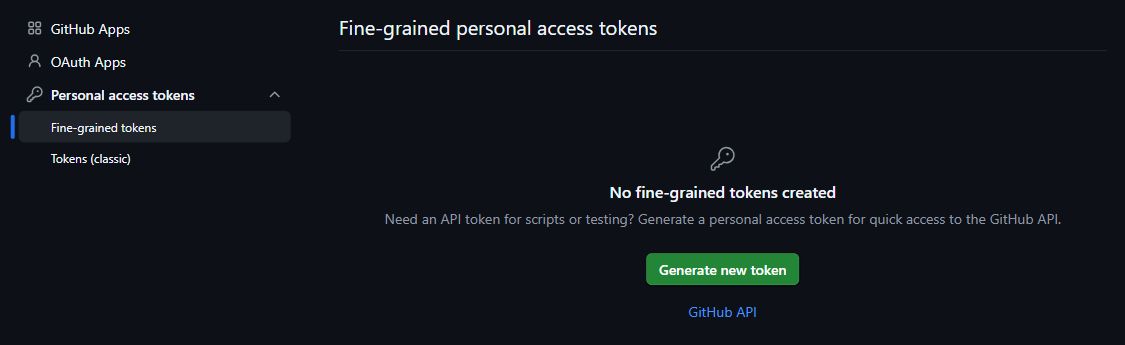
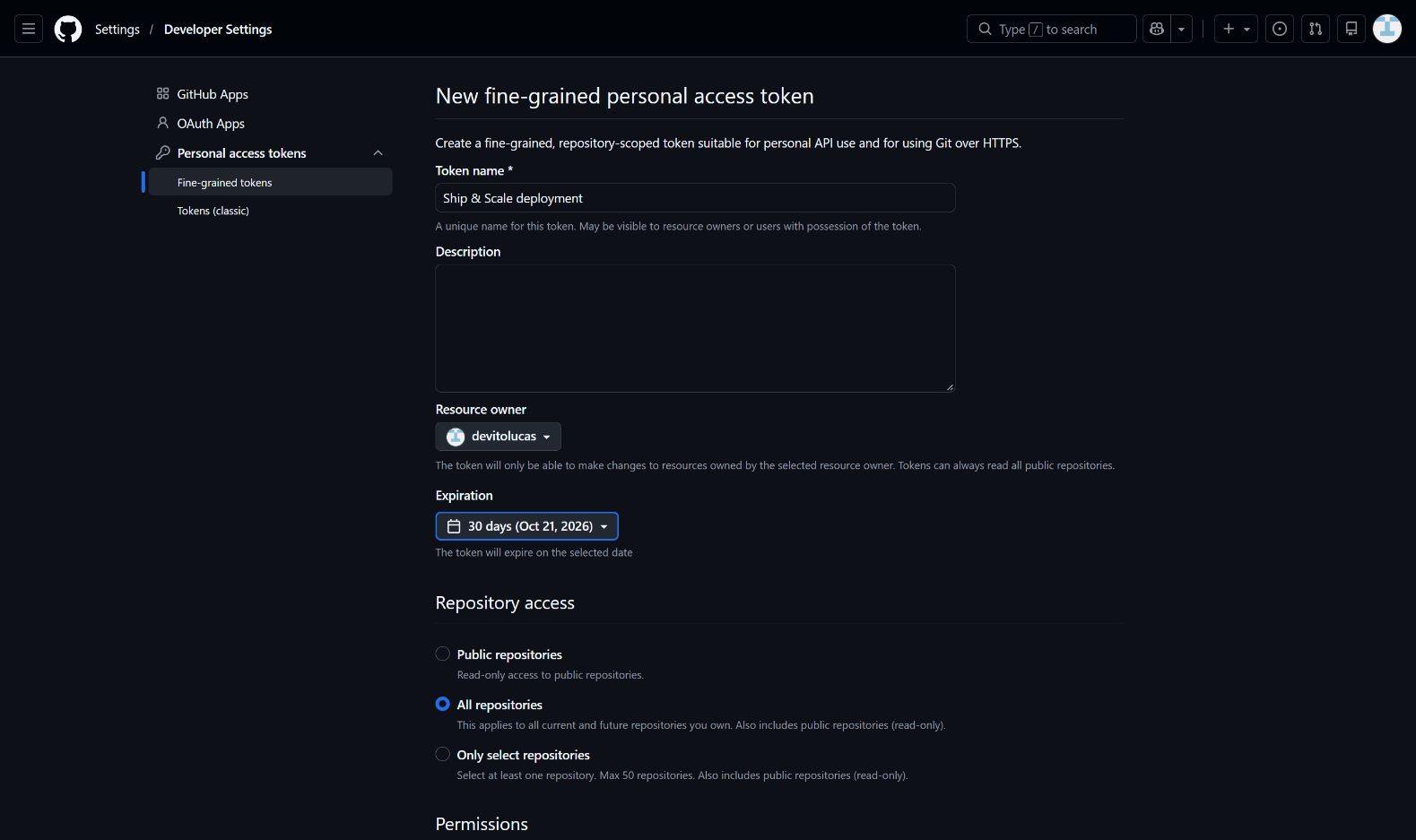
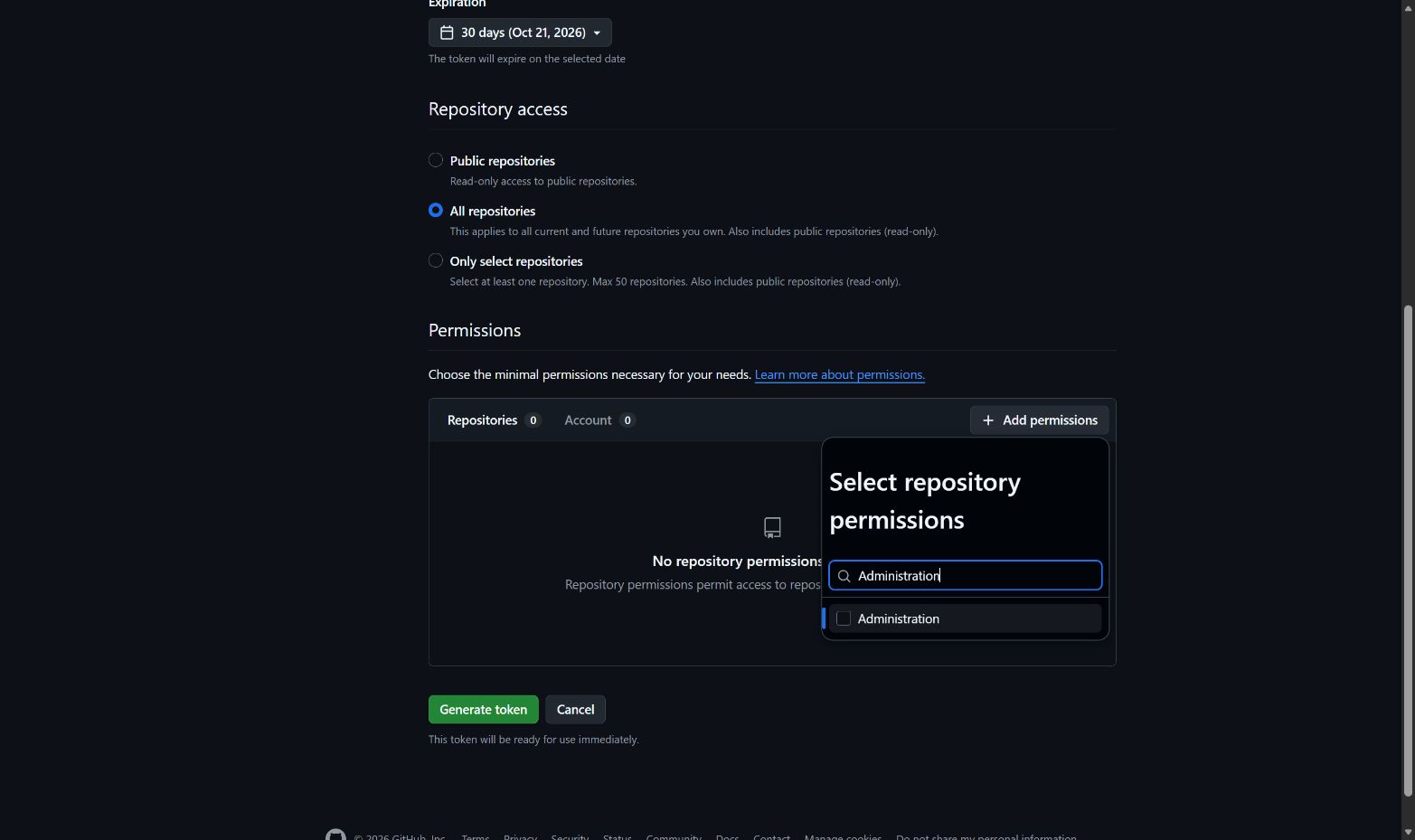
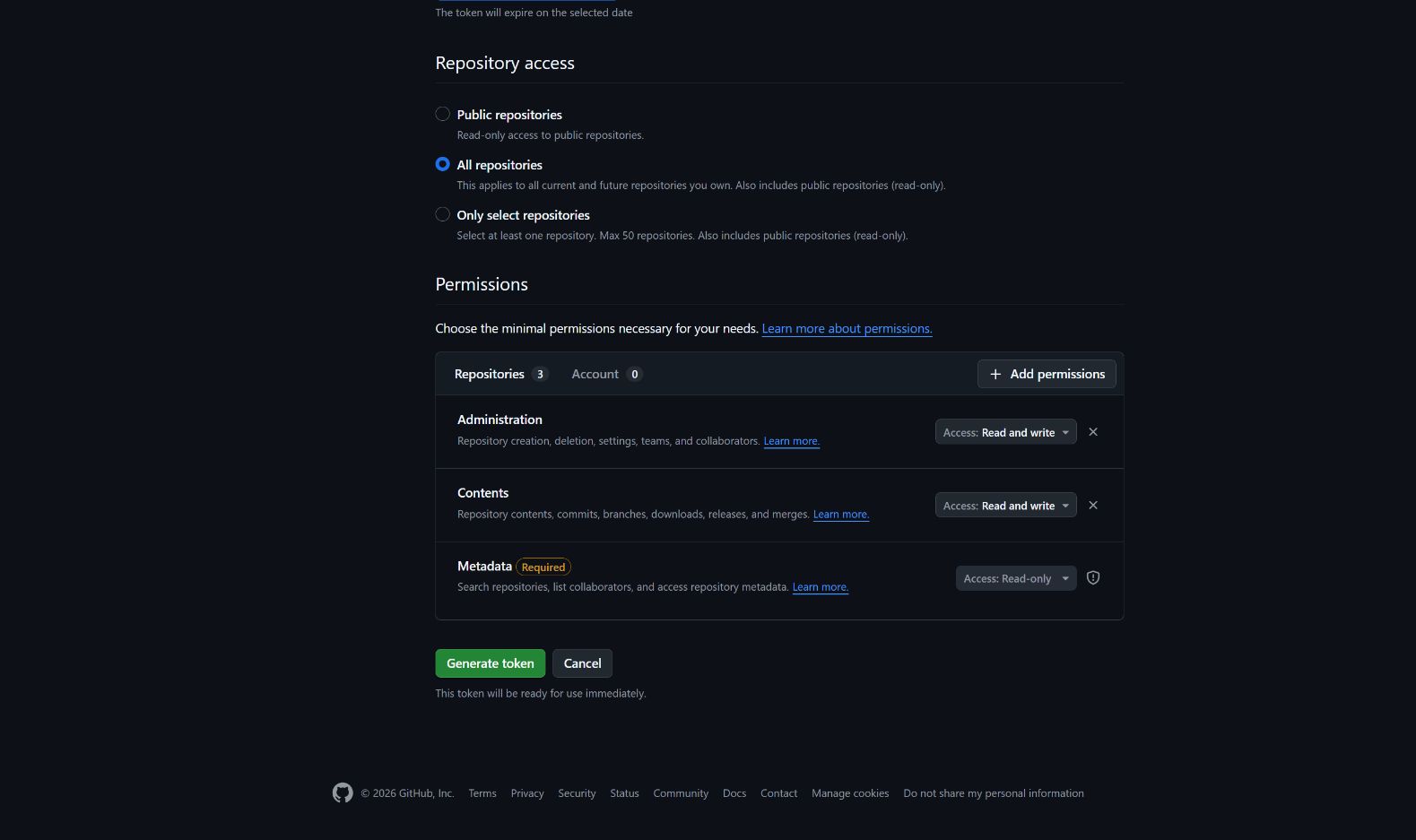
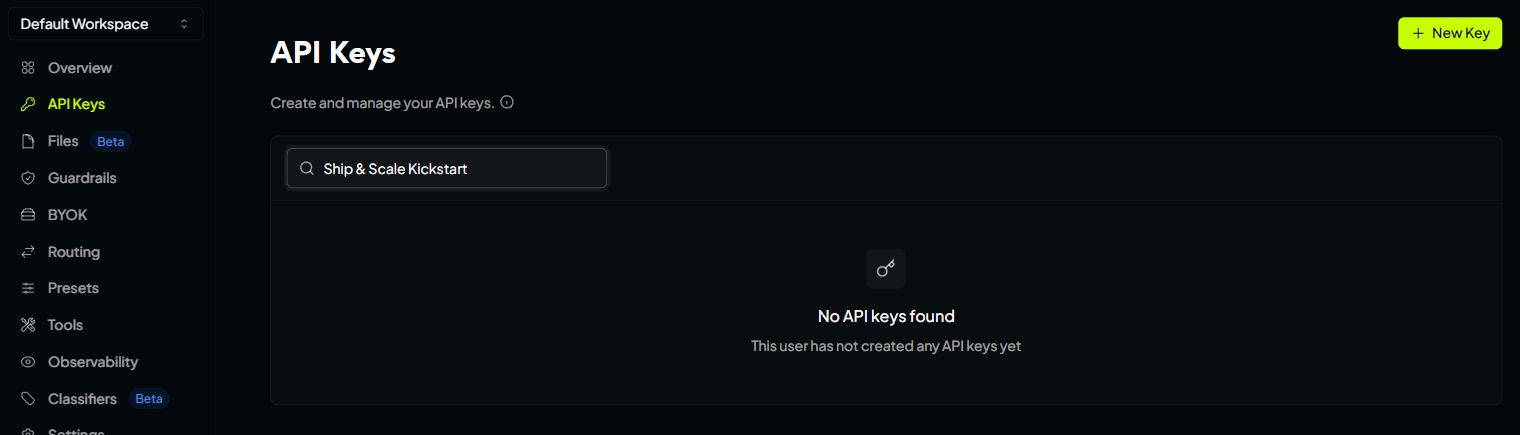
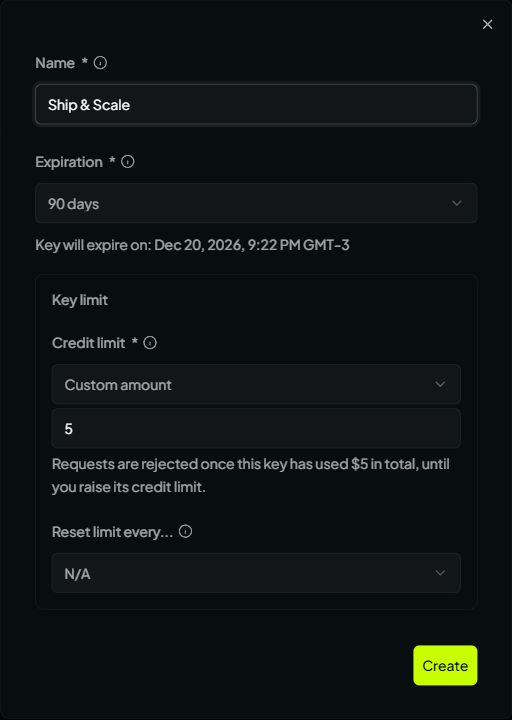
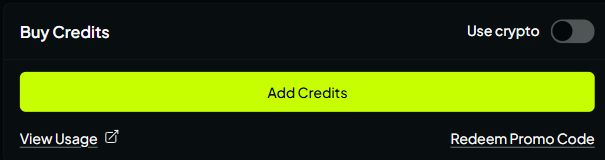
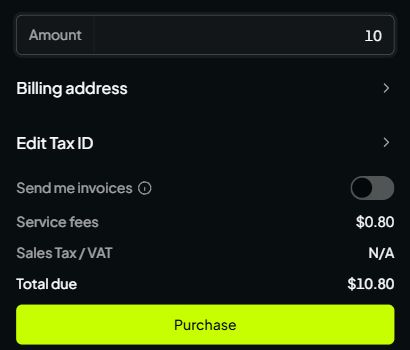
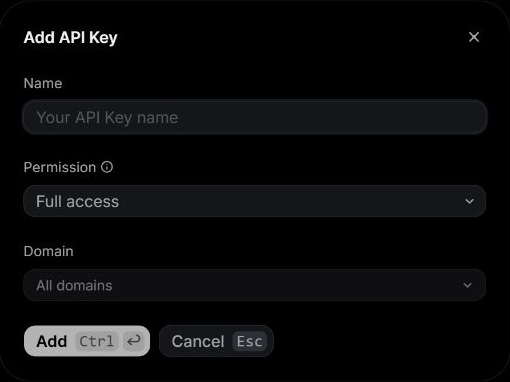 Check the Permission field before selecting Add. The image contains no API key.
### Add the key to .env [#add-the-key-to-env]
In your editor, open `.env` in the main project folder beside `package.json`. If you haven't created it, copy `.env.example` to `.env`. Keep an existing `.env` and edit it.
Find the existing `RESEND_API_KEY=` line, paste the key after `=`, and save:
```dotenv title="Your private .env"
RESEND_API_KEY=replace_with_your_resend_full_access_key
```
Use the actual value you copied and keep one `RESEND_API_KEY` line. Don't add a second assignment at the bottom of the file.
## Start with local test emails [#start-with-local-test-emails]
On a new installation, leave `RESEND_FROM_EMAIL`, `RESEND_TEST_MODE` and the `RESEND_TEMPLATE_*_ID` fields blank. Kickstart discovers a verified domain or selects the restricted test sender, then publishes the templates and saves their IDs.
With no verified domain, emails from `onboarding@resend.dev` can only go to the address associated with your Resend account. Use that address to test the app's email flows. If you have several verified domains, Kickstart asks which one to use.
**Before emailing other people**
Verify a sending domain you control before inviting customers or testing with other recipients. Owning a domain and verifying it for outbound email are separate steps.
## Verify a production sender [#verify-a-production-sender]
You can return to this section when your local app works and you're preparing deployment.
1. Open [Resend Domains](https://resend.com/domains) and add your domain or a sending subdomain, such as `mail.your-domain.com`.
2. Open the DNS settings where your domain is managed. That's usually where you bought it, such as Namecheap, GoDaddy or Cloudflare. If you changed nameservers, use the provider they point to.
3. Add the exact record types, names and values Resend gives you. Each domain has its own verification records.
4. Return to Resend and start verification. DNS changes can take from a few minutes to several hours to appear. Use Resend's diagnostics to fix pending or failed records.
5. Choose a From address on that verified domain and edit the existing fields in `.env`:
```dotenv title="Production sender in .env"
RESEND_FROM_EMAIL=noreply@your-verified-domain.example
RESEND_TEST_MODE=false
```
Replace the example address with your own. If your public contact form should email you, also set `CONTACT_TO_EMAIL` to an inbox you monitor. Resend's [domain guide](https://resend.com/docs/dashboard/domains/introduction) explains DNS verification. Setting up an outbound sender doesn't create an inbox.
## Check that you're ready [#check-that-youre-ready]
For the first Kickstart, a saved Full access key is enough to continue collecting credentials. Once all three are ready, run `npm run kickstart:check`.
For deployment, you also need verified domain status and the production sender settings above. Follow [Deployment Kickstart](/docs/start/deployment-kickstart) to apply them. Editing `.env` alone doesn't update the hosted Auth email hook or an existing production deployment.
**Example: the email settings in .env**
Check the Permission field before selecting Add. The image contains no API key.
### Add the key to .env [#add-the-key-to-env]
In your editor, open `.env` in the main project folder beside `package.json`. If you haven't created it, copy `.env.example` to `.env`. Keep an existing `.env` and edit it.
Find the existing `RESEND_API_KEY=` line, paste the key after `=`, and save:
```dotenv title="Your private .env"
RESEND_API_KEY=replace_with_your_resend_full_access_key
```
Use the actual value you copied and keep one `RESEND_API_KEY` line. Don't add a second assignment at the bottom of the file.
## Start with local test emails [#start-with-local-test-emails]
On a new installation, leave `RESEND_FROM_EMAIL`, `RESEND_TEST_MODE` and the `RESEND_TEMPLATE_*_ID` fields blank. Kickstart discovers a verified domain or selects the restricted test sender, then publishes the templates and saves their IDs.
With no verified domain, emails from `onboarding@resend.dev` can only go to the address associated with your Resend account. Use that address to test the app's email flows. If you have several verified domains, Kickstart asks which one to use.
**Before emailing other people**
Verify a sending domain you control before inviting customers or testing with other recipients. Owning a domain and verifying it for outbound email are separate steps.
## Verify a production sender [#verify-a-production-sender]
You can return to this section when your local app works and you're preparing deployment.
1. Open [Resend Domains](https://resend.com/domains) and add your domain or a sending subdomain, such as `mail.your-domain.com`.
2. Open the DNS settings where your domain is managed. That's usually where you bought it, such as Namecheap, GoDaddy or Cloudflare. If you changed nameservers, use the provider they point to.
3. Add the exact record types, names and values Resend gives you. Each domain has its own verification records.
4. Return to Resend and start verification. DNS changes can take from a few minutes to several hours to appear. Use Resend's diagnostics to fix pending or failed records.
5. Choose a From address on that verified domain and edit the existing fields in `.env`:
```dotenv title="Production sender in .env"
RESEND_FROM_EMAIL=noreply@your-verified-domain.example
RESEND_TEST_MODE=false
```
Replace the example address with your own. If your public contact form should email you, also set `CONTACT_TO_EMAIL` to an inbox you monitor. Resend's [domain guide](https://resend.com/docs/dashboard/domains/introduction) explains DNS verification. Setting up an outbound sender doesn't create an inbox.
## Check that you're ready [#check-that-youre-ready]
For the first Kickstart, a saved Full access key is enough to continue collecting credentials. Once all three are ready, run `npm run kickstart:check`.
For deployment, you also need verified domain status and the production sender settings above. Follow [Deployment Kickstart](/docs/start/deployment-kickstart) to apply them. Editing `.env` alone doesn't update the hosted Auth email hook or an existing production deployment.
**Example: the email settings in .env**
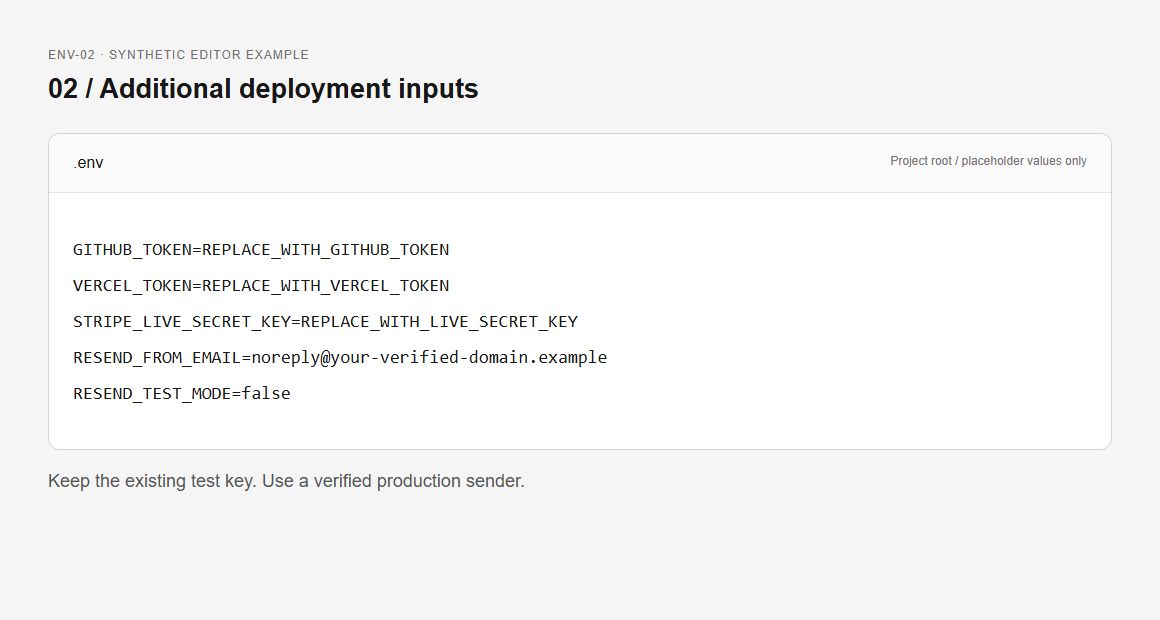 Keep your existing API key. Update the sender fields when your domain is verified.
## Technical reference [#technical-reference]
**Technical reference: permissions, generated settings and recovery**
## Check configuration and real delivery separately [#check-configuration-and-real-delivery-separately]
Run `npm run kickstart:check` only after the other local credentials are ready. Required account-level failures prevent project provisioning. With no project yet, later project and hook checks remain deferred. Template listing access proves neither future template-write permission nor inbox delivery.
After installation, trigger a recovery or sign-in email to an authorized test recipient. Inspect the message in the actual inbox, follow its link once, and verify the result in the application. Check spam placement and sender identity. For production readiness, repeat with an address different from the Resend account email.
A Resend accepted or delivered event is useful transport evidence. It does not prove the recipient saw the email or completed the application flow. Auth links contain one-use credentials, so avoid full URLs in diagnostic screenshots and logs.
## Troubleshoot and rotate [#troubleshoot-and-rotate]
| Problem | Check | Recovery |
| ----------------------------------- | ------------------------------------------ | --------------------------------------------------------------- |
| Domain/template access denied | Key permission and account | Use the intended account's Full access key |
| Mail only reaches one address | `RESEND_TEST_MODE` and sender domain | Verify a production domain, then reconcile sender configuration |
| Several verified domains | Terminal choice or explicit sender | Select the intended domain; do not choose by list order |
| Sender rejected despite a valid key | Domain verification and exact From address | Correct the address/status, then rerun |
| Mail sent, link fails | Active `APP_URL`, callback and link expiry | Use a fresh link at the configured origin |
If Kickstart stops partway through setup, finish it with the same Resend key. Kickstart remembers which key started the installation, so a different key can block recovery. After installation you can replace the key with another one from the same Resend account. Keep the saved template IDs so reruns reuse your existing templates.
To change the email content itself, see [email templates](/docs/email/templates-delivery).
[Back to Accounts](/docs/accounts)
Add OpenRouter if you want AI chat, or continue to Configuration.
---
# Stripe secret key
URL: https://ship-and-scale.vercel.app/docs/accounts/stripe
Find your Stripe test Secret key and save it for Kickstart.
By the end of this guide, your Stripe test Secret key will be saved in the starter's root `.env` file. Kickstart uses it to set up your app's test billing, including products, prices and the billing portal. You don't need to create those yourself.
## Test Secret key [#test-secret-key]
### Sign in and choose a sandbox [#sign-in-and-choose-a-sandbox]
Open the [Stripe Dashboard](https://dashboard.stripe.com). Create an account if you don't have one, or sign in to the account you'll use for your app.
Open the account menu in the top-left corner and choose **Switch to sandbox**. Select your app's sandbox, or choose **Create sandbox** if you haven't made one. Keep using the same sandbox throughout setup.
Check for the **Sandbox** banner at the top. An existing **Test mode** environment also works; the screenshot below shows that view. Payments here don't move real money.
Keep your existing API key. Update the sender fields when your domain is verified.
## Technical reference [#technical-reference]
**Technical reference: permissions, generated settings and recovery**
## Check configuration and real delivery separately [#check-configuration-and-real-delivery-separately]
Run `npm run kickstart:check` only after the other local credentials are ready. Required account-level failures prevent project provisioning. With no project yet, later project and hook checks remain deferred. Template listing access proves neither future template-write permission nor inbox delivery.
After installation, trigger a recovery or sign-in email to an authorized test recipient. Inspect the message in the actual inbox, follow its link once, and verify the result in the application. Check spam placement and sender identity. For production readiness, repeat with an address different from the Resend account email.
A Resend accepted or delivered event is useful transport evidence. It does not prove the recipient saw the email or completed the application flow. Auth links contain one-use credentials, so avoid full URLs in diagnostic screenshots and logs.
## Troubleshoot and rotate [#troubleshoot-and-rotate]
| Problem | Check | Recovery |
| ----------------------------------- | ------------------------------------------ | --------------------------------------------------------------- |
| Domain/template access denied | Key permission and account | Use the intended account's Full access key |
| Mail only reaches one address | `RESEND_TEST_MODE` and sender domain | Verify a production domain, then reconcile sender configuration |
| Several verified domains | Terminal choice or explicit sender | Select the intended domain; do not choose by list order |
| Sender rejected despite a valid key | Domain verification and exact From address | Correct the address/status, then rerun |
| Mail sent, link fails | Active `APP_URL`, callback and link expiry | Use a fresh link at the configured origin |
If Kickstart stops partway through setup, finish it with the same Resend key. Kickstart remembers which key started the installation, so a different key can block recovery. After installation you can replace the key with another one from the same Resend account. Keep the saved template IDs so reruns reuse your existing templates.
To change the email content itself, see [email templates](/docs/email/templates-delivery).
[Back to Accounts](/docs/accounts)
Add OpenRouter if you want AI chat, or continue to Configuration.
---
# Stripe secret key
URL: https://ship-and-scale.vercel.app/docs/accounts/stripe
Find your Stripe test Secret key and save it for Kickstart.
By the end of this guide, your Stripe test Secret key will be saved in the starter's root `.env` file. Kickstart uses it to set up your app's test billing, including products, prices and the billing portal. You don't need to create those yourself.
## Test Secret key [#test-secret-key]
### Sign in and choose a sandbox [#sign-in-and-choose-a-sandbox]
Open the [Stripe Dashboard](https://dashboard.stripe.com). Create an account if you don't have one, or sign in to the account you'll use for your app.
Open the account menu in the top-left corner and choose **Switch to sandbox**. Select your app's sandbox, or choose **Create sandbox** if you haven't made one. Keep using the same sandbox throughout setup.
Check for the **Sandbox** banner at the top. An existing **Test mode** environment also works; the screenshot below shows that view. Payments here don't move real money.